원본 문서
GPT Image 2 · en
{
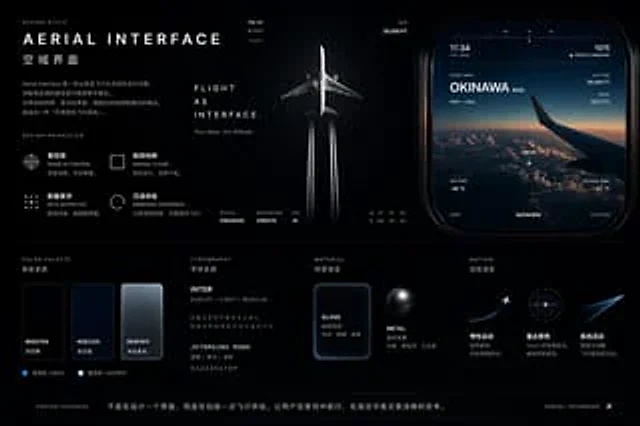
"type": "UI/UX Design System Concept Project",
"theme": "Aviation and Flight Interface",
"overall_style": "Dark mode, stylish, modern, technological, futuristic, glass-like.",
"layout": {
"top_left": {
"section": "Design Style",
"title": "{argument name=\"main title\" default=\"AERIAL INTERFACE\"}",
"subtitle": "{argument name=\"subtitle\" default=\"Airspace Interface\"}",
"description": "Introductory paragraph on airspace interface design",
"principles": {
"count": 4,
"labels": [
"sense of control",
"Minimalism and purity",
"Data Aesthetics",
"Immersive experience"
]
}
},
"top_center": {
"imagery": "A top-down view of a commercial aircraft flying upwards, leaving two white contrails against a dark background.",
"text": [
"Flight is the interface.",
"Your creativity sets the standard for us."
],
"metrics": [
"Status: Cruise",
"Destination: Creation",
"Estimated arrival time: ∞"
]
},
"top_right": {
"section": "UI components",
"imagery": "A rounded rectangular panel displaying an airplane wing above the clouds at sunset.",
"data_points": [
"11:34",
"1975 people were on board.",
"Flight data{argument name=\"destination\" default=\"Okinawa\"}",
"35,000 feet high",
"Speed 552 knots"
],
"tabs": {
"count": 3,
"labels": [
"map",
"Data View",
"system"
]
}
},
"bottom_left": {
"section": "Color scheme",
"swatches": {
"count": 3,
"labels": [
"#05070A",
"#0B1220",
"#E6F0FF"
]
}
},
"bottom_mid_left": {
"section": "typesetting",
"fonts": {
"count": 2,
"labels": [
"{argument name=\"primary font\" default=\"INTER\"}",
"{argument name=\"secondary font\" default=\"JETBRAINS MONO\"}"
]
}
},
"bottom_mid_right": {
"section": "Material",
"examples": {
"count": 2,
"labels": [
"Glass (frosted rectangle)",
"Metal (dark sphere)"
]
}
},
"bottom_right": {
"section": "motion effects",
"concepts": {
"count": 3,
"labels": [
"plane take-off",
"Radar Focusing Ring",
"glowing flight trails"
]
}
},
"footer": {
"text": "Design essence: It's not just about designing an interface, but about creating a flight experience."
}
}
}사용 방법
- 매개변수를 포함한 전체 원본 프롬프트를 복사하세요.
- 주제, 문구, 구도를 자신의 요구에 맞게 바꾸세요.
- 호환되는 외부 도구에서 사용하고 이용 조건과 결과를 확인하세요.
시작 전 확인
- 참조 이미지가 필요한지 확인하세요. 호환 표시는 해당 모델로 이 예시를 생성했다는 뜻이 아닙니다.
- 이름, 수치, 이미지 속 문구를 확인하세요. 모델 버전에 따라 결과가 다를 수 있습니다.