
원본 문서
GPT Image 2 · en
{
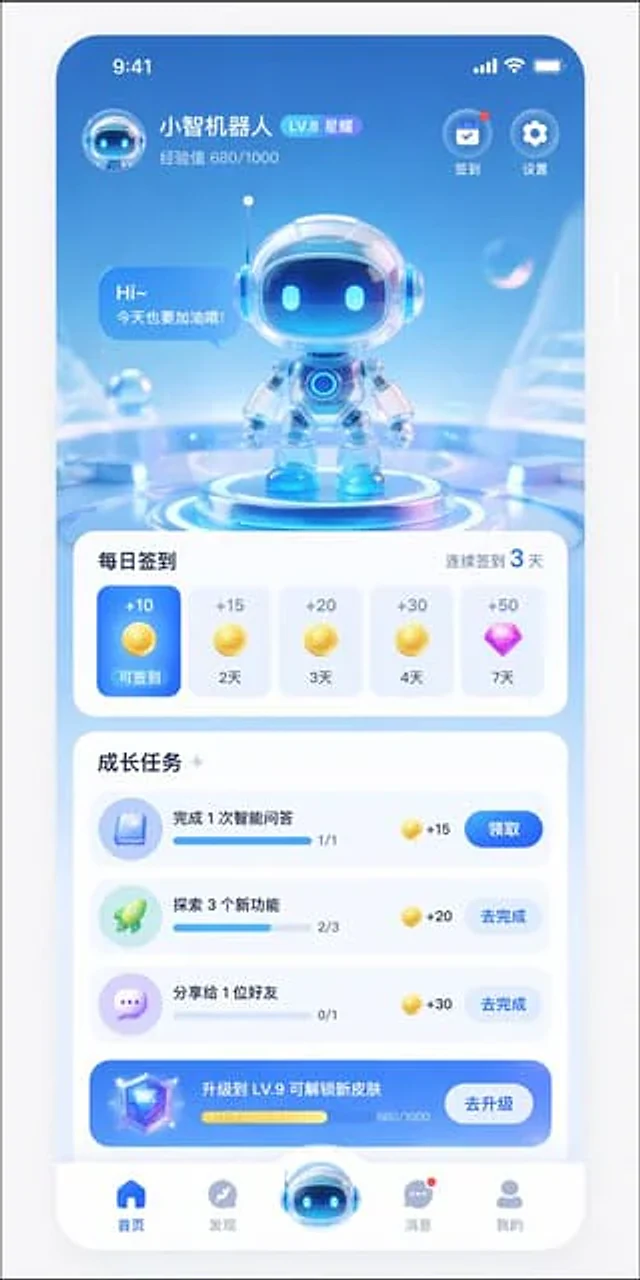
  "type": "Mobile App UI Design Draft",
  "theme": "A futuristic AI assistant with a 3D glass-like design and a light blue and white color scheme.",
  "header": {
    "user_profile": {
      "avatar": "Small 3D robot head",
      "name": "{argument name=\"app name\" default=\"Xiaozhi Robot\"}",
      "level_badge": "LV.8 Star",
      "experience": "Experience points 680/1000"
    },
    "top_right_icons": {
      "count": 2,
      "labels": [
        "Sign in",
        "set up"
      ]
    }
  },
  "hero_display": {
    "subject": "A cute 3D robot with a glass helmet and glowing blue eyes.",
    "pose": "Standing on the glowing, futuristic circular base",
    "speech_bubble": "{argument name=\"robot greeting\" default=\"Hi~ Let's do our best today too!\"}",
    "background": "An abstract, light blue, futuristic environment with suspended transparent bubbles."
  },
  "layout": {
    "sections": [
      {
        "title": "Daily check-in",
        "subtitle": "Sign in for 3 consecutive days",
        "type": "Horizontal scrolling cards",
        "count": 5,
        "items": [
          {
            "state": "Blue card in active state",
            "reward": "+10 Gold Coins",
            "label": "Sign-in available"
          },
          {
            "state": "Unactivated white card",
            "reward": "+15 Gold Coins",
            "label": "2 days"
          },
          {
            "state": "Unactivated white card",
            "reward": "+20 Gold Coins",
            "label": "3 days"
          },
          {
            "state": "Unactivated white card",
            "reward": "+30 Gold Coins",
            "label": "4 days"
          },
          {
            "state": "Unactivated white card",
            "reward": "+50 Purple Diamonds",
            "label": "7 days"
          }
        ]
      },
      {
        "title": "Growth Task",
        "type": "Vertical list",
        "count": 4,
        "items": [
          {
            "icon": "blue book",
            "text": "{argument name=\"task 1 title\" default=\"Complete 1 intelligent question answering\"}",
            "progress": "1/1",
            "reward": "+15",
            "button": "receive"
          },
          {
            "icon": "Green Rocket",
            "text": "{argument name=\"task 2 title\" default=\"Explore 3 new features\"}",
            "progress": "2/3",
            "reward": "+20",
            "button": "Go and complete"
          },
          {
            "icon": "Purple chat bubbles",
            "text": "Share with 1 friend",
            "progress": "0/1",
            "reward": "+30",
            "button": "Go and complete"
          },
          {
            "style": "Blue gradient banner",
            "icon": "3D diamond",
            "text": "{argument name=\"upgrade banner text\" default=\"Upgrade to LV.9 to unlock new skins\"}",
            "progress": "680/1000",
            "button": "Upgrade"
          }
        ]
      }
    ],
    "bottom_navigation": {
      "count": 5,
      "items": [
        {
          "icon": "Blue Homepage",
          "label": "front page"
        },
        {
          "icon": "Gray compass",
          "label": "Discover"
        },
        {
          "icon": "Large raised 3D robot head",
          "label": ""
        },
        {
          "icon": "Gray chat bubbles with red dots",
          "label": "information"
        },
        {
          "icon": "Gray profile",
          "label": "mine"
        }
      ]
    }
  }
}
사용 방법
- 매개변수를 포함한 전체 원본 프롬프트를 복사하세요.
- 주제, 문구, 구도를 자신의 요구에 맞게 바꾸세요.
- 호환되는 외부 도구에서 사용하고 이용 조건과 결과를 확인하세요.
시작 전 확인
- 참조 이미지가 필요한지 확인하세요. 호환 표시는 해당 모델로 이 예시를 생성했다는 뜻이 아닙니다.
- 이름, 수치, 이미지 속 문구를 확인하세요. 모델 버전에 따라 결과가 다를 수 있습니다.