원본 문서
GPT Image 2 · en
{
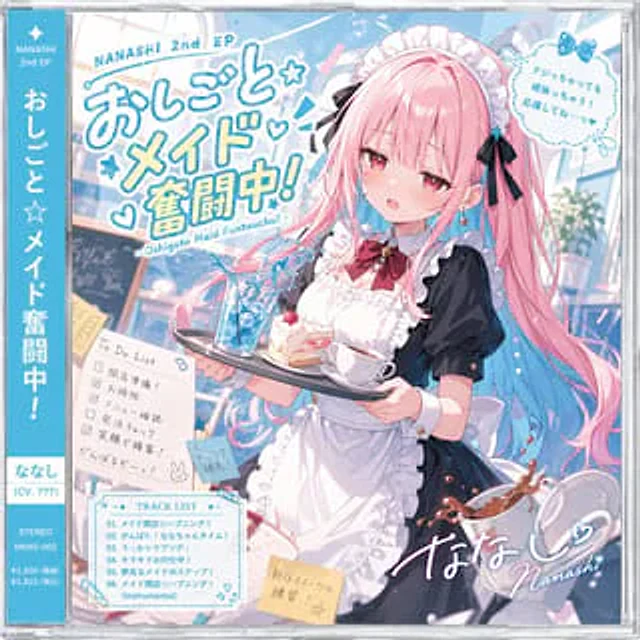
  "type": "Anime CD with a dust jacket, jewelry box cover",
  "character": {
    "name": "{argument name=\"character name\" default=\"ななし\"}",
    "appearance": "A panicked anime girl{argument name=\"hair color\" default=\"Pink and blue gradient hair ends\"} Twin ponytails, red eyes, beads of sweat",
    "outfit": "Black and white maid outfit, ruffled apron, red bow tie, black hair accessory",
    "action": "He holds a tray with spilled blue iced drink, strawberry cake, and a teacup; a spilled coffee cup is in the foreground."
  },
  "layout": {
    "obi_strip": {
      "position": "left edge",
      "color": "blue",
      "text": [
        "NANASHI 2nd EP",
        "{argument name=\"album title\" default=\"Working hard as a maid!\"}",
        "{argument name=\"character name\" default=\"ななし\"} (CV. ???)",
        "STEREO",
        "NNXS-002"
      ]
    },
    "main_title": {
      "position": "Top left corner",
      "text": [
        "NANASHI 2nd EP",
        "{argument name=\"album title\" default=\"Working hard as a maid!\"}",
        "- Oshigoto Maid Funtouchu! -"
      ]
    },
    "quote_bubble": {
      "position": "Top right corner",
      "text": "{argument name=\"character quote\" default=\"Even if I make a mistake, I'll do my best! Please cheer me on...♡\"}"
    },
    "to_do_list": {
      "position": "Middle left",
      "count": 5,
      "items": [
        "Preparing to open the store!",
        "cleaning",
        "Menu confirmation",
        "Order Check",
        "Serve customers with a smile!"
      ],
      "footer": "I'll do my best! (Attached: A little rabbit painted with a crow)"
    },
    "track_list": {
      "position": "bottom left corner",
      "count": 6,
      "tracks": [
        "01. {argument name=\"lead track name\" default=\"Maid shop opening☆A mishap!\"}",
        "02. がんばれ!ななちゃんタイム!",
        "03. うっかりラプソディー",
        "04. Serving with sparkle!",
        "05. The Dreaming Maid's Steps!",
        "06. {argument name=\"lead track name\" default=\"Maid shop opening☆A mishap!\"} (Instrumental)"
      ]
    },
    "sticky_notes": {
      "count": 2,
      "text": [
        "Drink refill!",
        "Practicing new sweets recipes!! ☆"
      ]
    },
    "signature": {
      "position": "bottom right corner",
      "text": "{argument name=\"character name\" default=\"ななし\"}♡ Nanashi"
    }
  }
}
사용 방법
- 매개변수를 포함한 전체 원본 프롬프트를 복사하세요.
- 주제, 문구, 구도를 자신의 요구에 맞게 바꾸세요.
- 호환되는 외부 도구에서 사용하고 이용 조건과 결과를 확인하세요.
시작 전 확인
- 참조 이미지가 필요한지 확인하세요. 호환 표시는 해당 모델로 이 예시를 생성했다는 뜻이 아닙니다.
- 이름, 수치, 이미지 속 문구를 확인하세요. 모델 버전에 따라 결과가 다를 수 있습니다.