원본 문서
GPT Image 2 · en
{
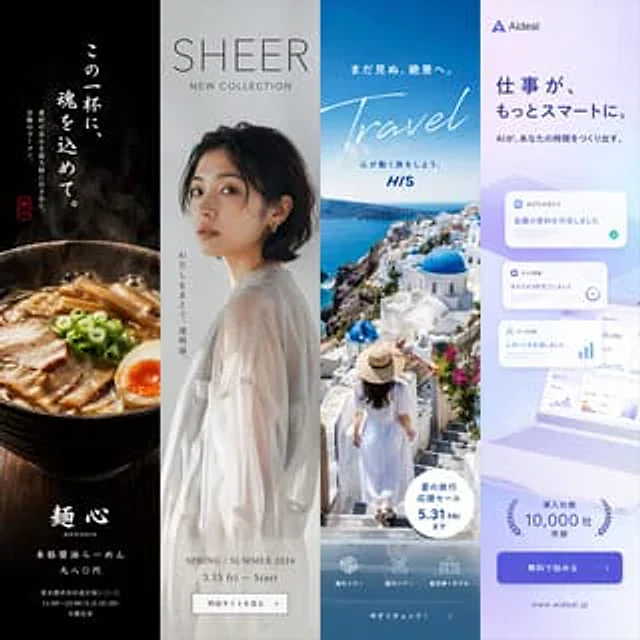
  "type": "Four-panel advertising mockup",
  "layout": "Divided vertically into four columns",
  "panels": [
    {
      "position": "Leftmost",
      "theme": "Food Advertisement",
      "subject": "A steaming bowl of authentic soy sauce ramen, topped with char siu pork, half a soft-boiled egg, dried bamboo shoots, and chopped green onions.",
      "background": "Dark, textured light and shadow",
      "typography": {
        "catchphrase": "{argument name=\"ramen catchphrase\" default=\"Putting my heart and soul into this one cup.\"}",
        "subtext": "The ultimate ramen, showcasing the freshness of the ingredients.",
        "brand_name": "Noodles",
        "details": "Authentic soy sauce ramen, 980 yen",
        "footer": "Address and business hours of Shibuya, Tokyo"
      }
    },
    {
      "position": "Middle left",
      "theme": "Fashion catalog",
      "subject": "A young Japanese woman turns around, wearing a sheer white long-sleeved top.",
      "background": "Light gray studio background",
      "typography": {
        "headline": "{argument name=\"fashion brand\" default=\"SHEER\"}",
        "subheadline": "New series",
        "vertical_text": "Wearing a transparent look",
        "details": "Starting March 15th (Friday) in Spring/Summer 2024",
        "button": "View the special website >"
      }
    },
    {
      "position": "Middle right",
      "theme": "Travel agency promotion",
      "subject": "A woman wearing a white summer dress and a straw hat walked down the white steps.",
      "background": "{argument name=\"travel destination\" default=\"Santorini, Greece\"} The background features iconic blue-domed churches, white buildings, and the deep blue Aegean Sea.",
      "typography": {
        "top_text": "Heading to unseen breathtaking scenery",
        "main_title": "trip",
        "subtitle": "Embark on a soul-stirring journey",
        "badge": "Summer travel specials, valid until May 31st (Friday).",
        "bottom_nav": {
          "count": 3,
          "labels": [
            "Overseas travel",
            "Domestic tourism",
            "Flight + Hotel"
          ]
        },
        "button": "View now! >"
      }
    },
    {
      "position": "far right",
      "theme": "B2B SaaS software",
      "subject": "An open laptop displays a data dashboard surrounded by floating UI elements.",
      "background": "Light purple and white gradient",
      "ui_elements": {
        "count": 3,
        "labels": [
          "AI Agent",
          "Task Management",
          "Data Analysis"
        ]
      },
      "typography": {
        "logo": "{argument name=\"tech product name\" default=\"Aideal\"}",
        "headline": "{argument name=\"tech headline\" default=\"Work can be smarter.\"}",
        "subheadline": "AI creates time for you",
        "badge": "More than 10,000 businesses use it",
        "button": "Start for free >",
        "url": "www.aideal.jp"
      }
    }
  ]
}
사용 방법
- 매개변수를 포함한 전체 원본 프롬프트를 복사하세요.
- 주제, 문구, 구도를 자신의 요구에 맞게 바꾸세요.
- 호환되는 외부 도구에서 사용하고 이용 조건과 결과를 확인하세요.
시작 전 확인
- 참조 이미지가 필요한지 확인하세요. 호환 표시는 해당 모델로 이 예시를 생성했다는 뜻이 아닙니다.
- 이름, 수치, 이미지 속 문구를 확인하세요. 모델 버전에 따라 결과가 다를 수 있습니다.