원본 문서
Nano Banana · en
{
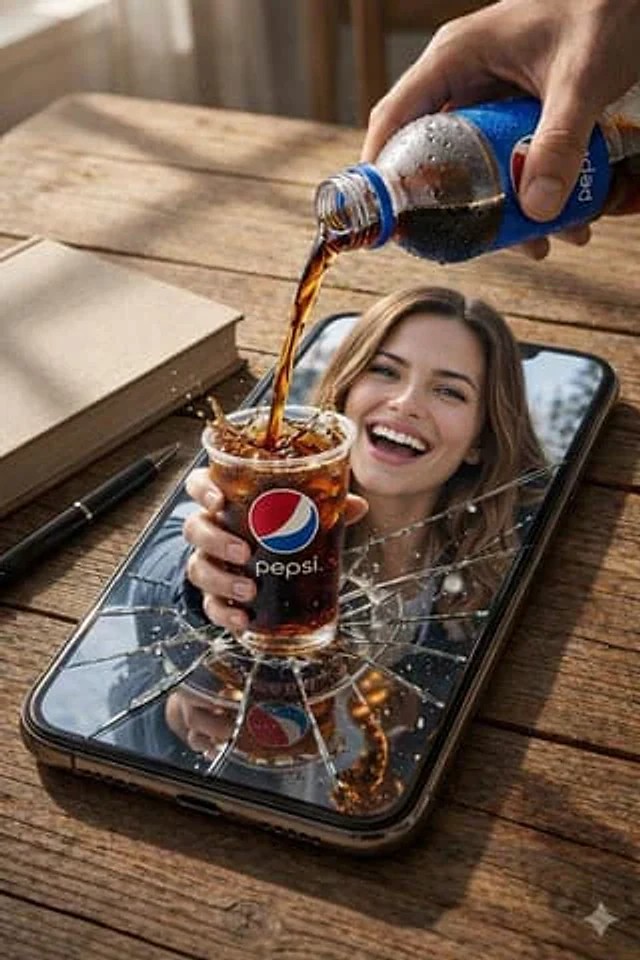
  "resolution": "8K UHD",
  "style": "photorealistic AI-edited composite, cinematic realism",
  "scene_type": "surreal product-style composition",
  "camera": {
    "angle": "slightly elevated top-down angle",
    "focus": "sharp foreground with shallow depth of field",
    "lens_effects": [
      "natural depth of field",
      "high clarity",
      "macro-level liquid detail"
    ]
  },
  "environment": {
    "surface": "wooden table with visible grain texture",
    "lighting": {
      "type": "soft natural daylight",
      "direction": "from upper left",
      "shadows": "soft realistic shadows under objects"
    },
    "background": {
      "indoor": true,
      "elements": [
        "blurred interior background",
        "snowy outdoor scenery visible inside phone screen in one image"
      ]
    }
  },
  "main_object": {
    "smartphone": {
      "position": "lying flat on wooden table",
      "orientation": "vertical portrait orientation",
      "color": "black",
      "screen_state": "visibly cracked glass with radial fracture lines",
      "screen_interaction": "screen appears broken outward, allowing subject to emerge"
    }
  },
  "human_subject": {
    "visibility": "upper body visible through phone screen",
    "expression": "wide smile, visible teeth",
    "eye_direction": "looking toward the viewer",
    "gender_presentation": "female-presenting",
    "hair": {
      "color": "light brown",
      "style": "loose, shoulder-length"
    },
    "clothing_variants": [
      {
        "outfit": "casual indoor look",
        "details": "neutral top visible behind phone screen"
      },
      {
        "outfit": "winter clothing",
        "details": [
          "dark padded jacket",
          "light turtleneck sweater",
          "black gloves",
          "black fur hat"
        ]
      }
    ]
  },
  "action": {
    "primary_action": "soda being poured into a transparent plastic cup",
    "motion": "liquid splash frozen mid-air",
    "liquid_behavior": [
      "visible carbonation bubbles",
      "splash droplets",
      "overflow splash effect"
    ]
  },
  "beverage": {
    "type": "cola",
    "cup": {
      "material": "transparent plastic",
      "filled_with": "dark carbonated soda with ice",
      "logo": "Pepsi logo clearly visible"
    },
    "bottle": {
      "material": "plastic",
      "label": "Pepsi branding visible",
      "condition": "condensation droplets on bottle surface",
      "held_by": "human hand entering frame from top right"
    }
  },
  "secondary_objects": [
    {
      "object": "book",
      "position": "left side of phone",
      "color": "light beige cover",
      "state": "closed"
    },
    {
      "object": "pen",
      "position": "near book on table",
      "color": "black",
      "orientation": "diagonal"
    }
  ],
  "effects": {
    "surreal_elements": [
      "subject emerging from phone screen",
      "physical interaction between digital and real space"
    ],
    "particles": [
      "liquid droplets",
      "snow particles in winter scene variant"
    ],
    "glass_effects": [
      "cracked screen shards",
      "reflections on broken glass"
    ]
  },
  "color_palette": {
    "dominant_colors": [
      "warm brown",
      "black",
      "deep cola brown",
      "blue and red branding accents"
    ],
    "contrast": "high contrast between warm table tones and cool screen elements"
  },
  "post_processing": {
    "sharpness": "ultra-sharp",
    "clarity": "high micro-detail",
    "noise": "none",
    "dynamic_range": "high"
  },
  "mood": "playful, surreal, visually striking",
  "realism_level": "high realism with intentional AI-edited surreal effect"
}
사용 방법
- 매개변수를 포함한 전체 원본 프롬프트를 복사하세요.
- 주제, 문구, 구도를 자신의 요구에 맞게 바꾸세요.
- 호환되는 외부 도구에서 사용하고 이용 조건과 결과를 확인하세요.
시작 전 확인
- 참조 이미지가 필요한지 확인하세요. 호환 표시는 해당 모델로 이 예시를 생성했다는 뜻이 아닙니다.
- 이름, 수치, 이미지 속 문구를 확인하세요. 모델 버전에 따라 결과가 다를 수 있습니다.