원본 문서
GPT Image 2 · en
{
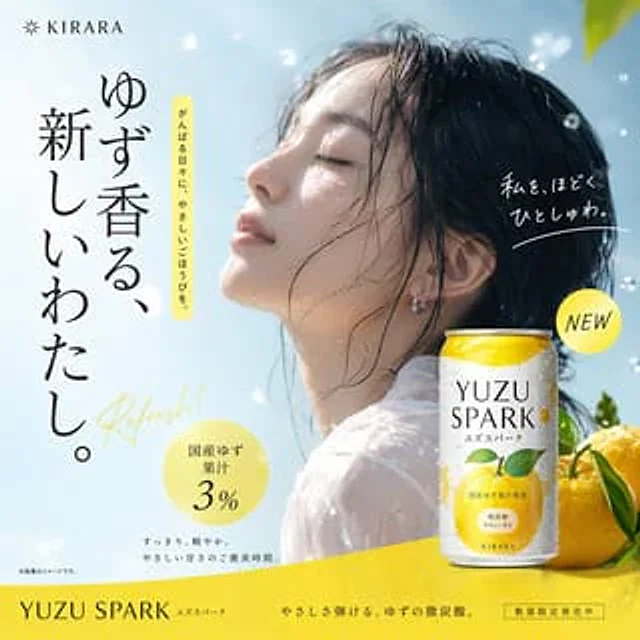
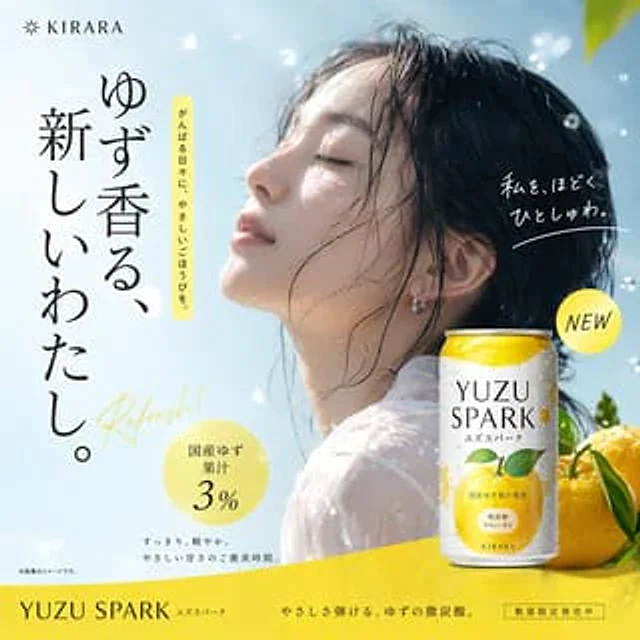
  "type": "Japanese beverage advertising poster",
  "subject": {
    "description": "Young Asian woman, side view{argument name=\"subject vibe\" default=\"Close your eyes, look up, and feel the refreshing sensation.\"}",
    "appearance": "Wet hair, damp skin, sheer white top",
    "environment": "Floating water droplets, a bright blue sky, and the bright lights of the sun."
  },
  "product": {
    "type": "Aluminum beverage cans",
    "placement": "bottom right corner",
    "design": "The color gradient is white to yellow, with condensation droplets.",
    "branding": "{argument name=\"product name\" default=\"YUZU SPARK\"} Use a large serif font and label it 'ユズスパーク' below.",
    "illustration": "yellow{argument name=\"flavor fruit\" default=\"Grapefruit\"} Fruits and green leaves",
    "props": "Place two whole yellow grapefruits and green leaves at the back of the jar."
  },
  "layout": {
    "top_left": "Featuring a starburst icon and the 'KIRARA' logo.",
    "main_copy_left": "Large vertical black text:{argument name=\"main headline\" default=\"A new me, scented with yuzu.\"}",
    "sub_copy_left": "The vertically arranged black text inside the yellow capsule reads: 'A gentle reward for your hard work every day.'",
    "script_text": "Yellow cursive text: 'Refresh!'",
    "right_copy": "White handwritten text with an underline: 'Watashi o hodoku hitoshuwa.'",
    "badges": [
      {
        "position": "bottom left corner",
        "style": "Yellow circle",
        "text": "{argument name=\"badge text\" default=\"3% domestically produced yuzu juice\"}"
      },
      {
        "position": "Middle right",
        "style": "Yellow circle",
        "text": "NEW"
      }
    ],
    "bottom_text": "Small black text: 'Clean and light. A gentle sweetness for a well-deserved treat.'",
    "footer": "A pure yellow horizontal stripe containing the product name, the slogan 'A gentle, effervescent yuzu sparkling drink.', and the boxed text 'Limited quantity available now'."
  }
}
사용 방법
- 매개변수를 포함한 전체 원본 프롬프트를 복사하세요.
- 주제, 문구, 구도를 자신의 요구에 맞게 바꾸세요.
- 호환되는 외부 도구에서 사용하고 이용 조건과 결과를 확인하세요.
시작 전 확인
- 참조 이미지가 필요한지 확인하세요. 호환 표시는 해당 모델로 이 예시를 생성했다는 뜻이 아닙니다.
- 이름, 수치, 이미지 속 문구를 확인하세요. 모델 버전에 따라 결과가 다를 수 있습니다.