원본 문서
GPT Image 2 · en
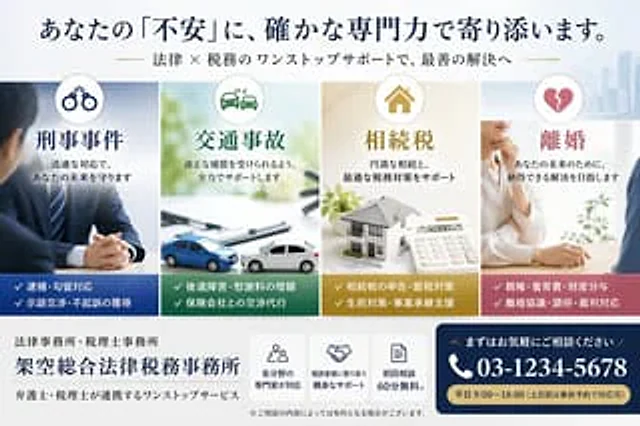
Create a sophisticated Japanese landing page banner for a fictional general law and tax firm. The style should be clean, professional, and convey a high level of trust. Use soft daylight lighting on a white background with subtle outlines of modern city architecture on the right. Employ a wide, horizontal header layout. At the very top, place a striking navy blue Japanese title.{argument name="headline text" default="Your anxieties will be addressed by our solid professional capabilities."} Below, a smaller Japanese subtitle with gold accents is placed.{argument name="subheadline text" default="One-stop legal and tax support to help you achieve the best solutions."} Below the title, four vertical service cards of equal width are arranged horizontally. Card 1 is for criminal defense, with a circular handcuff icon at the top, a cool blue color scheme, and the main title "Criminal Cases." The accompanying text reads "Protecting Your Future with a Swift Response." The accompanying image shows a professional man in a suit sitting at a desk with his hands folded. The bottom dark blue area lists two key points marked with checkmarks: "Arrest/Detention Response" and "Negotiation/Negotiation for Non-Prosecution." Card 2 is for traffic accidents, with a circular car crash icon at the top, a green color scheme, and the title "Traffic Accidents." The accompanying text reads "Fully Supporting You in Obtaining Reasonable Compensation." The accompanying image shows a bright desktop scene with documents showing two mini-cars colliding. The bottom dark green area lists two key points: "Post-Traumatic Stress/Increased Compensation" and "Handling Negotiations with Insurance Companies." Card 3 is about inheritance tax, featuring a circular house icon at the top, a warm gold tone, and the title "Inheritance Tax." The accompanying text reads "Supporting a successful inheritance and optimal tax strategies." The image shows a desktop scene with a house model, documents, and a calculator. The bottom mustard gold area lists two key points: "Inheritance Tax Filing & Tax Saving Strategies" and "Living Policy & Business Succession Support." Card 4 is about divorce, featuring a broken heart icon at the top, a rose pink tone, and the title "Divorce." The accompanying text reads "For your future, aiming to achieve a satisfactory solution." The image shows a soft, professional consultation scene, with a woman in a white shirt speaking across the table while resting her chin on her hand. The bottom gray-pink area lists two key points: "Parental Rights & Child Support & Property Division" and "Divorce Agreements & Mediation & Court Appeals." At the bottom, the left side includes the firm's logo, with a small line of text "Law Firm & Tax Firm" and a large letter of the firm's name.{argument name="firm name" default="Fence-based comprehensive legal and tax firm"} Below this is a smaller line of text: "One-stop service for lawyers and tax advisors working together." In the center below, there are three compact white function boxes with navy blue line icons and brief Japanese descriptions: Box 1 displays a crowd icon with the text "Experts in various fields respond"; Box 2 displays a handshake icon with the text "Friendly support close to the client"; Box 3 displays a document icon with the text "First consultation 60 minutes free." Below this is a small disclaimer: "※Fees may apply depending on the consultation content." In the lower right corner, a prominent navy blue rounded-corner Call to Action (CTA) panel is created. It includes the small text "Please feel free to contact us," and a large white phone number with a telephone icon.{argument name="phone number" default="03-1234-5678"} And a gold capsule-shaped strip at the bottom with the text "{argument name="business hours" default="Weekdays 9:00-18:00 (Reservations can be made in advance for weekends and public holidays)"} The main title uses elegant Japanese-style font with clear spacing, balanced margins, and subtle shadows, reflecting a high-end legal professional brand image.사용 방법
- 매개변수를 포함한 전체 원본 프롬프트를 복사하세요.
- 주제, 문구, 구도를 자신의 요구에 맞게 바꾸세요.
- 호환되는 외부 도구에서 사용하고 이용 조건과 결과를 확인하세요.
시작 전 확인
- 참조 이미지가 필요한지 확인하세요. 호환 표시는 해당 모델로 이 예시를 생성했다는 뜻이 아닙니다.
- 이름, 수치, 이미지 속 문구를 확인하세요. 모델 버전에 따라 결과가 다를 수 있습니다.