원본 문서
GPT Image 2 · en
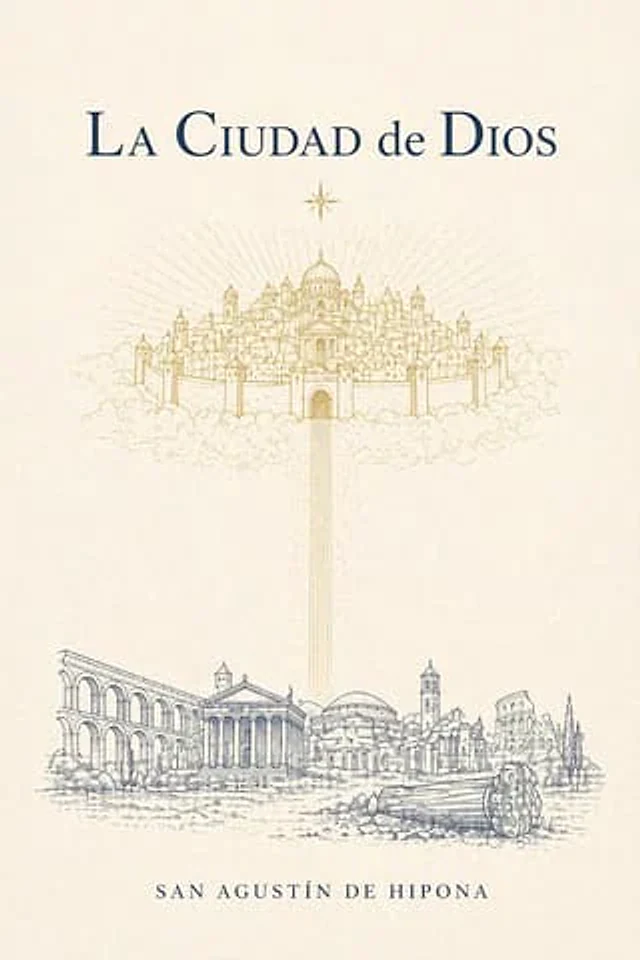
A minimalist and elegant retro book cover design, using warm ivory textured paper, suitable for {argument name="book title" default="La Ciudad de Dios"} The title is placed at the top center in a large, classic serif font in a deep navy blue, with meticulous spacing, exuding a literary feel. A gold eight-pointed star is placed directly below the title. In the upper center, a sacred city floating in the clouds is depicted using exquisite gold line art: a symmetrical holy city comprising a central domed cathedral, numerous surrounding towers, spires, walls, and gates, surrounded by soft clouds, with radiating rays of sunlight spreading outwards from behind. From the central gate of this heavenly city, a slender, vertical golden beam of light shines downwards, reaching the lower half of the cover. In the bottom third, a landscape of ancient Rome is depicted in delicate blue-grey ink lines: five major architectural remains and monuments are arranged horizontally, including a long arcade on the left, a classical columned temple in the left center, a domed building in the center, a bell tower and surrounding ruins in the right center, and the ruins of an amphitheater-like structure on the far right, along with a broken column drum and scattered shrubs and ground textures in the right foreground. Maintain an ethereal, symmetrical, and thought-provoking composition, leaving ample negative space between the sky and the ground. (The author's name should be included.){argument name="author name" default="SAN AGUSTÍN DE HIPONA"} Centered at the bottom, it uses a small, uppercase serif font with moderate spacing in a deep navy blue. The entire image contains only three visible text elements: the title, the author's name, and no subtitle. The color scheme is limited to ivory, gold, and deep navy blue, presenting a precise engraving feel and a sacred, eternal, and classical theological atmosphere.사용 방법
- 매개변수를 포함한 전체 원본 프롬프트를 복사하세요.
- 주제, 문구, 구도를 자신의 요구에 맞게 바꾸세요.
- 호환되는 외부 도구에서 사용하고 이용 조건과 결과를 확인하세요.
시작 전 확인
- 참조 이미지가 필요한지 확인하세요. 호환 표시는 해당 모델로 이 예시를 생성했다는 뜻이 아닙니다.
- 이름, 수치, 이미지 속 문구를 확인하세요. 모델 버전에 따라 결과가 다를 수 있습니다.