원본 문서
GPT Image 2 · en
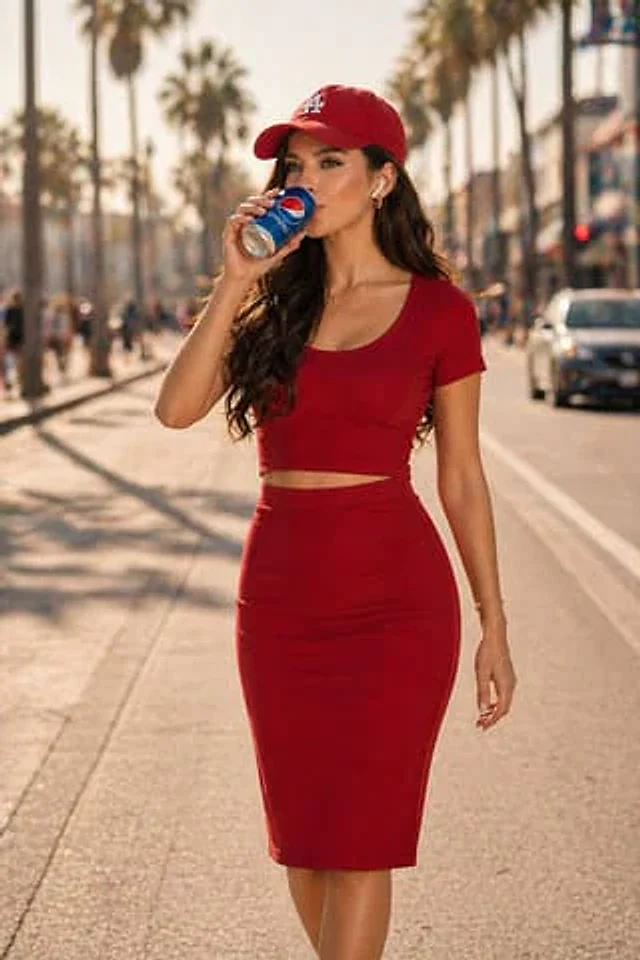
A cinematic, high-end lifestyle visual depicts a young woman walking along a sun-drenched road on a hot summer day. She is drinking an ice-cold beverage.{argument name="beverage" default="Pepsi"} As the can moved, the clearly visible condensation droplets on its surface highlighted the contrast between the high temperature and the coolness. She wore wireless headphones, immersed in her own world. Her face had to perfectly match the provided reference image—accurate facial structure, skin tone, hairstyle, and expression—refined, natural, and visually appealing. She was dressed in coordinated {argument name="outfit color" default="red"} Outfit: A stylish cropped top (short sleeves, hem above the abdomen) paired with a short skirt that falls above the knee. The style is modern, simple, and avant-garde. She also wears a matching hat, adding a sporty streetwear aesthetic. Setting: An open road under strong light, with subtle heat waves in the background; warm colors suggest hot weather. The light is bright and slightly intense, creating realistic shadows and highlights on the skin and clothing.{argument name="beverage" default="Pepsi"} The aluminum can is richly detailed, with a clear logo, a metallic texture, and a condensation effect. Her interaction with the beverage appears natural and casual, like a moment captured while walking. The composition has a dynamic and lively feel, with a subtle sense of movement (the flowing hair, the walking posture). The background is softened to increase depth of field, ensuring the focus remains on the subject. Color grading: a warm summer atmosphere, with bold {argument name="outfit color" default="red"} Clothing and{argument name="beverage" default="Pepsi"} The brand's signature cool blue provides a striking contrast. Style: Cinematic lifestyle photography, commercial beverage advertising, street fashion aesthetics. Resolution: Ultra-high resolution, 4K, high detail, photorealistic.사용 방법
- 매개변수를 포함한 전체 원본 프롬프트를 복사하세요.
- 주제, 문구, 구도를 자신의 요구에 맞게 바꾸세요.
- 호환되는 외부 도구에서 사용하고 이용 조건과 결과를 확인하세요.
시작 전 확인
- 참조 이미지가 필요한지 확인하세요. 호환 표시는 해당 모델로 이 예시를 생성했다는 뜻이 아닙니다.
- 이름, 수치, 이미지 속 문구를 확인하세요. 모델 버전에 따라 결과가 다를 수 있습니다.