원본 문서
GPT Image 2 · zh
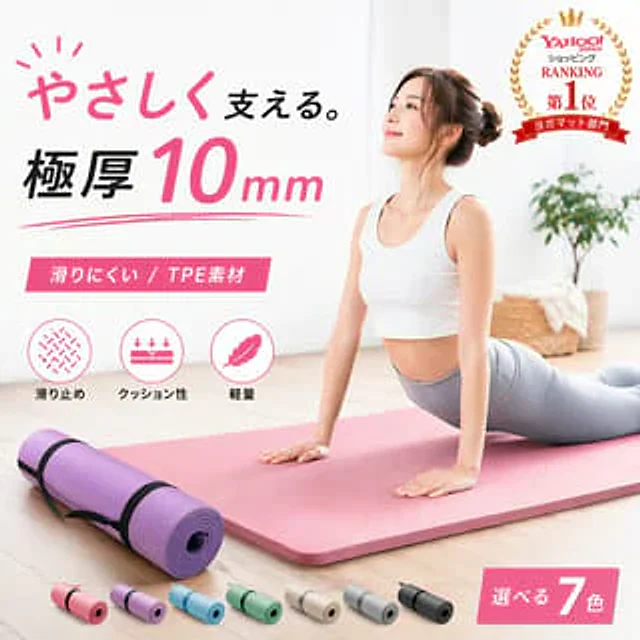
Create a minimalist Japanese e-commerce ad image showcasing a premium yoga mat placed in a bright, minimalist home environment. In the main scene, a woman with a slightly blurred face is performing the Upward-Facing Dog pose on a thick pink yoga mat laid diagonally across a light-colored wooden floor. She wears a white sports bra and light gray leggings, and her hair is neatly styled in a bun. To the left foreground, a purple rolled-up yoga mat secured with two black straps is displayed. Seven smaller rolled-up yoga mats in color variations are neatly arranged along the bottom edge: pink, light purple, sky blue, mint green, beige, light gray, and black. On the left, add striking Japanese promotional text in a stylish, modern typography: the title is “やさしく支える.”, where “やさしく” is in pink handwriting and “支える.” is in black. Below this is a line of bold text: “极厚10mm”, where “10” is enlarged and pink, and “mm” is smaller and in pink italics. Add a pink rectangular banner with white text below, reading "Slippery/ TPE Material". Below the banner, place three circular function icons with Japanese labels: 1) an anti-slip texture icon, labeled "Slippery Stop"; 2) a cushioning icon with a downward arrow, labeled "Cushioning"; 3) a feather icon, labeled "Lightweight". Add a gold laurel medal with a crown and layered red ribbons in the upper right corner, containing the Japanese phrase "Yahoo! JAPAN Shopping Ranking No. 1 Yogamat Department". Add a pink diagonal label in the lower right corner, reading "Select 7 Colors", with the number 7 enlarged and displayed in white. The background should be soft, transparent, and high-key, including white walls and natural light, with a slightly blurred potted plant and woven basket placed on the right. Employing a sophisticated commercial product photography style, with soft shadows, muted tones, a luxurious and healthy brand feel, clear layout, and realistic textures, it is perfectly suited as the main image for e-commerce platforms.사용 방법
- 매개변수를 포함한 전체 원본 프롬프트를 복사하세요.
- 주제, 문구, 구도를 자신의 요구에 맞게 바꾸세요.
- 호환되는 외부 도구에서 사용하고 이용 조건과 결과를 확인하세요.
시작 전 확인
- 참조 이미지가 필요한지 확인하세요. 호환 표시는 해당 모델로 이 예시를 생성했다는 뜻이 아닙니다.
- 이름, 수치, 이미지 속 문구를 확인하세요. 모델 버전에 따라 결과가 다를 수 있습니다.