원본 문서
Nano Banana · en
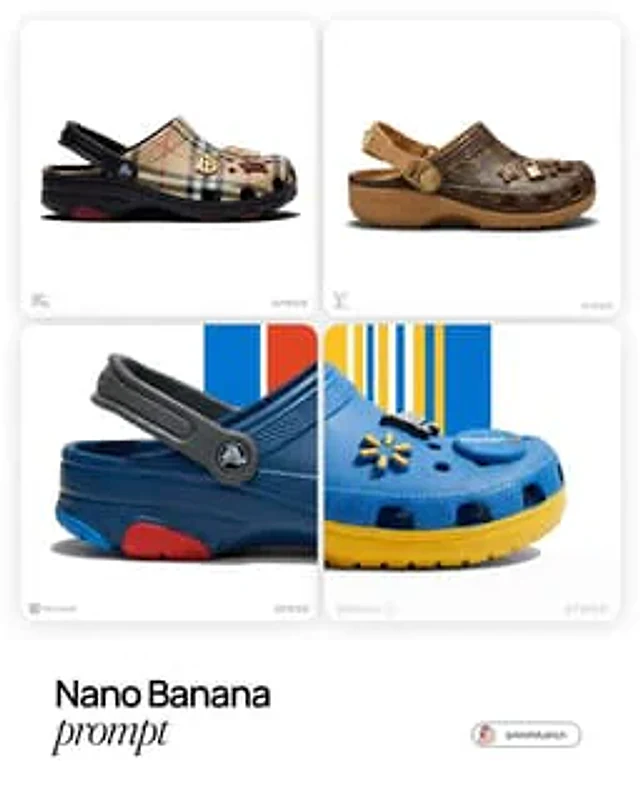
[Louis Vuitton]. Act as a World-Class Footwear Designer and Product Photographer creating a high-end "Crocs Collaboration" campaign image.

1. THE SUBJECT (CUSTOMIZED CROCS CLOG):

Generate a photorealistic, high-end customized Crocs Classic Clog inspired by the visual identity of [BRAND NAME].

View: The shoe is positioned in a Strict Side Profile View (facing right), exactly like a product profile shot. It must look grounded and substantial.

Color Blocking: Apply [BRAND NAME]'s official color palette intelligently:

Body: The main foam upper is the brand's Primary Color.

Sole/Strap: Use the Secondary/Accent colors for the thick rubber sole unit and the heel strap to create contrast.

Custom Jibbitz (Charms): The shoe is decorated with 3-4 high-quality 3D Jibbitz charms plugged into the ventilation holes. These charms must be iconic symbols or products associated with [BRAND NAME] (e.g., if "Starbucks" -> a tiny frappuccino cup and logo; if "Nike" -> a 3D swoosh).

2. THE BACKGROUND ():

The background is a Pure White Studio Space (#FFFFFF).

3. LIGHTING & MATERIALITY (EDITORIAL QUALITY):

Lighting: Ultra-realistic High-Key Studio Lighting. Use a large softbox from the top-left to create smooth, glossy highlights on the rubber curves of the Crocs. The lighting is bright, neutral, and expensive.

Texture: The material must look like real Croslite foam resin—matte with subtle specular highlights on the edges. The Jibbitz charms should look like hard glossy plastic or rubber.

Shadows: A sharp, realistic contact shadow under the shoe to ground it on the white floor.

4. BRANDING & LAYOUT (UI ELEMENTS):

Bottom Left Corner: Place a small, discrete, Monochrome Light Grey Logo of [BRAND NAME].

Bottom Right Corner: Place a small, discrete, Monochrome Light Grey "Crocs" Logo.

TECH SPECS:

Macro product photography, Phase One camera, 100mm lens, razor-sharp focus, 8k resolution, uncompressed, commercial look.
사용 방법
- 매개변수를 포함한 전체 원본 프롬프트를 복사하세요.
- 주제, 문구, 구도를 자신의 요구에 맞게 바꾸세요.
- 호환되는 외부 도구에서 사용하고 이용 조건과 결과를 확인하세요.
시작 전 확인
- 참조 이미지가 필요한지 확인하세요. 호환 표시는 해당 모델로 이 예시를 생성했다는 뜻이 아닙니다.
- 이름, 수치, 이미지 속 문구를 확인하세요. 모델 버전에 따라 결과가 다를 수 있습니다.