원본 문서
GPT Image 2 · en
{
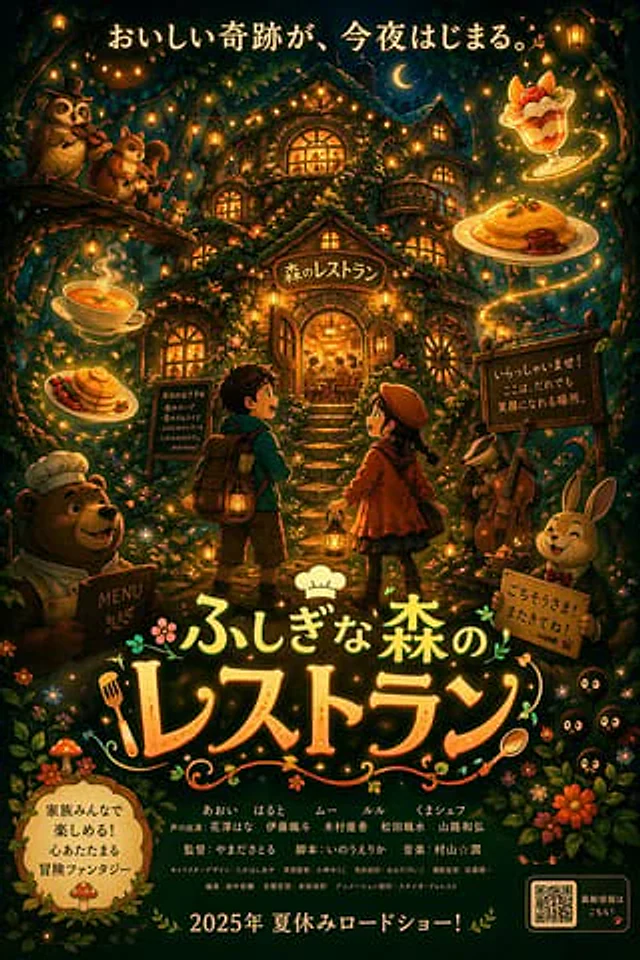
  "type": "Anime-style animated movie poster",
  "scene": "At night, a glowing, multi-story treehouse restaurant in the dark magic forest is illuminated by string lights and warm window light.",
  "subjects": {
    "children": "At the Prospect Centre, there are two children facing the restaurant: a boy with a backpack and a lantern, and a girl wearing a red coat, a beret, and a lantern.",
    "animals": "Four anthropomorphic animals: a chef bear holding a menu in the lower left corner, an owl playing the violin and a squirrel playing the flute on a tree branch in the upper left corner, a badger playing the cello in the middle right corner, and a rabbit wearing a suit and holding a sign in the lower right corner.",
    "creatures": "Three small, black, soot-like creatures with glowing eyes (bottom right corner).",
    "floating_food": "Four types of glowing food that float in the air: soup, pancakes, omelet rice, and fruit parfait."
  },
  "layout": {
    "top_text": "{argument name=\"top catchphrase\" default=\"A delicious miracle begins tonight.\"}",
    "building_sign": "{argument name=\"restaurant name\" default=\"Forest Restaurant\"}",
    "left_board": "Today's recommendations: Forest Soup, Starry Sky Omelette Rice, Soft Pancakes, Happy Parfait... and more!",
    "right_board": "Welcome! This is a place where everyone can smile.",
    "main_title": {
      "text": "{argument name=\"movie title\" default=\"Wonderful Forest Restaurant\"}",
      "styling": "Large artistic font featuring chef's hat, fork, and spoon designs."
    },
    "rabbit_sign": "We're full! Welcome back anytime!",
    "bottom_left_badge": "{argument name=\"genre badge\" default=\"Enjoy it with the whole family! A heartwarming adventure fantasy movie.\"}",
    "bottom_center_credits": "A fictional cast and crew list (in Japanese).",
    "bottom_release_date": "{argument name=\"release date\" default=\"Released in the summer of 2025!\"}",
    "bottom_right": "QR code with the text \"Get the latest information!\""
  }
}
사용 방법
- 매개변수를 포함한 전체 원본 프롬프트를 복사하세요.
- 주제, 문구, 구도를 자신의 요구에 맞게 바꾸세요.
- 호환되는 외부 도구에서 사용하고 이용 조건과 결과를 확인하세요.
시작 전 확인
- 참조 이미지가 필요한지 확인하세요. 호환 표시는 해당 모델로 이 예시를 생성했다는 뜻이 아닙니다.
- 이름, 수치, 이미지 속 문구를 확인하세요. 모델 버전에 따라 결과가 다를 수 있습니다.