원본 문서
GPT Image 2 · en
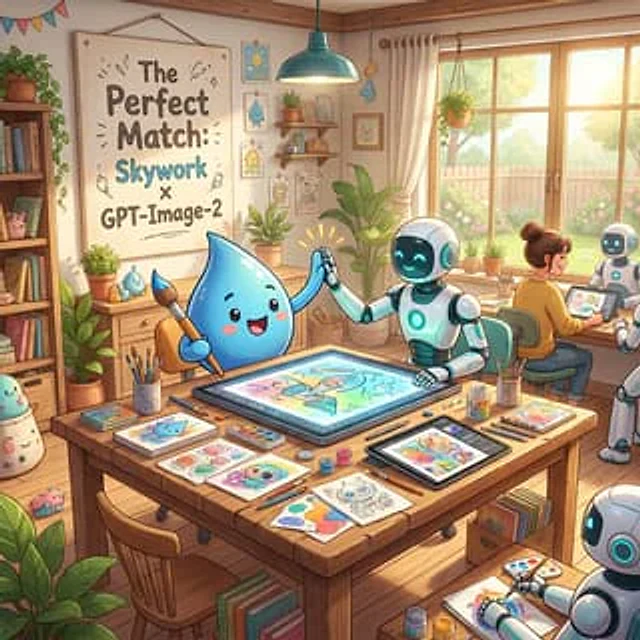
A warm, whimsical digital illustration of a cozy sunlit art studio showing a friendly collaboration between a cute blue water-drop mascot and cheerful white-and-teal robots. In the foreground, a large wooden worktable is covered with art supplies and finished sketches: exactly 3 paintbrush cups, multiple pencils and pens, watercolor palettes, small paint jars, loose character drawings, and 2 digital drawing tablets. At the center of the table, one large horizontal pen-display tablet shows a colorful pastel illustration in progress. The blue droplet character, with glossy rounded body, tiny arms, rosy cheeks, and a happy open smile, sits on the left holding a paintbrush and giving a high-five to a humanoid robot seated on the right. The robot has a smooth white body with teal glowing accents, a dark face screen with bright cyan smiling eyes, and one hand touching the tablet while the other meets the mascot’s hand, with small celebratory spark lines around the high-five. In the midground on the right, exactly 2 more robots are visible: one seated beside a human artist and one partially visible in the lower-right corner drawing on paper. The human artist is seen from behind, hair in a bun, sitting at a desk near the window and working on a tablet. The studio is filled with cozy decorative details: a large framed poster on the left wall reading "The Perfect Match: Skywork x GPT-Image-2", a bookshelf packed with books and cute objects, potted plants throughout the room, framed mini art prints, wall shelves with jars and decor, hanging bunting in the upper left, a teal pendant lamp above the table, and a large window on the right with cream curtains revealing a bright garden, fence, and soft greenery outside. Use soft golden morning light, pastel colors, polished children’s-book-style rendering, clean linework, gentle shading, inviting creative atmosphere, highly detailed props, and a polished cinematic composition that feels like an uplifting promotional illustration for {argument name="brand collaboration text" default="Skywork x GPT-Image-2"}.사용 방법
- 매개변수를 포함한 전체 원본 프롬프트를 복사하세요.
- 주제, 문구, 구도를 자신의 요구에 맞게 바꾸세요.
- 호환되는 외부 도구에서 사용하고 이용 조건과 결과를 확인하세요.
시작 전 확인
- 참조 이미지가 필요한지 확인하세요. 호환 표시는 해당 모델로 이 예시를 생성했다는 뜻이 아닙니다.
- 이름, 수치, 이미지 속 문구를 확인하세요. 모델 버전에 따라 결과가 다를 수 있습니다.