원본 문서
GPT Image 2 · en
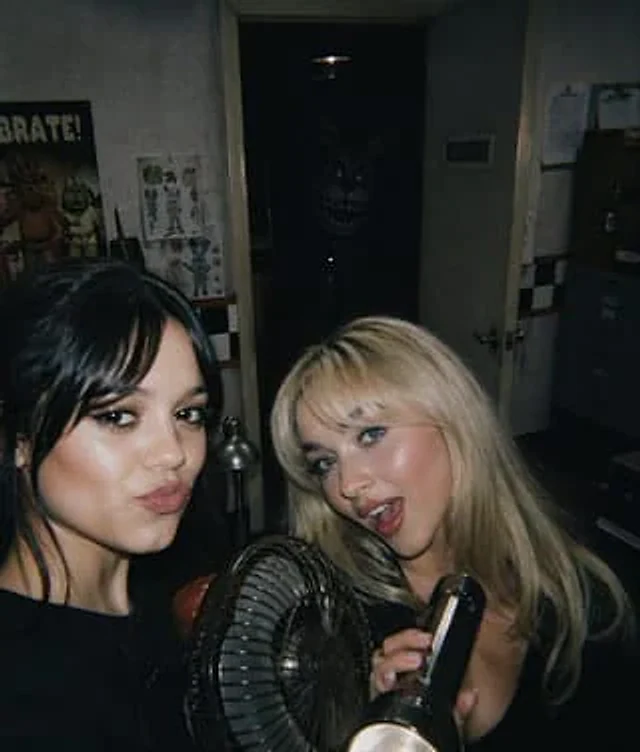
A raw, found-footage style horror photograph, taken at night in a dimly lit, cramped security office, using a direct flash from an on-camera setup, resulting in a slight film grain effect. In the foreground are two young women, both partially cropped, their faces blurred into rectangular blocks of color for privacy. The woman on the left has long, dark hair, wears a black top, and is slightly turned away from the camera. The woman on the right has long, platinum blonde hair, wears a low-cut black top, and holds a black flashlight in her right hand. Below them, in the foreground, is a small black metal table fan with a visible circular grille. In the background, a narrow door in the center of the image is half-open, leading to an almost completely dark space. Deep within that doorway stands the silhouette of a terrifying electronic rabbit doll, with glowing eyes, long, upright ears, a huge, toothy grin, and faintly visible metallic body details, appearing and disappearing in the shadows. The office walls are grayish-white and worn, with black and white checkered stripes and a thin red line running across them. On the left wall hangs a brightly colored "CELEBRATE!" poster featuring an electronic anime character, next to which is a smaller drawing sheet of the character. A black walkie-talkie sits on the table. A silver desk lamp shines near the door. On the right wall, two sheets of paper are clipped together, and a gray filing cabinet is in shadow. The door is ajar, revealing the handle. The composition should evoke the feeling of a party snapshot instantly transforming into a horror scene, with the foreground subject illuminated by a strong flash, contrasting with a deep black background. The overall effect should be characterized by simulated noise, low-saturation colors, and an unsettling realism, with the monster hidden in the center of the background serving as the central element of the horror.사용 방법
- 매개변수를 포함한 전체 원본 프롬프트를 복사하세요.
- 주제, 문구, 구도를 자신의 요구에 맞게 바꾸세요.
- 호환되는 외부 도구에서 사용하고 이용 조건과 결과를 확인하세요.
시작 전 확인
- 참조 이미지가 필요한지 확인하세요. 호환 표시는 해당 모델로 이 예시를 생성했다는 뜻이 아닙니다.
- 이름, 수치, 이미지 속 문구를 확인하세요. 모델 버전에 따라 결과가 다를 수 있습니다.