원본 문서
GPT Image 2 · en
{
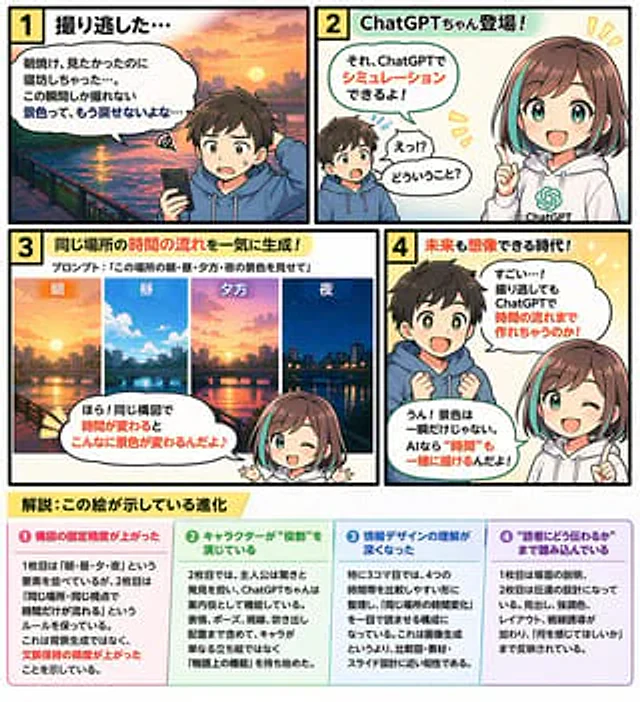
  "type": "4-panel educational comic strip with bottom infographic",
  "characters": {
    "boy": {
      "description": "Little boy, brown hair",
      "outfit": "{argument name=\"boy outfit\" default=\"blue hoodie\"}"
    },
    "girl": {
      "name": "{argument name=\"main character name\" default=\"ChatGPT sauce\"}",
      "description": "Anime Girl",
      "hair": "{argument name=\"girl hair style\" default=\"Brown bob with blue highlights\"}",
      "outfit": "White hoodie with green AI logo"
    }
  },
  "layout": {
    "comic_panels": [
      {
        "panel_number": 1,
        "title": "1. We missed the filming opportunity...",
        "scene": "The boy looked disappointed as he held his smartphone, with a sunrise over a river and city in the background.",
        "speech_bubble": "I wanted to see the sunrise, but I overslept... This kind of fleeting view will never come back..."
      },
      {
        "panel_number": 2,
        "title": "2 ChatGPT-chan makes its debut!",
        "scene": "The boy was surprised, and the girl pointed ahead and smiled.",
        "speech_bubbles": [
          "Huh? What does that mean?",
          "You can simulate that using ChatGPT!"
        ]
      },
      {
        "panel_number": 3,
        "title": "3. Generate time flow for the same location all at once!",
        "sub_text": "Prompt words:{argument name=\"panel 3 prompt text\" default=\""Showcasing the scenery of this place in the morning, noon, evening, and at night."\"}",
        "sub_images": {
          "count": 4,
          "description": "The same cityscape at different times of day",
          "labels": [
            "morning",
            "middle",
            "Night",
            "night"
          ]
        },
        "scene": "The girl is pointing to the sub-image above.",
        "speech_bubble": "Look! With the composition remaining the same, the scenery changes so much over time!"
      },
      {
        "panel_number": 4,
        "title": "4 An era where even the future can be imagined!",
        "scene": "The boy's eyes sparkled with amazement; the girl blinked and pointed ahead.",
        "speech_bubbles": [
          "Wow, that's amazing! Even if you missed the filming, you can still create a time-lapse using ChatGPT!",
          "Yes! Scenery isn't just a fleeting moment. With AI, even \"time\" can be depicted!"
        ]
      }
    ],
    "infographic_section": {
      "position": "bottom",
      "title": "{argument name=\"infographic main title\" default=\"Analysis: This image illustrates evolution.\"}",
      "columns": {
        "count": 4,
        "headers": [
          "❶ The precision of the composition has been improved.",
          "❷ The character is playing a \"role\".",
          "❸ My understanding of information design has deepened.",
          "❹ It delves into the level of \"how to communicate with the reader\"."
        ],
        "content_description": "Detailed descriptions below each heading"
      }
    }
  }
}
사용 방법
- 매개변수를 포함한 전체 원본 프롬프트를 복사하세요.
- 주제, 문구, 구도를 자신의 요구에 맞게 바꾸세요.
- 호환되는 외부 도구에서 사용하고 이용 조건과 결과를 확인하세요.
시작 전 확인
- 참조 이미지가 필요한지 확인하세요. 호환 표시는 해당 모델로 이 예시를 생성했다는 뜻이 아닙니다.
- 이름, 수치, 이미지 속 문구를 확인하세요. 모델 버전에 따라 결과가 다를 수 있습니다.