원본 문서
Nano Banana · en
[BRAND NAME].
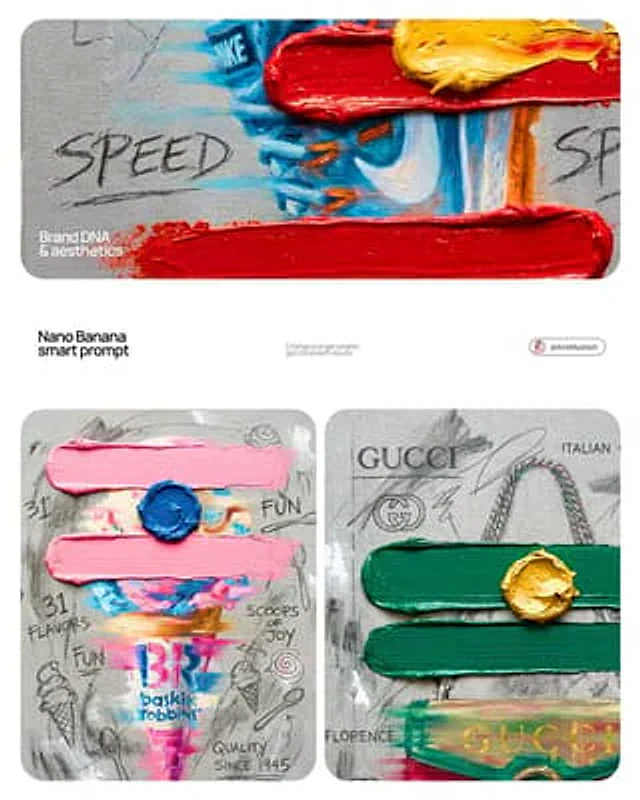
Goal: Generate a professional mixed-media oil painting on textured canvas where the color palette and graphics are dynamically adapted to the brand identity.

1. BRAND COLOR ADAPTATION
- Analyze the visual identity of [BRAND NAME].
- Use the primary brand color for the two main horizontal impasto strokes.
- Use a contrasting secondary brand color for the thick, raised central dollop of paint.
- Replace the original red and yellow with this new adaptive color scheme.

2. PAINTED SUBJECT & MOTION
- Object: A central, vertically oriented product related to [BRAND NAME], rendered as a cohesive OIL PAINTING directly on the canvas.
- Technique: Apply a "motion blur" oil painting effect with visible horizontal brushstrokes to create a sense of dynamic movement.
- Integration: The object must be part of the painted layer, sharing the same heavy-grain canvas texture as the background, not an overlay.
- Branding: Paint the "[BRAND NAME]" logo using distressed, semi-transparent oil paint layers within the object's silhouette.

3. ADAPTIVE IMPASTO & TEXTURE
- Primary Strokes: Two thick, physical, horizontal impasto oil paint strokes applied over the painted object in the brand's primary color.
- Detail: One heavily textured, raised dollop of the brand's secondary color oil paint placed precisely on the center stroke.
- Surface: Background is a raw, heavy-grain grey textured canvas with visible weave, charcoal smudges, and gesso dabs.

4. BRAND-CENTRIC GRAPHICS
- Handwriting: Use charcoal and graphite to scribble keywords, slogans, and values associated with [BRAND NAME] across the canvas.
- Symbols: Replace the original $ and doodles with hand-drawn, messy abstract icons representing [BRAND NAME].
- Execution: All text and symbols must look like they were scratched or drawn with graphite over the dried oil paint layers.

5. STYLE
- Contemporary mixed-media pop-art. 8K macro photography focusing on the physical thickness of oil paint and the raw canvas grain.
사용 방법
- 매개변수를 포함한 전체 원본 프롬프트를 복사하세요.
- 주제, 문구, 구도를 자신의 요구에 맞게 바꾸세요.
- 호환되는 외부 도구에서 사용하고 이용 조건과 결과를 확인하세요.
시작 전 확인
- 참조 이미지가 필요한지 확인하세요. 호환 표시는 해당 모델로 이 예시를 생성했다는 뜻이 아닙니다.
- 이름, 수치, 이미지 속 문구를 확인하세요. 모델 버전에 따라 결과가 다를 수 있습니다.