원본 문서
GPT Image 2 · en
{
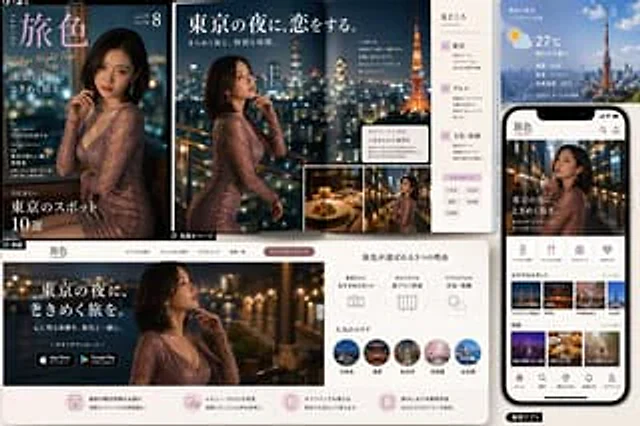
  "type": "Travel magazine and mobile application promotional mockups",
  "theme": "Romantic Tokyo Night Tour Brand Design",
  "brand": {
    "name": "{argument name=\"brand name\" default=\"Travel Colors\"}",
    "romanized": "TABIIRO",
    "tagline": "Tokyo Night Trip"
  },
  "style": {
    "overall": "The fusion of luxury editorial design and modern travel app UI presentation",
    "color_palette": "Deep navy blue, black, warm gold, soft pink, white, and city light blur effect",
    "lighting": "Cinematic nighttime lighting, accompanied by twinkling city lights and warm highlights.",
    "mood": "Elegant, romantic, desirable, high-end"
  },
  "subject": {
    "primary_model": "A glamorous East Asian woman, dressed in a fitted, shimmering rose gold long-sleeved evening gown and sporting a shoulder-length dark bob, poses thoughtfully by the railing of a balcony overlooking the Tokyo nightscape.",
    "setting": "High-rise terraces or rooftops offer a view of the blurred skyline and Tokyo Tower in the background."
  },
  "layout": {
    "composition": "The multi-panel marketing project showcased magazine covers, double-page spreads, website landing pages, and smartphone app interfaces.",
    "sections": [
      {
        "title": "Magazine cover",
        "position": "Top left",
        "count": 1,
        "labels": [
          "Travel Colors",
          "Tokyo Night Trip",
          "Tokyo at night, a heart-stirring journey.",
          "Cover: Women Exploring Tokyo",
          "Special Interview: Rediscovering the Charm of Tokyo",
          "10 Must-Visit Tokyo Attractions This Summer"
        ]
      },
      {
        "title": "Magazine spread",
        "position": "Upper-middle",
        "count": 1,
        "labels": [
          "Issue 56",
          "8",
          "I've fallen in love with the Tokyo night.",
          "A dazzling city and special moments.",
          "Highlights",
          "01 Spectacular View",
          "02 Food",
          "03 Culture and Experience"
        ]
      },
      {
        "title": "Weather and City Information Panel",
        "position": "Top right",
        "count": 1,
        "labels": [
          "Tokyo real-time weather",
          "27°C",
          "Sunny turning cloudy",
          "Humidity: 62%",
          "Wind speed: 2.1 m/s",
          "Feeling temperature: 28°C",
          "Updated 2024.5.20 15:00"
        ]
      },
      {
        "title": "Smartphone application interface",
        "position": "right side",
        "count": 1,
        "labels": [
          "Travel Colors",
          "Tokyo at night, a heart-stirring journey.",
          "Recommended attractions",
          "Special Topic",
          "front page",
          "search",
          "Travel Guide",
          "notify",
          "Personal Center"
        ]
      },
      {
        "title": "Website landing page",
        "position": "lower left and middle",
        "count": 1,
        "labels": [
          "Travel Colors",
          "Tokyo at night, a heart-stirring journey.",
          "Create unforgettable experiences with Travel Colors.",
          "Download now",
          "Download from the App Store",
          "Get it on Google Play",
          "3 Reasons to Choose Travel Colors",
          "Featured attractions",
          "Customize your own travel plan",
          "Real-time weather and information",
          "Popular areas"
        ]
      },
      {
        "title": "Popular Area Tour",
        "position": "Middle to lower",
        "count": 5,
        "labels": [
          "Roppongi",
          "Asakusa",
          "Marunouchi",
          "Nakameguro",
          "Odaiba"
        ]
      },
      {
        "title": "In-app topic thumbnails",
        "position": "Right side of the phone",
        "count": 6,
        "labels": [
          "Roppongi Hills Observatory",
          "Senso-ji Temple",
          "Nakame Kuroyō Sakura",
          "Neon Street",
          "Tokyo Food Tour",
          "A Stroll in Tokyo for Adults"
        ]
      },
      {
        "title": "Reason icon row",
        "position": "Middle, lower and upper",
        "count": 3,
        "labels": [
          "Featured attractions",
          "Customize your own travel plan",
          "Real-time weather and information"
        ]
      },
      {
        "title": "Bottom service function row",
        "position": "bottom of the website panel",
        "count": 4,
        "labels": [
          "Provides the latest travel information",
          "Abundant reviews and positive word-of-mouth",
          "Supports offline use",
          "Easily create travel guides"
        ]
      }
    ],
    "inset_images": {
      "count": 2,
      "descriptions": [
        "Exquisite tableware and fine wines in a candlelit restaurant",
        "Bust of the same woman on a balcony against the backdrop of city lights"
      ]
    }
  },
  "background": {
    "surface": "A clean, light-colored desktop or presentation board",
    "arrangement": "The overlapping of printed pages and digital screens creates the effect of a brand case study."
  },
  "rendering": {
    "quality": "High-resolution commercial prototype",
    "camera": "A slightly upward-looking frontal view clearly captures all the panels.",
    "detail_level": "Clear layout, glossy printing quality, realistic mobile phone hardware, and exquisite UI cards."
  },
  "customization": {
    "city": "{argument name=\"city\" default=\"Tokyo\"}",
    "main headline": "{argument name=\"main headline\" default=\"Tokyo at night, a heart-stirring journey.\"}",
    "temperature": "{argument name=\"temperature\" default=\"27°C\"}",
    "dress color": "{argument name=\"dress color\" default=\"Rose Gold Glitter\"}"
  }
}
사용 방법
- 매개변수를 포함한 전체 원본 프롬프트를 복사하세요.
- 주제, 문구, 구도를 자신의 요구에 맞게 바꾸세요.
- 호환되는 외부 도구에서 사용하고 이용 조건과 결과를 확인하세요.
시작 전 확인
- 참조 이미지가 필요한지 확인하세요. 호환 표시는 해당 모델로 이 예시를 생성했다는 뜻이 아닙니다.
- 이름, 수치, 이미지 속 문구를 확인하세요. 모델 버전에 따라 결과가 다를 수 있습니다.