원본 문서
GPT Image 2 · en
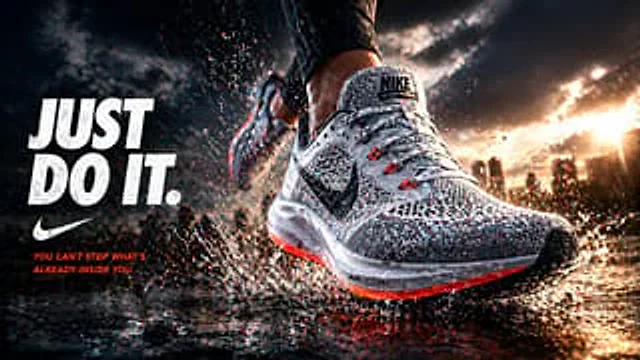
Create a cinematic sneaker advertisement poster. The main subject is a close-up of a giant running shoe in motion, splashing shallow water on a wet city street at sunset. The composition uses a low-angle, ultra-dynamic motion capture perspective, with one main shoe occupying the right side of the frame and another blurred shoe in the background, suggesting the runner is taking a stride. This featured sneaker is made of white and gray knit material, with a black swoosh logo on the side, gray laces, small red lace buckles, a thick, semi-transparent cushioned sole, and a bright orange-red glow emanating from the edge of the sole. The poster showcases realistic water droplets and clear textural details on the upper, with frozen, explosive splashes of water around the sole. The runner wears dark athletic leggings, revealing only the lower legs. In the background, a soft-focus city skyline is visible in the distance on the right, with warm golden sunlight filtering through the cloudy sky near the horizon. The strong contrast between cool blue-gray shadows and fiery orange highlights gives the road surface a wet, post-rain texture. Three text elements are arranged vertically on the left: a large, bold, distressed white headline.{argument name="headline text" default="JUST DO IT."} Below is a white checkmark-shaped brand logo, and below that is a line of smaller orange capital letters inspirational slogans.{argument name="tagline text" default="YOU CAN'T STOP WHAT'S ALREADY INSIDE YOU."} Add a visible brand name to the shoe tongue label.{argument name="brand name" default="NIKE"} This makes it look like a target{argument name="product type" default="running shoes"} High-end, high-impact commercial posters featuring hyper-realistic details, dramatic lighting, shallow depth of field, a sense of dynamism, clear typography, advertising photography-grade quality, and a 16:9 widescreen layout.사용 방법
- 매개변수를 포함한 전체 원본 프롬프트를 복사하세요.
- 주제, 문구, 구도를 자신의 요구에 맞게 바꾸세요.
- 호환되는 외부 도구에서 사용하고 이용 조건과 결과를 확인하세요.
시작 전 확인
- 참조 이미지가 필요한지 확인하세요. 호환 표시는 해당 모델로 이 예시를 생성했다는 뜻이 아닙니다.
- 이름, 수치, 이미지 속 문구를 확인하세요. 모델 버전에 따라 결과가 다를 수 있습니다.