원본 문서
GPT Image 2 · en
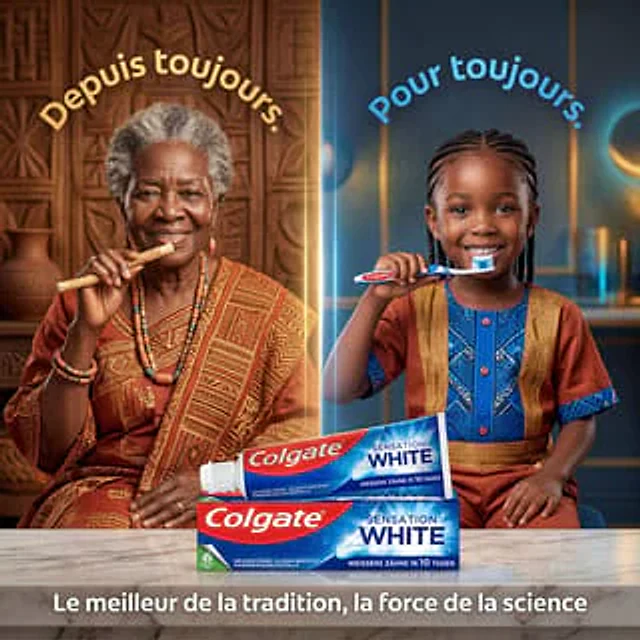
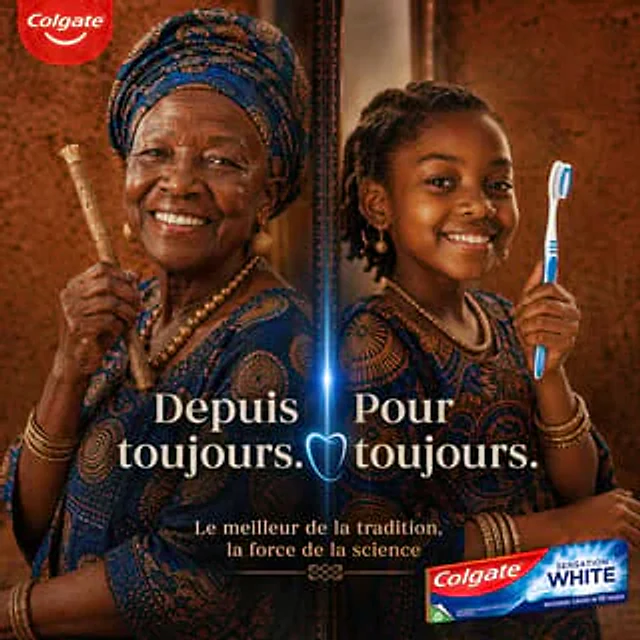
for{argument name="brand name" default="Colgate Sensation White"} The luxury goods advertising poster is designed with the image vertically divided into two halves by a narrow, elegant mirror with a bright blue glow in the center. On the left, an elderly African woman is shown three-quarters turned to the side, her arms crossed. She wears a richly patterned indigo and gold traditional batik dress, a matching headscarf, multi-layered gold bead necklace, dangling earrings, and stacked bracelets, holding a traditional chewing stick vertically in her hand. On the right, a young African woman wearing the same indigo and gold dress and gold jewelry stands in the same mirrored pose, holding a modern blue and white toothbrush vertically in her hand. Both figures are elegant and dignified, photographed in half-body style against a warm brown textured studio background, complemented by cinematic gold lighting, high contrast, delicate skin tone processing, and high-end beauty advertising aesthetics. A red circular Colgate logo is added to the upper left corner. A large, elegant cream-colored serif font is overlaid at the bottom center of the image: the text on the left is {argument name="left slogan" default="Depuis toujours."} The text on the right is{argument name="right slogan" default="Pour toujours."} A glowing blue tooth icon is placed in the center of the mirrored dividing line. A smaller, cream-colored serif caption is added to the bottom center:{argument name="tagline text" default="Le meilleur de la tradition, la force de la science"} A box of Colgate Sensation White toothpaste is placed in the lower right corner, slightly angled towards the camera, its texture glossy and realistic. The overall composition aims to convey the fusion of ancestral tradition and modern dental science, showcasing high-end African fashion portraiture, symmetrical balance, editorial-level advertising design, and an international high-end cosmetics advertising style.사용 방법
- 매개변수를 포함한 전체 원본 프롬프트를 복사하세요.
- 주제, 문구, 구도를 자신의 요구에 맞게 바꾸세요.
- 호환되는 외부 도구에서 사용하고 이용 조건과 결과를 확인하세요.
시작 전 확인
- 참조 이미지가 필요한지 확인하세요. 호환 표시는 해당 모델로 이 예시를 생성했다는 뜻이 아닙니다.
- 이름, 수치, 이미지 속 문구를 확인하세요. 모델 버전에 따라 결과가 다를 수 있습니다.