원본 문서
GPT Image 2 · en
{
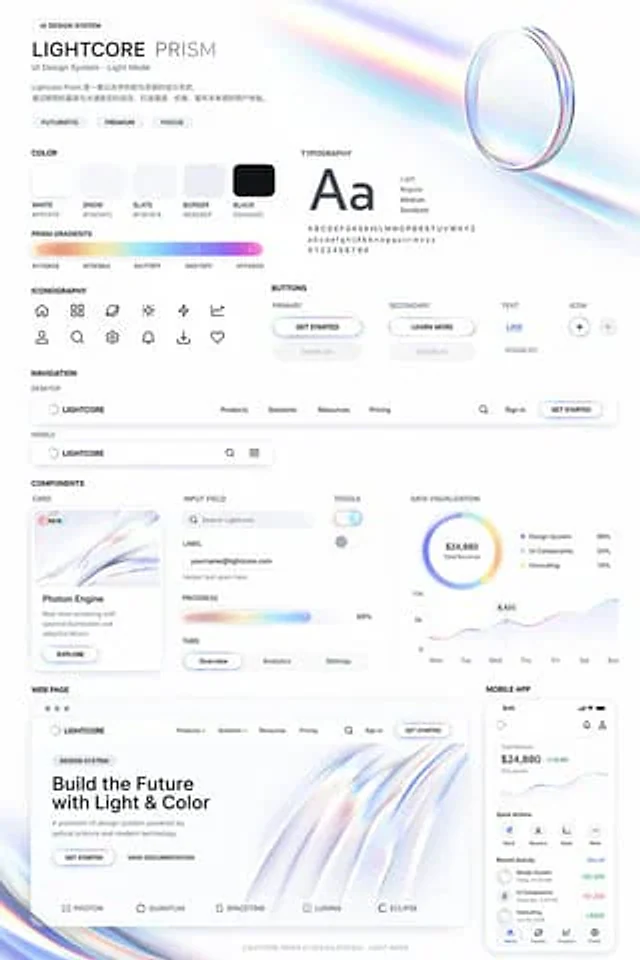
  "type": "UI design system demonstration project",
  "theme": "{argument name=\"visual theme\" default=\"Optical Science and Light Refraction\"}",
  "overall_aesthetic": "A clean white background, light color mode, futuristic and sophisticated feel; its distinctive feature lies in {argument name=\"primary gradient colors\" default=\"Iridescent, soft orange, yellow, cyan, purple, pink\"} embellishment",
  "header": {
    "title": "{argument name=\"system name\" default=\"LIGHTCORE PRISM\"}",
    "subtitle": "UI Design System - Light Mode",
    "tags": [
      "Futuristic",
      "sense of sophistication",
      "Focus"
    ],
    "hero_graphic": "3D transparent glass ring that refracts iridescent light"
  },
  "layout": {
    "sections": [
      {
        "title": "color",
        "count": 5,
        "labels": [
          "White #FFFFFF",
          "Snowy #FAFAFC",
          "Slate color #F2F4F8",
          "Border color #E6E8EF",
          "Black #0A0A0C"
        ],
        "description": "5 rounded square solid color blocks"
      },
      {
        "title": "Prism Gradient",
        "count": 1,
        "description": "A long horizontal gradient bar with five hexadecimal color codes below."
      },
      {
        "title": "typesetting",
        "description": "The large 'Aa' font is listed in four weights (Light, Regular, Medium, Semibold) along with the complete alphabet/numbers."
      },
      {
        "title": "icon",
        "count": 12,
        "description": "12 minimalist line-style icons arranged in a 2x6 grid."
      },
      {
        "title": "Button",
        "count": 8,
        "categories": [
          "main",
          "secondary",
          "text",
          "icon"
        ],
        "description": "There are a total of 8 buttons, displaying the normal and disabled states for each category. The main button features an iridescent border and {argument name=\"primary button text\" default=\"Start using\"} text."
      },
      {
        "title": "navigation",
        "count": 2,
        "variants": [
          "Desktop",
          "mobile"
        ],
        "description": "The desktop navigation includes a logo, four text links, a search bar, a login button, and a mobile navigation bar."
      },
      {
        "title": "Components",
        "count": 6,
        "items": [
          "Card: 'Photon Engine' with abstract rainbow graphics and buttons",
          "Input boxes: a labeled search bar and an email input box.",
          "Progress bar: 68% rainbow progress bar",
          "Tabs: Overview, Analysis, Settings",
          "Switches: 2 switches (on/off)",
          "Data visualization: a pie chart with 3 legend items, and a 7-day line chart."
        ]
      },
      {
        "title": "Web page",
        "description": "Desktop browser model, including title '{argument name=\"hero headline\" default=\"Building the future with light and color\"} The design includes two buttons, a flowing 3D rainbow wave graphic, and five partner logos at the bottom."
      },
      {
        "title": "Mobile application",
        "description": "The smartphone model displays a balance of $24,880, a line chart, four quick action icons, a list of recent activities with three items, and a bottom navigation bar with four icons."
      }
    ]
  }
}
사용 방법
- 매개변수를 포함한 전체 원본 프롬프트를 복사하세요.
- 주제, 문구, 구도를 자신의 요구에 맞게 바꾸세요.
- 호환되는 외부 도구에서 사용하고 이용 조건과 결과를 확인하세요.
시작 전 확인
- 참조 이미지가 필요한지 확인하세요. 호환 표시는 해당 모델로 이 예시를 생성했다는 뜻이 아닙니다.
- 이름, 수치, 이미지 속 문구를 확인하세요. 모델 버전에 따라 결과가 다를 수 있습니다.