원본 문서
GPT Image 2 · en
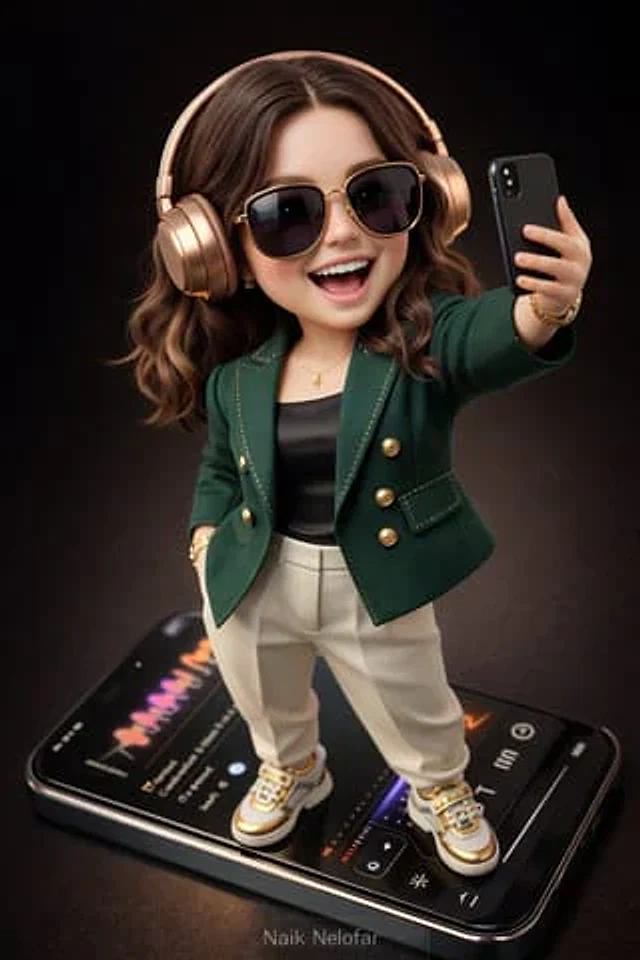
Create a high-detail 3D semi-realistic chibi character with slightly exaggerated cute proportions but with photorealistic facial rendering, natural skin pores, realistic lighting, and finely detailed hair strands. The character should look like a collectible designer toy figure with smooth surfaces, high-end materials, and ultra-clean edges. The character is styled in an fashion look: A tailored designer jacket in deep emerald green with gold stitching accents A sleek black silk fitted top underneath High-fashion tapered trousers in matte ivory tone designer sneakers / footwear in white and gold with polished details Accessories must feel ultra- and fashionable: oversized sunglasses with glossy black lenses and gold frame wristwatch with metallic gold case and elegant dial Subtle designer bracelet and minimal accents The character stands confidently on top of a giant modern smartphone, like a collectible display piece. They are wearing stylish wireless over-ear headphones in metallic rose gold and holding the phone slightly forward while taking a playful joyful selfie, smiling and laughing with energetic expression. The smartphone screen displays a realistic modern music-player interface with colorful waveform animations and elegant UI elements. Scene style and lighting: Background: deep cinematic dark brown gradient studio backdrop Lighting: soft studio lighting with subtle reflections and rim light Materials: high-quality fabric textures, polished metals, and realistic plastics Style: collectible toy aesthetic mixed with semi-realistic chibi design Camera perspective: Aerial / top-down camera angle Slight cinematic depth of field for realism Rendering quality: Ultra-detailed 3D render 8K resolution smooth shading hyper-clean edges high clarity Add a small elegant watermark text “Naik Nelofar ” at the bottom of the image, subtle but clearly readable. Aspect ratio: 3:4 vertical composition사용 방법
- 매개변수를 포함한 전체 원본 프롬프트를 복사하세요.
- 주제, 문구, 구도를 자신의 요구에 맞게 바꾸세요.
- 호환되는 외부 도구에서 사용하고 이용 조건과 결과를 확인하세요.
시작 전 확인
- 참조 이미지가 필요한지 확인하세요. 호환 표시는 해당 모델로 이 예시를 생성했다는 뜻이 아닙니다.
- 이름, 수치, 이미지 속 문구를 확인하세요. 모델 버전에 따라 결과가 다를 수 있습니다.