Documento original
GPT Image 2.5 · en
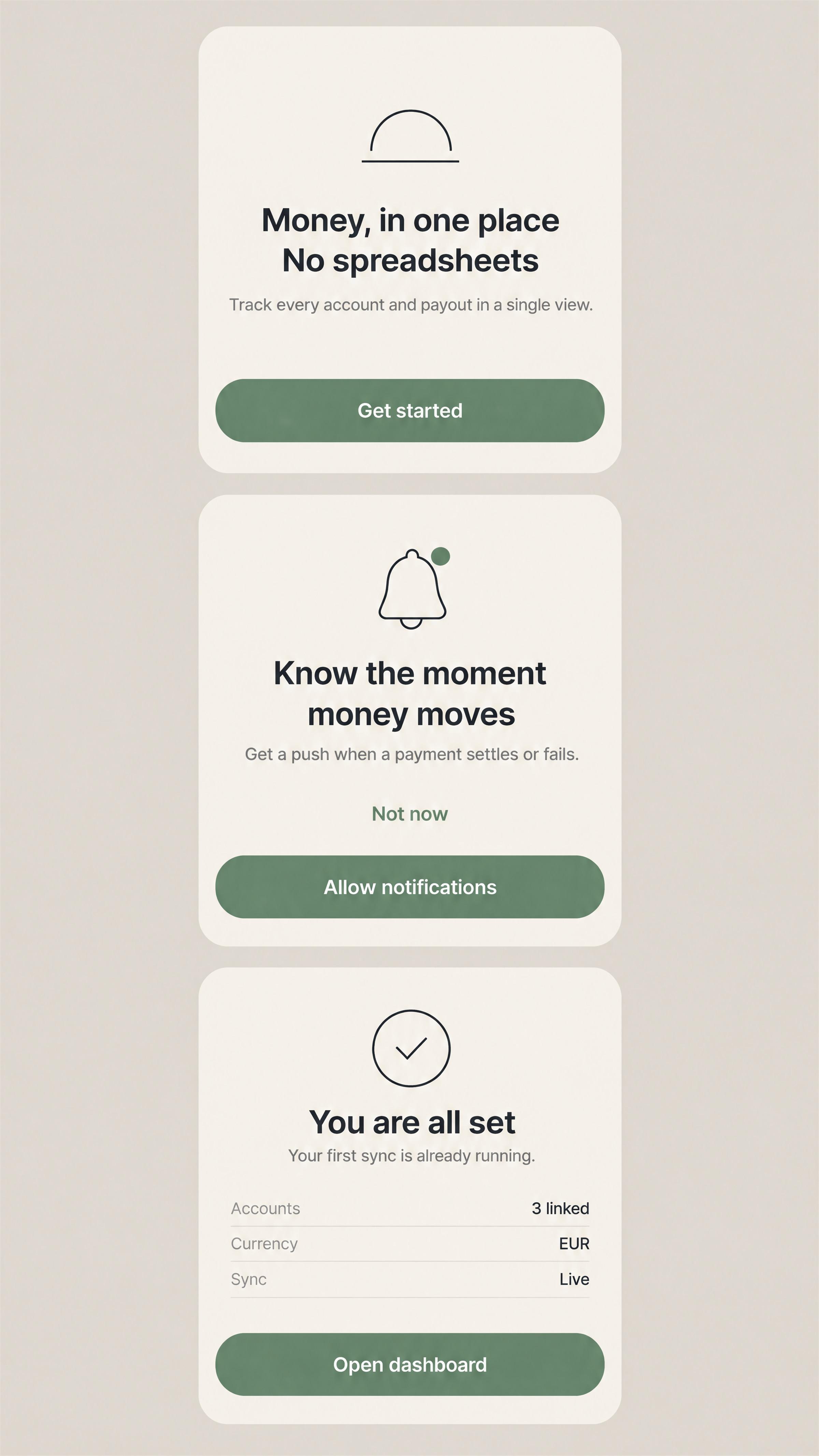
A mobile app onboarding set, 9:16 portrait, presented as three phone screens stacked vertically on a soft warm
greige background with even gaps between them, shown straight on with no perspective and no hand.

THE THREE SCREENS, top to bottom
- Each screen is a rounded rectangle at the same size and the same width, occupying about 30% of the frame
  height each, their left and right edges aligned to one vertical axis so the stack reads as a single column.
- Each screen shows its content only: no device bezel, no notch, no camera cutout, no status bar, no home
  indicator, no browser chrome. The rounded corners are the only indication that these are screens.

SCREEN 1 — welcome
A small thin-stroke emblem centred in the upper third: an arch over a horizontal line. Below it, a two-line
headline centred. Below that, one short supporting line centred in a lighter weight. At the bottom, a single
full-width primary button with rounded ends, filled in the accent colour, with its label centred.

SCREEN 2 — notifications
A simple line illustration centred in the upper third: a rounded bell with a single small dot badge at its upper
right, drawn with the same thin stroke as the emblem on screen 1. Below it, a two-line headline centred and one
supporting line. At the bottom, the same full-width primary button, and directly above it one text-only
secondary link centred in the accent colour.

SCREEN 3 — complete
A centred mark in the upper third: a thin-stroke circle with a simple check inside it. Below it, a short
headline of four words centred, one supporting line, and a small three-row summary list — each row a label at
the left and a value at the right, separated by faint rules. At the bottom, the same full-width primary button.

EXACT VISIBLE TEXT — render exactly these strings, once each, in the screen stated
- Screen 1 headline line 1: "Money, in one place"
- Screen 1 headline line 2: "No spreadsheets"
- Screen 1 supporting line: "Track every account and payout in a single view."
- Screen 1 button: "Get started"
- Screen 2 headline line 1: "Know the moment"
- Screen 2 headline line 2: "money moves"
- Screen 2 supporting line: "Get a push when a payment settles or fails."
- Screen 2 button: "Allow notifications"
- Screen 2 secondary link: "Not now"
- Screen 3 headline: "You are all set"
- Screen 3 supporting line: "Your first sync is already running."
- Screen 3 summary row labels, top to bottom: "Accounts", "Currency", "Sync"
- Screen 3 summary row values, top to bottom: "3 linked", "EUR", "Live"
- Screen 3 button: "Open dashboard"
No other text anywhere — no page dots, no step counters, no "1 of 3", no version numbers, no legal line, no
watermark.

STYLE AND MATERIAL
A light, warm, quiet interface. Ground is a warm off-white; body text is near-black; one accent colour, a muted
green, used only for the three primary buttons, the secondary link and the small bell badge. Type is one
geometric sans throughout, in exactly four sizes: headline, supporting line, button label, and the small
summary rows. Rounded rectangles with generous internal padding. Buttons are flat fills with no gradient, no
shadow and no border. Thin line illustrations use a single stroke weight throughout and no fills except the
bell badge.

CONSTRAINTS
No dark mode, no glassmorphism, no neon, no gradient meshes, no photographic imagery, no product screenshots
inside the screens, no charts or graphs on any screen. Do not add a fourth screen, a floating card, a tooltip,
a notification banner, an avatar or a logo other than the emblem described. Do not rotate, tilt or perspective
the screens. Do not paraphrase, re-case or re-punctuate any string, and do not add a full stop that is not
written above. No watermark, no signature, no frame around the whole set.
Como usar
- Copie o prompt original completo, incluindo os parâmetros.
- Adapte o tema, o texto e a composição aos seus requisitos.
- Use uma ferramenta externa compatível; confira o acesso e o resultado.
Antes de começar
- Verifique se é necessária uma imagem de referência. Compatibilidade não comprova qual modelo gerou o exemplo.
- Confira nomes, números e textos; os resultados variam entre versões do modelo.