Documento original
GPT Image 2 · en
{
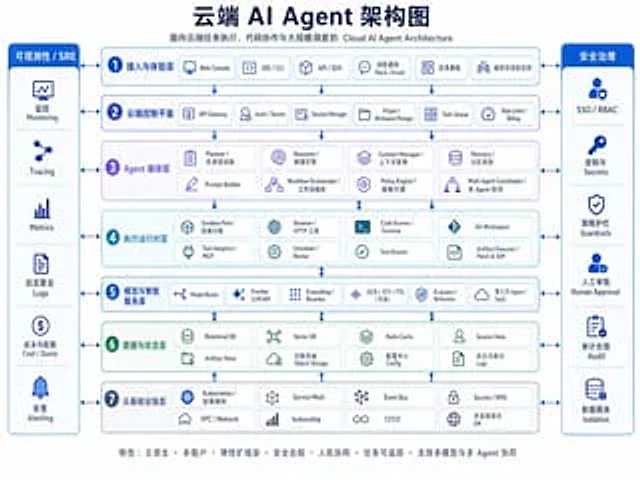
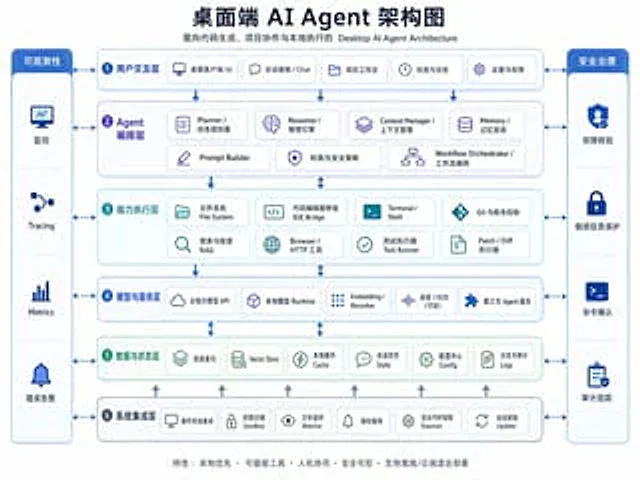
  "type": "Bilingual Enterprise Architecture Infographic",
  "topic": "{argument name=\"headline text\" default=\"Desktop AI Agent Architecture Diagram\"}",
  "subtitle": "Desktop AI Agent Architecture for Code Generation, Project Collaboration, and Local Execution",
  "style": {
    "look": "Concise and modern SaaS architecture diagram, enterprise presentation style, vector infographic.",
    "background": "light gray-white",
    "palette": {
      "primary": "Deep Navy Blue",
      "secondary": "medium blue",
      "accent": "Blue-green",
      "support": "Soft gray",
      "security": "Bright sapphire blue"
    },
    "typography": "Bold Chinese titles paired with small bilingual labels, clear sans-serif font, highly legible.",
    "icons": "The rounded white card contains a minimalist line icon with subtle shadows and a blue outline.",
    "geometry": "Symmetrical grid, rounded rectangles, thin connecting arrows, uniform module spacing"
  },
  "layout": {
    "orientation": "4:3 aspect ratio presentation slides",
    "header": {
      "title_centered": true,
      "title_size": "large",
      "subtitle_below": true
    },
    "sections": [
      {
        "title": "Observability",
        "position": "Leftmost vertical sidebar",
        "count": 4,
        "labels": [
          "monitor",
          "Tracing",
          "Metrics",
          "Error alert"
        ],
        "container": "A blue panel with rounded corners, containing four stacked cells and icons."
      },
      {
        "title": "Security Management",
        "position": "Rightmost vertical sidebar",
        "count": 4,
        "labels": [
          "Permission verification",
          "Sensitive information protection",
          "Command confirmation",
          "Audit trail"
        ],
        "container": "A blue panel with rounded corners, containing four stacked cells and icons."
      },
      {
        "title": "1 User Interaction Layer",
        "position": "Top horizontal layer",
        "count": 5,
        "labels": [
          "Desktop client UI",
          "Chat panel",
          "Project work area",
          "Mission and History",
          "Settings and Permissions"
        ],
        "container": "Wide, rounded white panel with blue border"
      },
      {
        "title": "2 Agent Orchestration Layer",
        "position": "Second horizontal layer",
        "count": 7,
        "labels": [
          "Planner / Task Planner",
          "Reasoner / Reasoning Engine",
          "Context Manager",
          "Memory / Memory System",
          "Prompt Builder",
          "Permissions and Security Policies",
          "Workflow Orchestrator"
        ],
        "container": "Wide, rounded white panel with a pale purple-blue tint"
      },
      {
        "title": "3 Capability Execution Layer",
        "position": "Third level",
        "count": 8,
        "labels": [
          "File System",
          "Code Editor Bridge IDE",
          "Terminal / Shell",
          "Git and version control",
          "Search and retrieve RAG",
          "Browser / HTTP Tools",
          "Test Runner",
          "Patch / Diff executor"
        ],
        "container": "Wide, rounded white panel with a light blue tint"
      },
      {
        "title": "4. Model and Service Layer",
        "position": "Fourth level",
        "count": 5,
        "labels": [
          "Cloud-based large model API",
          "Local Model Runtime",
          "Embedding / Reranker",
          "Voice/OCR (optional)",
          "Third-party agent services"
        ],
        "container": "Wide, rounded white panel with blue border"
      },
      {
        "title": "5. Data and State Layer",
        "position": "Fifth level",
        "count": 6,
        "labels": [
          "Project Index",
          "Vector Store",
          "Local Cache",
          "Session State",
          "Configuration Center",
          "Logs and Audit Logs"
        ],
        "container": "Wide, rounded white panel with a light green tint"
      },
      {
        "title": "6 System Integration Layer",
        "position": "Bottom horizontal layer",
        "count": 6,
        "labels": [
          "Operating system integration",
          "Permission Sandbox",
          "File Watcher",
          "Notification service",
          "background daemon process",
          "Automatic Updater"
        ],
        "container": "Wide, rounded white panel with blue border"
      }
    ],
    "centerpiece": "The middle layer is a stacked architecture with governance sidebars on both sides.",
    "connectors": "Dashed double-headed arrows connect each core layer to the sidebars; vertical blue arrows flow downwards between the core layers; small gray upward arrows rise from the bottom integration layer to the data layer.",
    "footer": {
      "count": 1,
      "text": "Features: Local-first; Pluggable tools; Human-machine collaboration; Secure and controllable; Supports hybrid offline/cloud deployment",
      "position": "Centered at the bottom"
    }
  },
  "rendering": {
    "flat_vector": true,
    "high_resolution": true,
    "sharp_lines": true,
    "balanced_whitespace": true,
    "professional_pitch_deck_quality": true
  }
}
Como usar
- Copie o prompt original completo, incluindo os parâmetros.
- Adapte o tema, o texto e a composição aos seus requisitos.
- Use uma ferramenta externa compatível; confira o acesso e o resultado.
Antes de começar
- Verifique se é necessária uma imagem de referência. Compatibilidade não comprova qual modelo gerou o exemplo.
- Confira nomes, números e textos; os resultados variam entre versões do modelo.