Documento original
GPT Image 2 · en
{
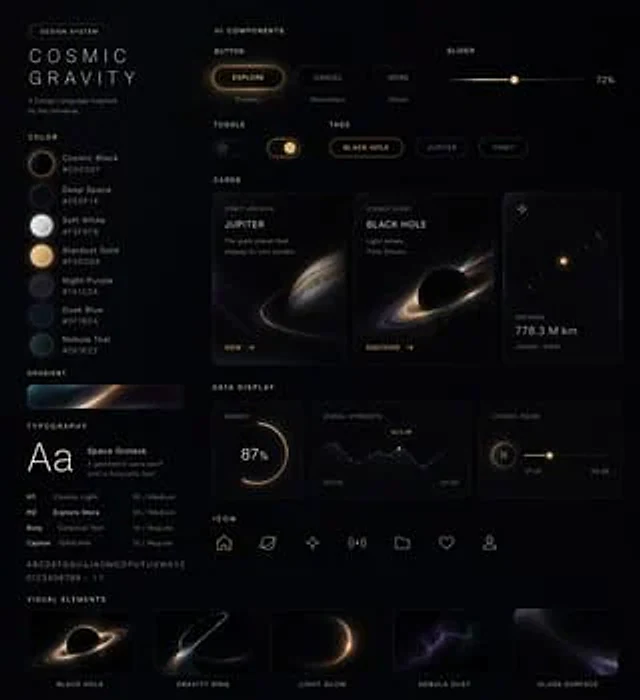
  "type": "Futuristic Glass-like UI Design System Project",
  "theme": "The deep-space planetary exploration dashboard features a high-end Apple-style industrial design.",
  "style": {
    "background": "The near-black matte canvas has a subtle, hazy, star-like quality.",
    "lighting": "Soft shadows, subtle glow, warm amber highlights, cool blue-purple accents, and a translucent glass panel.",
    "material": "Frosted glass, glossy dark surface, delicate luminous lines, soft refraction",
    "mood": "Luxurious sci-fi, minimalist, cinematic, highly refined"
  },
  "layout": {
    "format": "Single-frame wide-format display project",
    "sections": [
      {
        "title": "COSMIC GRAVITY",
        "position": "Left sidebar",
        "count": 5,
        "labels": [
          "Title Brand Block",
          "Palette color swatches",
          "Gradient strip",
          "Font Examples",
          "Text Proportion List"
        ]
      },
      {
        "title": "UI elements",
        "position": "upper right",
        "count": 7,
        "labels": [
          "EXPLORE button",
          "Rounded corner label 1",
          "Rounded corner label 2",
          "Horizontal slider",
          "Switch",
          "BLACK HOLE Capsule Button",
          "JUPITER Capsule Button"
        ]
      },
      {
        "title": "card",
        "position": "Middle right",
        "count": 3,
        "labels": [
          "JUPITER Card",
          "BLACK HOLE cards",
          "Small indicator cards"
        ]
      },
      {
        "title": "Data Display",
        "position": "lower right",
        "count": 3,
        "labels": [
          "87% Circular Progress Card",
          "Line chart card",
          "Horizontal control cards"
        ]
      },
      {
        "title": "Bottom navigation",
        "position": "Bottom Center",
        "count": 7,
        "labels": [
          "Homepage icon",
          "Cloud Icons",
          "Spark icon",
          "signal icon",
          "Rounded rectangle icon",
          "Heart icon",
          "Tray icon"
        ]
      },
      {
        "title": "Visual examples",
        "position": "bottom row",
        "count": 5,
        "labels": [
          "BLACK HOLE",
          "GRAVITY RING",
          "LIGHT GLOW",
          "NEBULA DUST",
          "GLASS SURFACE"
        ]
      }
    ],
    "centerpiece": "Floating on a black canvas are tightly packed, semi-transparent, dark cards and controls, arranged like a poster for a high-end design system."
  },
  "text": {
    "branding": "{argument name=\"headline text\" default=\"COSMIC GRAVITY\"}",
    "small labels": "The miniature uppercase sans-serif microtext throughout the image is primarily used for stylizing technical UI annotations.",
    "percentage": "87%",
    "distance": "779.3 M km",
    "right slider value": "79%"
  },
  "visuals": {
    "palette": [
      {
        "name": "Bright white",
        "appearance": "Soft glowing white color sample"
      },
      {
        "name": "Warm sand color",
        "appearance": "Creamy Beige Color Sample"
      },
      {
        "name": "Soft plum color",
        "appearance": "Dark purple color sample"
      },
      {
        "name": "Deep sea blue",
        "appearance": "blue-black color sample"
      },
      {
        "name": "bluish-black",
        "appearance": "Dark blue color sample"
      }
    ],
    "planets": [
      {
        "name": "Jupiter-like planets",
        "appearance": "A striped gas giant with slender, luminous orbital rings"
      },
      {
        "name": "Black hole/ring hole",
        "appearance": "Dark circular center with a bright accretion disk-shaped halo"
      },
      {
        "name": "distant stars",
        "appearance": "Small, bright gold dots with a faint halo"
      }
    ],
    "chart motifs": [
      "Illuminated circular progress ring",
      "Minimalist Mountain-Shaped Line Chart",
      "Horizontal numerical slider"
    ]
  },
  "typography": {
    "primary": "Stylish geometric sans-serif font, uppercase, wide letter spacing",
    "specimen": "Large white Aa sample",
    "secondary": "Small, clean sans-serif font for labels and data."
  },
  "colorScheme": {
    "primary": "{argument name=\"accent color\" default=\"Warm Amber Gold\"}",
    "secondary": "{argument name=\"secondary glow color\" default=\"Deep blue-purple\"}",
    "surface": "Charcoal black translucent glass",
    "text": "Soft white and soft gray"
  },
  "camera": {
    "view": "Facing the perspective of flat-lay posters",
    "composition": "A balanced grid layout with ample negative space and slim panel borders."
  },
  "rendering": "Ultra-refined modern product design renderings, high contrast, elegant glass-like finish, clear UI suite showcase, subtle blurring and halo effects; high-end concept images suitable for sci-fi applications or dashboards.",
  "customization": {
    "product name": "{argument name=\"product name\" default=\"UI ELEMENTS\"}",
    "theme name": "{argument name=\"theme name\" default=\"Deep Space Exploration\"}"
  }
}
Como usar
- Copie o prompt original completo, incluindo os parâmetros.
- Adapte o tema, o texto e a composição aos seus requisitos.
- Use uma ferramenta externa compatível; confira o acesso e o resultado.
Antes de começar
- Verifique se é necessária uma imagem de referência. Compatibilidade não comprova qual modelo gerou o exemplo.
- Confira nomes, números e textos; os resultados variam entre versões do modelo.