

Veja em ação
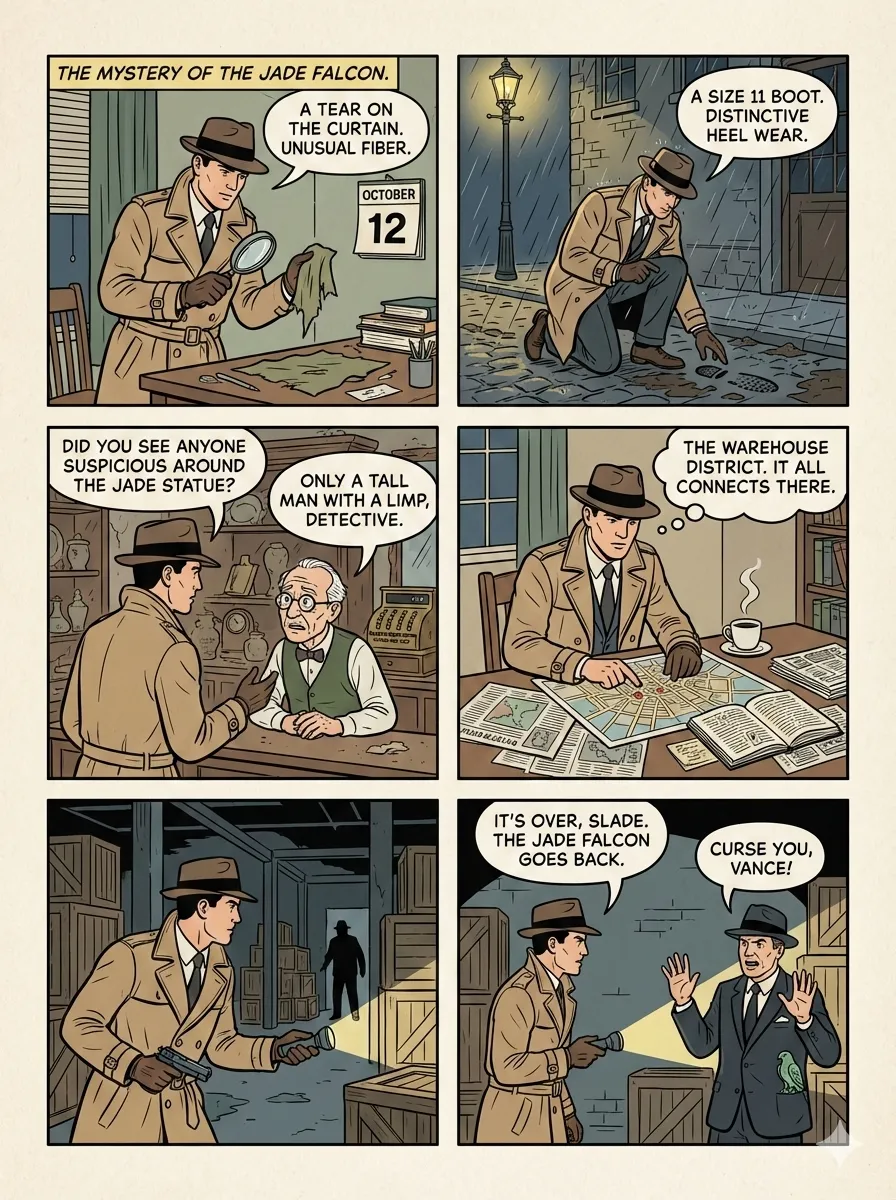
Standard comic layout: a detective story
A six-panel detective scene uses dialogue, changing camera distance and a regular grid to move the story forward. It is the author's standard-layout preview.
Licença
Original WebP bytes retained; immutable local filename.
MIT License

Copyright (c) 2026 Jim Liu

Permission is hereby granted, free of charge, to any person obtaining a copy
of this software and associated documentation files (the "Software"), to deal
in the Software without restriction, including without limitation the rights
to use, copy, modify, merge, publish, distribute, sublicense, and/or sell
copies of the Software, and to permit persons to whom the Software is
furnished to do so, subject to the following conditions:

The above copyright notice and this permission notice shall be included in all
copies or substantial portions of the Software.

THE SOFTWARE IS PROVIDED "AS IS", WITHOUT WARRANTY OF ANY KIND, EXPRESS OR
IMPLIED, INCLUDING BUT NOT LIMITED TO THE WARRANTIES OF MERCHANTABILITY,
FITNESS FOR A PARTICULAR PURPOSE AND NONINFRINGEMENT. IN NO EVENT SHALL THE
AUTHORS OR COPYRIGHT HOLDERS BE LIABLE FOR ANY CLAIM, DAMAGES OR OTHER
LIABILITY, WHETHER IN AN ACTION OF CONTRACT, TORT OR OTHERWISE, ARISING FROM,
OUT OF OR IN CONNECTION WITH THE SOFTWARE OR THE USE OR OTHER DEALINGS IN THE
SOFTWARE.
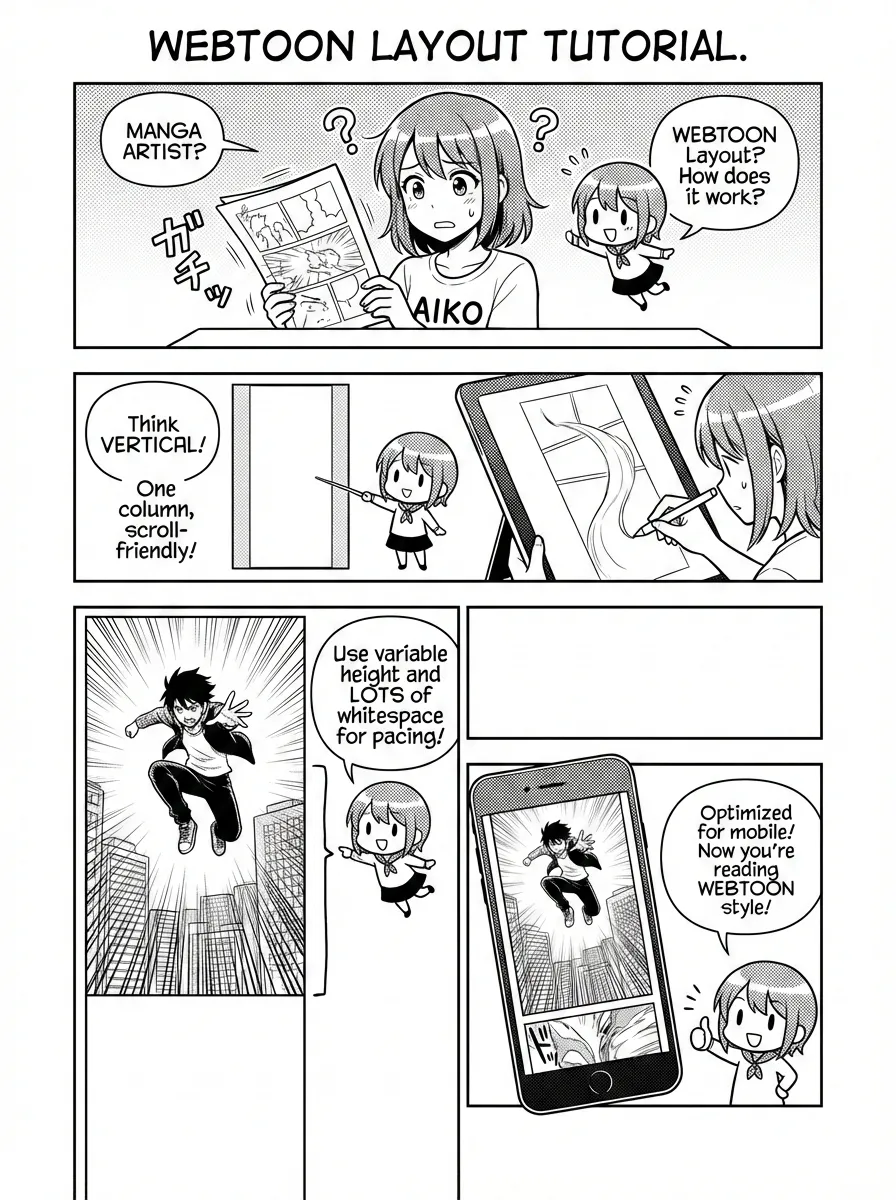
Webtoon layout: a vertical reading tutorial
A black-and-white tutorial demonstrates vertical reading, variable spacing and a phone-sized canvas. It is an author-published layout sample, not a comic generated on this site.
Licença
Original WebP bytes retained; immutable local filename.
MIT License

Copyright (c) 2026 Jim Liu

Permission is hereby granted, free of charge, to any person obtaining a copy
of this software and associated documentation files (the "Software"), to deal
in the Software without restriction, including without limitation the rights
to use, copy, modify, merge, publish, distribute, sublicense, and/or sell
copies of the Software, and to permit persons to whom the Software is
furnished to do so, subject to the following conditions:

The above copyright notice and this permission notice shall be included in all
copies or substantial portions of the Software.

THE SOFTWARE IS PROVIDED "AS IS", WITHOUT WARRANTY OF ANY KIND, EXPRESS OR
IMPLIED, INCLUDING BUT NOT LIMITED TO THE WARRANTIES OF MERCHANTABILITY,
FITNESS FOR A PARTICULAR PURPOSE AND NONINFRINGEMENT. IN NO EVENT SHALL THE
AUTHORS OR COPYRIGHT HOLDERS BE LIABLE FOR ANY CLAIM, DAMAGES OR OTHER
LIABILITY, WHETHER IN AN ACTION OF CONTRACT, TORT OR OTHERWISE, ARISING FROM,
OUT OF OR IN CONNECTION WITH THE SOFTWARE OR THE USE OR OTHER DEALINGS IN THE
SOFTWARE.
Como usar
- Copie o comando e verifique o pacote antes de instalar no seu ambiente de agente.
- Consulte no original as ferramentas, credenciais e ambientes necessários.
- Descreva os dados de entrada e a entrega esperada; confira a saída com as fontes.
npx skills add https://github.com/jimliu/baoyu-skills --skill baoyu-comicAntes de começar
- A instalação não inclui assinatura de modelo, franquia API ou acesso aos seus arquivos.
- Estrelas e instalações indicam atividade, não um teste independente de qualidade ou segurança.
Renderizado do repositório de origem, preservando títulos, exemplos, código, tabelas, links e imagens.
Knowledge Comic Creator
User Input Tools
When this skill prompts the user, follow this tool-selection rule (priority order):
- Prefer built-in user-input tools exposed by the current agent runtime — e.g.,
AskUserQuestion,request_user_input,clarify,ask_user, or any equivalent. - Fallback: if no such tool exists, emit a numbered plain-text message and ask the user to reply with the chosen number/answer for each question.
- Batching: if the tool supports multiple questions per call, combine all applicable questions into a single call; if only single-question, ask them one at a time in priority order.
Concrete AskUserQuestion references below are examples — substitute the local equivalent in other runtimes.
Image Generation Tools
Resolve the image backend in this order:
- User names a backend in the current message → use it.
- `preferred_image_backend` in
EXTEND.mdnames a backend available now → use it.askmeans ask every run. - Auto-select (preference
auto, unset, or the pinned backend is unavailable), first match wins:
- Codex `imagegen` skill is in your available skills → you are in Codex and MUST use it:
Skillwithskill: "imagegen", passing the prompt file's content plus output path and aspect ratio. It outranks non-native skills such asbaoyu-image-gen. - Codex via `codex exec` (`codex-imagegen`): no native
imagegen, but thecodexCLI is onPATHwith an activecodex login→baoyu-image-gen --provider codex-cli(preferred), or the bundled wrapper if baoyu-image-gen is unavailable. Load references/codex-imagegen.md only for this branch. - Cursor `GenerateImage` → use it (outranks non-native skills). It has no aspect-ratio parameter, so state the aspect ratio / dimensions in the
descriptionprompt; it saves to a tool-managed location, so copy the file to the expected output path (e.g.,outputs/.../NN-xxx.png). Reference images go inreference_image_paths. - Other runtime-native image tool (e.g., Hermes
image_generate) → use it the same way. - Exactly one non-native backend installed (e.g.,
baoyu-image-gen) → use it. - Several non-native backends → ask the user once, batched with other initial questions.
- None available → tell the user and ask how to proceed.
⛔ Raster only: never substitute SVG, HTML/CSS, canvas, or other code-based rendering for a raster image, even for diagram-like content. If no raster backend resolves, go to step 4.
⛔ No bitmap text patching: never use ImageMagick, Pillow, Canvas, SVG, HTML/CSS, OCR scripts, or any other overlay to cover, rewrite, erase, stroke, or replace dialogue, sound effects, panel labels, or any other text inside an already generated comic page. Regenerate from a corrected prompt, redraw the page with less or no on-image text, or ask the user which imperfect candidate to keep.
Prompt file (hard): before invoking any backend, write each image's full, final prompt to its own file under prompts/ (NN-{type}-[slug].md) and pass that file (or its content) to the backend. It is the reproducibility record and lets you switch backends without rewriting prompts.
Change the pinned backend via ## Changing Preferences below. Tool names above are examples; use the local equivalent in other runtimes.
Batch Generation Policy
After every prompt file for the current generation group is saved and verified, generate images in batches by default:
- Use the backend's native batch / multi-task interface if it exists. Each task keeps its own prompt file, output path, aspect ratio, session ID, and direct reference images.
- Else, if the runtime can issue parallel tool calls, dispatch up to
generation_batch_sizeimages at a time (default4). An explicit request in the current message (e.g.--batch-size 4, "并行4张一起生成") overrides EXTEND.md. - Else generate sequentially.
Rules:
- Honor dependencies: generate
characters/characters.pngbefore pages that use it as a reference. - Never start the first page batch until all selected page prompt files exist on disk.
- Retry failed items once without regenerating successful items.
- Do not use subagents merely to parallelize image rendering; use them only for separate prompt iteration or creative exploration.
Reference Images
User-supplied reference images guide art style, palette, scene composition, or subject. They are separate from the auto-generated character sheet (Step 7.1); both can coexist — user refs guide the look, the character sheet anchors recurring character identity.
Intake via --ref <files...> or file paths / pasted images in conversation:
- File path(s) → copy to
refs/NN-ref-{slug}.{ext}alongside the comic output - Pasted image with no path → ask for the path (per User Input Tools), or extract style traits verbally as a text fallback
- No reference → skip this section
Usage modes (per reference):
| Usage | Effect |
|---|---|
direct | Pass the file to the backend as a reference image on every page (or selected pages) |
style | Extract style traits (line treatment, texture, mood) and append to every page's prompt body |
palette | Extract hex colors and append to every page's prompt body |
Record in each page's prompt frontmatter when refs exist:
references:
  - ref_id: 01
    filename: 01-ref-scene.png
    usage: direct
At generation time:
- Verify each referenced file exists on disk
usage: directAND backend accepts multiple refs → pass both the character sheet (Step 7.2) and user refs via the backend's ref parameter; compress images first (Step 7.1) to avoid payload failures- Backend accepts only one ref → prefer the character sheet for pages with recurring characters; embed user-ref traits in the prompt body
style/palette→ embed extracted traits in every page's prompt text regardless of backend
Options
Visual Dimensions
| Option | Values | Description |
|---|---|---|
--art | ligne-claire (default), manga, realistic, ink-brush, chalk, minimalist | Art style / rendering technique |
--tone | neutral (default), warm, dramatic, romantic, energetic, vintage, action | Mood / atmosphere |
--layout | standard (default), cinematic, dense, splash, mixed, webtoon, four-panel | Panel arrangement |
--aspect | 3:4 (default, portrait), 4:3 (landscape), 16:9 (widescreen) | Page aspect ratio |
--lang | auto (default), zh, en, ja, etc. | Output language |
--ref <files...> | File paths | Reference images applied to every page for style / palette / scene guidance. See Reference Images above. |
--batch-size <n> | 1-8 | Temporary page generation batch size for this run. Default: generation_batch_size from EXTEND.md, otherwise 4. |
Partial Workflow Options
| Option | Description |
|---|---|
--storyboard-only | Generate storyboard only, skip prompts and images |
--prompts-only | Generate storyboard + prompts, skip images |
--images-only | Generate images from existing prompts directory |
--regenerate N | Regenerate specific page(s) only (e.g., 3 or 2,5,8) |
Details: references/partial-workflows.md
Art, Tone & Preset Catalogue
- Art styles (6):
ligne-claire,manga,realistic,ink-brush,chalk,minimalist→references/art-styles/<style>.md - Tones (7):
neutral,warm,dramatic,romantic,energetic,vintage,action→references/tones/<tone>.md - Layouts:
references/layouts/<layout>.md - Presets (5), with special rules beyond plain art+tone — load
references/presets/<preset>.mdwhen a preset is picked:
| Preset | Equivalent | Hook |
|---|---|---|
ohmsha | manga + neutral | Visual metaphors, no talking heads, gadget reveals |
wuxia | ink-brush + action | Qi effects, combat visuals, atmospheric |
shoujo | manga + romantic | Decorative elements, eye details, romantic beats |
concept-story | manga + warm | Visual symbol system, growth arc, dialogue+action balance |
four-panel | minimalist + neutral + four-panel layout | 起承转合 structure, B&W + spot color, stick-figure characters |
- Compatibility matrix and content-signal → preset table: references/auto-selection.md. Read it before recommending combinations in Step 2.
Script Directory
Scripts live in this skill's scripts/ subdirectory.
- Determine this SKILL.md file's directory path as
{baseDir}; script path ={baseDir}/scripts/<script-name>.ts. Replace all{baseDir}in this document with the actual path - Resolve
${BUN_X}runtime: ifbuninstalled →bun; ifnpxavailable →npx -y bun; else suggest installing bun
| Script | Purpose |
|---|---|
scripts/merge-to-pdf.ts | Merge comic pages into PDF |
File Structure
Output directory: comic/{topic-slug}/
- Slug: 2-4 words kebab-case from topic (e.g.,
alan-turing-bio) - Conflict: append timestamp (e.g.,
turing-story-20260118-143052)
Contents:
| File | Description | |
|---|---|---|
source-{slug}.{ext} | Source files | |
analysis.md | Content analysis | |
storyboard.md | Storyboard with panel breakdown | |
characters/characters.md | Character definitions | |
characters/characters.png | Character reference sheet | |
| `prompts/NN-{cover\ | page}-[slug].md` | Generation prompts |
| `NN-{cover\ | page}-[slug].png` | Generated images |
{topic-slug}.pdf | Final merged PDF |
Language Handling
Detection priority: --lang flag → EXTEND.md language → user's conversation language → source content language.
Use that language for ALL interactions: storyboard outlines and scene descriptions, image prompts, selection options and confirmations, progress updates, questions, errors, summaries. Technical terms remain in English.
Workflow
Full step-by-step details (analysis, confirmation questions, storyboard, review gates, prompts, regeneration variants): references/workflow.md.
Comic Progress:
- [ ] Step 1: Setup & Analyze
  - [ ] 1.1 Preferences (EXTEND.md) ⛔ BLOCKING
    - [ ] Found → load preferences → continue
    - [ ] Not found → run first-time setup → MUST complete before other steps
  - [ ] 1.2 Analyze, 1.3 Check existing
- [ ] Step 2: Confirmation - Style & options ⚠️ REQUIRED
- [ ] Step 3: Generate storyboard + characters
- [ ] Step 4: Review outline (conditional)
- [ ] Step 5: Generate prompts
- [ ] Step 6: Review prompts (conditional)
- [ ] Step 7: Generate images
  - [ ] 7.1 Generate character sheet (if needed) → characters/characters.png
  - [ ] 7.2 Generate pages (with --ref if character sheet exists)
- [ ] Step 8: Merge to PDF
- [ ] Step 9: Completion report- Step 2 confirmation is required — do not skip. Steps 4/6 run only if the user requested them in Step 2.
Step 7: Image Generation
Pick a backend once per session using ## Image Generation Tools. If the backend is a repo skill (e.g., baoyu-image-gen), read its SKILL.md and use its documented interface rather than its scripts. For codex-imagegen, see references/codex-imagegen.md (n=1 per call, so page batches dispatch one wrapper call per page).
7.1 Character sheet — generate (to characters/characters.png, aspect 4:3) when the comic is multi-page with recurring characters. Skip for simple presets (e.g., four-panel minimalist) or single-page comics. Compress to JPEG before using as --ref (sips -s format jpeg -s formatOptions 80 … on macOS, pngquant --quality=65-80 … elsewhere) to avoid payload failures. characters/characters.md must exist before invoking the backend.
7.2 Pages — each page's prompt MUST already be at prompts/NN-{cover|page}-[slug].md before invoking the backend. Strategy depends on the character sheet:
| Character sheet | Backend --ref | Strategy |
|---|---|---|
| Exists | Supported | Pass sheet as --ref on every page |
| Exists | Not supported | Prepend character descriptions to every prompt file |
| Skipped | — | All descriptions inline in prompt |
Build the page task list from saved prompt files and dispatch per ## Batch Generation Policy. --regenerate N and --images-only apply the same batching rules to the selected existing prompts.
Backup rule: existing prompts/…md and …png files → rename with -backup-YYYYMMDD-HHMMSS suffix before regenerating. Aspect ratio from storyboard (default 3:4; preset may override).
`--ref` failure recovery: compress sheet → retry → still fails → drop --ref and embed character descriptions in the prompt text.
EXTEND.md Paths ⛔ BLOCKING
If EXTEND.md is not found, first-time setup is blocking — complete it before any content analysis or style/tone questions.
| Priority | Path | Scope |
|---|---|---|
| 1 | .baoyu-skills/baoyu-comic/EXTEND.md | Project |
| 2 | $HOME/.baoyu-skills/baoyu-comic/EXTEND.md | User home |
| Result | Action |
|---|---|
| Found | Read, parse, display summary → continue |
| Not found | ⛔ Run first-time setup (references/config/first-time-setup.md) → save EXTEND.md → continue |
EXTEND.md supports: watermark, preferred art/tone/layout, custom style definitions, character presets, language preference, preferred image backend, generation batch size. Schema: references/config/preferences-schema.md.
Other References
analysis-framework.md (content analysis) · storyboard-template.md · character-template.md · ohmsha-guide.md · config/watermark-guide.md
Page Modification
| Action | Steps |
|---|---|
| Edit | Update prompt file FIRST → --regenerate N → Regenerate PDF |
| Add | Create prompt at position → Generate with character ref → Renumber subsequent (NN+1) → Update storyboard → Regenerate PDF |
| Delete | Remove files → Renumber subsequent (NN-1) → Update storyboard → Regenerate PDF |
Always update the prompt file (prompts/NN-{cover|page}-[slug].md) before regenerating, so changes stay documented and reproducible.
File naming: NN-{cover|page}-[slug].png (e.g., 03-page-enigma-machine.png); slugs are kebab-case, unique, derived from content. Renumbering updates the NN prefix only; slugs unchanged.
Text correction policy:
- If dialogue, sound effects, panel labels, or any other rendered text is misspelled, garbled, hard to read, or visually weak, do not patch the bitmap with code.
- For text-correction regenerations, write a new prompt file and a new output path so the flawed candidate is preserved for comparison.
- Post-processing is limited to crop, resize, compression, or format conversion that does not alter text or the main composition.
Notes
- Use stylized alternatives for sensitive public figures
- Maintain style consistency via session ID
- Watermark/language are configured once in EXTEND.md
Changing Preferences
EXTEND.md lives at .baoyu-skills/baoyu-comic/EXTEND.md (project) or ~/.baoyu-skills/baoyu-comic/EXTEND.md (user). To change it:
- Edit directly — full schema:
references/config/preferences-schema.md. - Reconfigure interactively — delete EXTEND.md (or ask "reconfigure baoyu-comic preferences" / "重新配置"); the next run re-triggers first-time setup.
- Common one-line edits:
preferred_image_backend: auto— default; runtime-native tool wins, falls back to the only installed backend, asks only if multiple non-native are present.preferred_image_backend: codex-imagegen— pin to Codex's built-in.preferred_image_backend: baoyu-image-gen— pin to the baoyu-image-gen skill.preferred_image_backend: ask— confirm backend every run.generation_batch_size: 4— default number of page images to render concurrently when the backend/runtime supports batch or parallel generation.watermark.enabled: true,preferred_art,preferred_tone,preferred_layout,language— shift the auto-selection defaults and cosmetic choices.
