原始文档
GPT Image 2 · en
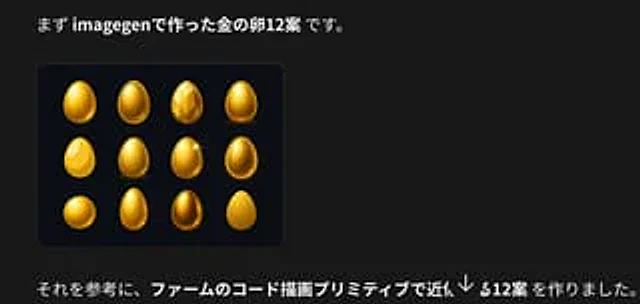
Create a dark presentation-style social media image in Japanese about golden egg design variations. Canvas: wide horizontal 16:9-ish crop, black/charcoal background (#181818), clean modern typography, generous negative space on the right. Top text: place a large Japanese sentence near the upper left reading 「まず imagegenで作った金の卵12案 です。」 with “imagegen” and “金の卵12案” in bold white, the rest in regular white. Main visual: below the headline on the left, draw a rounded rectangular dark navy-black card with a subtle border and soft shadow. Inside the card show exactly 12 golden egg concept designs arranged in a 4-column by 3-row grid. The 12 eggs are: 1) glossy smooth upright gold egg with bright highlight, 2) oval egg with raised rim/outline like an icon, 3) faceted low-poly gemstone egg, 4) smooth metallic gold egg standing on a small shadow, 5) flat bright yellow egg with large white highlight, 6) textured/brushed gold egg, 7) glossy gold egg with a star sparkle on the upper right, 8) dark glowing gold egg with bright rim light, 9) squat round golden egg, 10) tall narrow smooth gold egg, 11) darker bronze-gold reflective egg, 12) simple matte yellow-gold egg silhouette. Bottom text: place a long Japanese sentence across the lower left reading 「それを参考に、ファームのコード描画プリミティブで近似する12案 を作りました。」 with the central phrase 「ファームのコード描画プリミティブで近似する12案」 in bold white and the rest in regular white. Add a semi-transparent circular down-arrow overlay near the bottom center-right, like a social media viewer control. Visual style: clean screenshot-like composition, high contrast, realistic glossy gold rendering for the eggs, subtle card border, no extra logos or watermarks. Customizable text slots: top sentence may use {argument name="top Japanese text" default="まず imagegenで作った金の卵12案 です。"}; bottom sentence may use {argument name="bottom Japanese text" default="それを参考に、ファームのコード描画プリミティブで近似する12案 を作りました。"}; main object may use {argument name="object theme" default="golden egg"}.使用方法
- 复制完整原始提示词,并保留其中的参数。
- 按需求替换主体、文字和构图要求。
- 在兼容的外部工具中使用,核对当前使用条件并检查结果。
开始前需了解
- 先确认是否需要参考图。标注兼容模型,不代表该示例由这个模型生成。
- 核对名称、数字与画面文字;不同模型版本的结果可能不同。