
原始文档
GPT Image 2 · zh
{
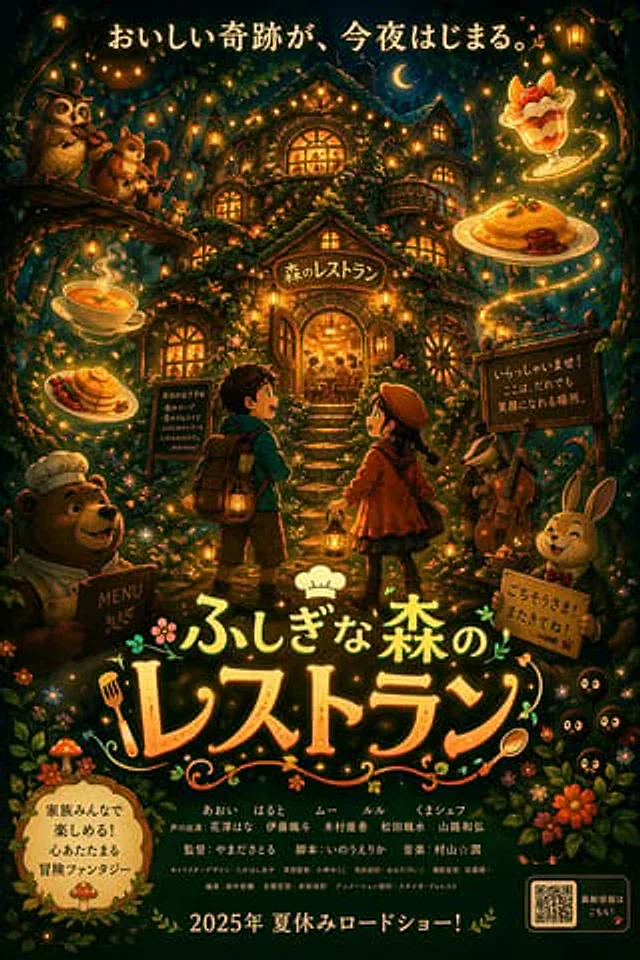
  "type": "anime-style animated movie poster",
  "scene": "Magical glowing multi-story treehouse restaurant in a dark enchanted forest at night, illuminated by string lights and warm window glow.",
  "subjects": {
    "children": "2 children in center foreground facing the restaurant: a boy with a backpack and lantern, and a girl in a red coat and beret with a lantern.",
    "animals": "4 anthropomorphic animals: a bear chef holding a MENU book (bottom left), an owl playing violin and a squirrel playing flute on a branch (top left), a badger playing cello (mid right), and a rabbit in a suit holding a sign (bottom right).",
    "creatures": "3 small black soot-sprite-like creatures with glowing eyes (bottom right).",
    "floating_food": "4 glowing food items floating in the air: soup, pancakes, omurice, and a fruit parfait."
  },
  "layout": {
    "top_text": "{argument name=\"top catchphrase\" default=\"おいしい奇跡が、今夜はじまる。\"}",
    "building_sign": "{argument name=\"restaurant name\" default=\"森のレストラン\"}",
    "left_board": "本日のおすすめ\n・森のスープ\n・星のオムライス\n・ふわふわパンケーキ\n・しあわせのパフェ\n...and more!",
    "right_board": "いらっしゃいませ!\nここは、だれでも\n笑顔になれる場所。",
    "main_title": {
      "text": "{argument name=\"movie title\" default=\"ふしぎな森のレストラン\"}",
      "styling": "Large stylized typography with a chef hat, fork, and spoon motifs."
    },
    "rabbit_sign": "ごちそうさま!またきてね!",
    "bottom_left_badge": "{argument name=\"genre badge\" default=\"家族みんなで楽しめる!心あたたまる冒険ファンタジー\"}",
    "bottom_center_credits": "Fictional cast and staff names in Japanese.",
    "bottom_release_date": "{argument name=\"release date\" default=\"2025年 夏休みロードショー!\"}",
    "bottom_right": "QR code with text '最新情報はこちら!'"
  }
}
使用方法
- 复制完整原始提示词,并保留其中的参数。
- 按需求替换主体、文字和构图要求。
- 在兼容的外部工具中使用,核对当前使用条件并检查结果。
开始前需了解
- 先确认是否需要参考图。标注兼容模型,不代表该示例由这个模型生成。
- 核对名称、数字与画面文字;不同模型版本的结果可能不同。