原始文档
GPT Image 2 · en
{
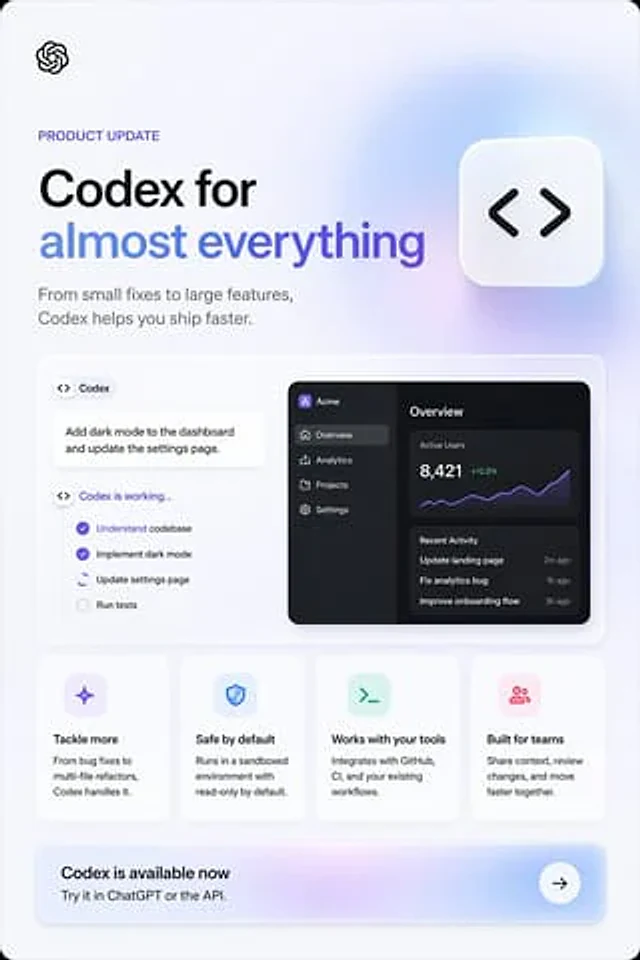
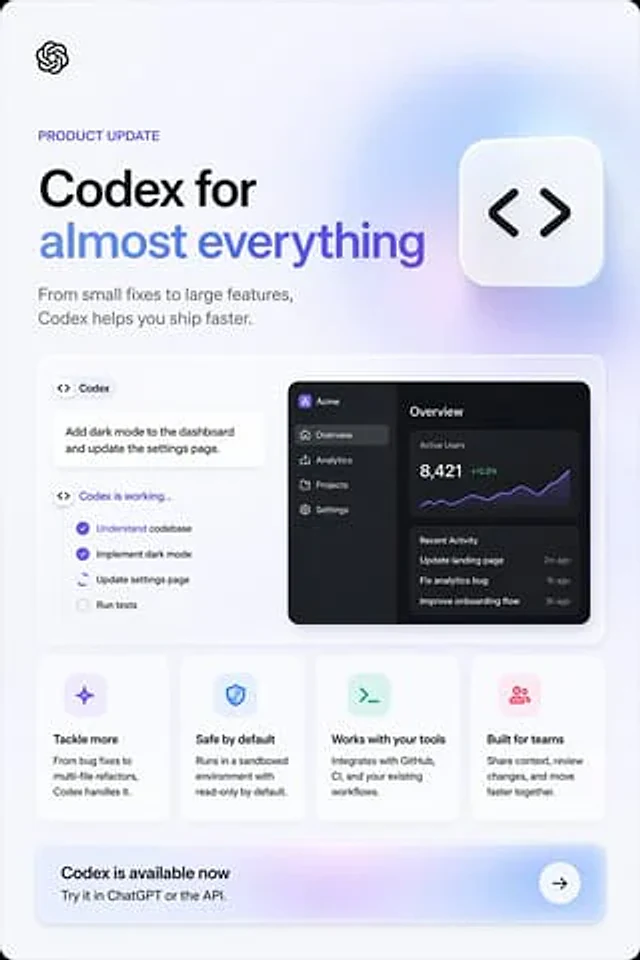
  "type": "Product Update Marketing Poster",
  "style": "The SaaS landing page features clean, modern graphics, Apple-style minimalism, soft ambient gradients, subtle shadows, rounded cards, a crisp vector UI, and high-end promotional design.",
  "brand": "OpenAI",
  "canvas": {
    "aspect_ratio": "2:3 Vertical Version",
    "background": "Very light cool gray with a subtle lavender blue gradient, rounded corners on the outer frame."
  },
  "layout": {
    "sections": [
      {
        "title": "Top of screen",
        "position": "top",
        "count": 4,
        "labels": [
          "OpenAI logo",
          "Product Update",
          "Main title",
          "Subtitle"
        ]
      },
      {
        "title": "Main display panel",
        "position": "Central",
        "count": 3,
        "labels": [
          "Codex Task Cards",
          "Work list cards",
          "Dark Analysis Dashboard Preview"
        ]
      },
      {
        "title": "Function cards",
        "position": "Mid-lower part",
        "count": 4,
        "labels": [
          "Facing more challenges",
          "Default security",
          "Compatible with existing tools",
          "Building for the team"
        ]
      },
      {
        "title": "Action call banner",
        "position": "bottom",
        "count": 3,
        "labels": [
          "Codex is now available.",
          "Try it in ChatGPT or the API.",
          "Arrow button"
        ]
      }
    ],
    "centerpiece": "There is a large floating rounded square icon near the top right corner, with black code bracket symbols."
  },
  "content_blocks": {
    "eyebrow": "{argument name=\"eyebrow text\" default=\"Product Update\"}",
    "headline_line_1": "{argument name=\"headline line 1\" default=\"Codex, empowering\"}",
    "headline_line_2": "{argument name=\"headline line 2\" default=\"Everything is possible\"}",
    "subheadline": "{argument name=\"subheadline\" default=\"From small fixes to large feature development, Codex helps you deliver faster.\"}",
    "cta_title": "{argument name=\"call to action title\" default=\"Codex is now available.\"}"
  },
  "visual_details": {
    "logo": "Small black OpenAI knot logo in the top left corner",
    "headline": "The left side features a large, bold, sans-serif title; the first line is black, and the second line is blue-purple gradient text.",
    "subheadline_style": "Medium gray sans-serif font, two lines below the title",
    "floating_icon": "A white, rounded square tile with a soft shadow, containing black <> code symbols, placed in the upper right corner.",
    "showcase_panel": "Large white rounded rectangle with thin border and soft shadow.",
    "left_task_area": {
      "count": 3,
      "items": [
        "Small capsule labels with code icons and the text \"Codex\"",
        "A white notification card reads: Add dark mode to the dashboard and update the settings page.",
        "Status listing titled \"Codex is running...\""
      ]
    },
    "checklist": {
      "count": 4,
      "items": [
        "Understand the codebase (check the purple box)",
        "Enable dark mode (check the purple box).",
        "Update settings page (Activation/In Progress, with partial circular indicators)",
        "Run test (not checked, grayed out)"
      ]
    },
    "right_dashboard": {
      "theme": "Dark Mode UI Preview",
      "app_name": "Acme",
      "sidebar": {
        "count": 4,
        "items": [
          "Overview (selected)",
          "analyze",
          "project",
          "set up"
        ]
      },
      "main_panels": {
        "count": 3,
        "items": [
          "Overview Title",
          "Active users metric: 8,421, shown in green (+12.5%) and purple line chart.",
          "A list of recent activities containing 3 records."
        ]
      },
      "recent_activity": {
        "count": 3,
        "items": [
          "Updated landing page — 2 minutes ago",
          "Fixed analysis bugs — 1 hour ago",
          "Optimize the onboarding process — 3 hours ago"
        ]
      }
    },
    "feature_cards": {
      "count": 4,
      "cards": [
        {
          "title": "Facing more challenges",
          "icon": "Purple glitter/star icon in a light lavender rounded square",
          "body": "From bug fixing to multi-file refactoring, Codex can handle it all."
        },
        {
          "title": "Default security",
          "icon": "Blue shield icon in light blue rounded square",
          "body": "When running in a sandbox environment, it is read-only by default."
        },
        {
          "title": "Compatible with existing tools",
          "icon": "Green terminal icon in a light mint-colored rounded square",
          "body": "Integrate with GitHub, CI, and your existing workflows."
        },
        {
          "title": "Building for the team",
          "icon": "Pink group/user icon in light pink rounded square",
          "body": "Share the context, review changes, and accelerate progress together."
        }
      ]
    },
    "cta_banner": {
      "style": "A wide, rounded rectangle with a soft purple-blue gradient background, and a white circular arrow button on the right.",
      "subtitle": "Try it in ChatGPT or the API."
    }
  },
  "composition": "The balanced left-aligned layout, the modular card grid at the bottom, the ample white space, and the high-end, tech-advertising feel all contribute to a sophisticated and high-tech advertising aesthetic.",
  "rendering": "Sharp typography, subtle sense of depth, soft glass-like lighting effects, no photographic elements."
}
使用方法
- 复制完整原始提示词,并保留其中的参数。
- 按需求替换主体、文字和构图要求。
- 在兼容的外部工具中使用,核对当前使用条件并检查结果。
开始前需了解
- 先确认是否需要参考图。标注兼容模型,不代表该示例由这个模型生成。
- 核对名称、数字与画面文字;不同模型版本的结果可能不同。