Originaldokument
GPT Image 2 · en
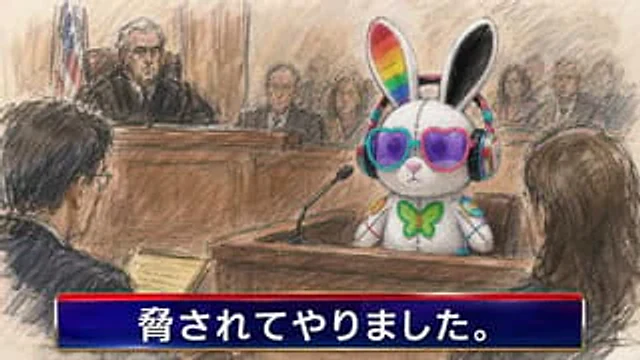
Create a satirical courtroom news sketch in the style of a hand-drawn pastel and charcoal courtroom artist illustration. The scene shows a wooden courtroom with a judge on the raised bench at the back left, a U.S. flag behind the judge, warm beige walls, rough pencil shading, and a documentary news feel. In the witness stand at center-right sits {argument name="witness character" default="a cute white plush rabbit mascot"}: it has tall rabbit ears with one inner ear rainbow-striped and the other black, large round purple lenses in mismatched turquoise and pink frames, colorful over-ear headphones, stitched seams down the face and body, a green butterfly bow tie, and small bright decorative patches on its arms. A black gooseneck microphone points toward the witness from the wooden stand. In the foreground, show two dark, sketchy human figures from behind: one lawyer on the left holding a yellow legal pad, and one person with long brown hair on the right facing the witness. Include exactly 10 anonymized human face blocks in the courtroom: 1 blurred rectangular face on the judge, 1 large blurred rectangle on the left foreground lawyer, 4 small blurred faces among the central background spectators, and 4 small blurred faces among the right-side background spectators. Keep the human faces featureless, covered by soft brown-gray rectangular blur blocks. Add a glossy TV-news lower-third banner across the entire bottom: a deep navy blue gradient rectangle with a bright red top strip, thin metallic gold edges, and large bold white Japanese text reading {argument name="lower third text" default="脅されてやりました。"}. Use a 16:9 horizontal composition, slightly chaotic courtroom sketch lines, muted browns and grays contrasted with the vivid colorful rabbit accessories, no photorealism, no watermark, no extra captions.Verwendung
- Den vollständigen Original-Prompt einschließlich Parametern kopieren.
- Motiv, Text und Komposition an die eigenen Anforderungen anpassen.
- Ein kompatibles externes Werkzeug nutzen; Zugangsbedingungen und Ergebnis prüfen.
Vor dem Start
- Prüfen, ob ein Referenzbild nötig ist. Kompatibilität belegt nicht das tatsächlich verwendete Modell.
- Namen, Zahlen und Bildtexte prüfen; Modellversionen können andere Ergebnisse liefern.