Originaldokument
GPT Image 2 · en
{
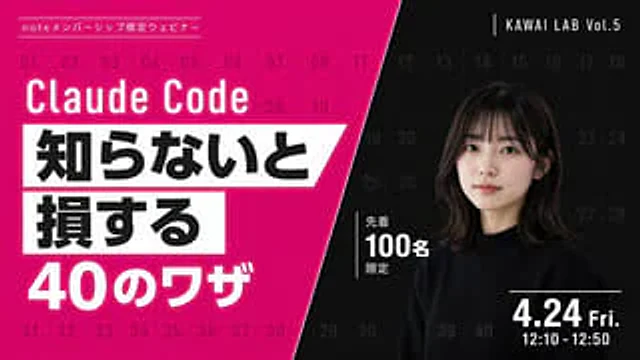
  "type": "Webinar promotional banner",
  "style": "Modern style, eye-catching layout, high contrast, diagonal division layout",
  "background": {
    "pattern": "A light grid consisting of 40 sequential numbers from 01 to 40 covering the entire canvas.",
    "left_color": "Bright magenta",
    "right_color": "black",
    "split_style": "A sharp diagonal line from the top center to the bottom left corner"
  },
  "left_section": {
    "top_label": "{argument name=\"top label\" default=\"Note: Member-only webinars\"}",
    "title": "{argument name=\"main title\" default=\"Claude Code\"}",
    "highlight_box_1": {
      "text": "{argument name=\"highlight text 1\" default=\"If you don't know, you will\"}",
      "style": "Black text on a white slanted rectangular background"
    },
    "highlight_box_2": {
      "text": "{argument name=\"highlight text 2\" default=\"suffer a loss\"}",
      "style": "Black text on a white slanted rectangular background"
    },
    "bottom_text": "40 Tips"
  },
  "right_section": {
    "top_right_label": "KAWAI LAB Vol.5",
    "subject": "A portrait of a young Japanese woman with shoulder-length dark hair and bangs, wearing a black crew-neck sweater, looking naturally at the camera.",
    "middle_badge": {
      "text": "Limited to the first 100 people",
      "style": "White text with vertical lines"
    },
    "bottom_right_date": "{argument name=\"date and time\" default=\"Friday, April 24th, 12:10 - 12:50\"}"
  }
}
Verwendung
- Den vollständigen Original-Prompt einschließlich Parametern kopieren.
- Motiv, Text und Komposition an die eigenen Anforderungen anpassen.
- Ein kompatibles externes Werkzeug nutzen; Zugangsbedingungen und Ergebnis prüfen.
Vor dem Start
- Prüfen, ob ein Referenzbild nötig ist. Kompatibilität belegt nicht das tatsächlich verwendete Modell.
- Namen, Zahlen und Bildtexte prüfen; Modellversionen können andere Ergebnisse liefern.