Originaldokument
GPT Image 2 · en
{
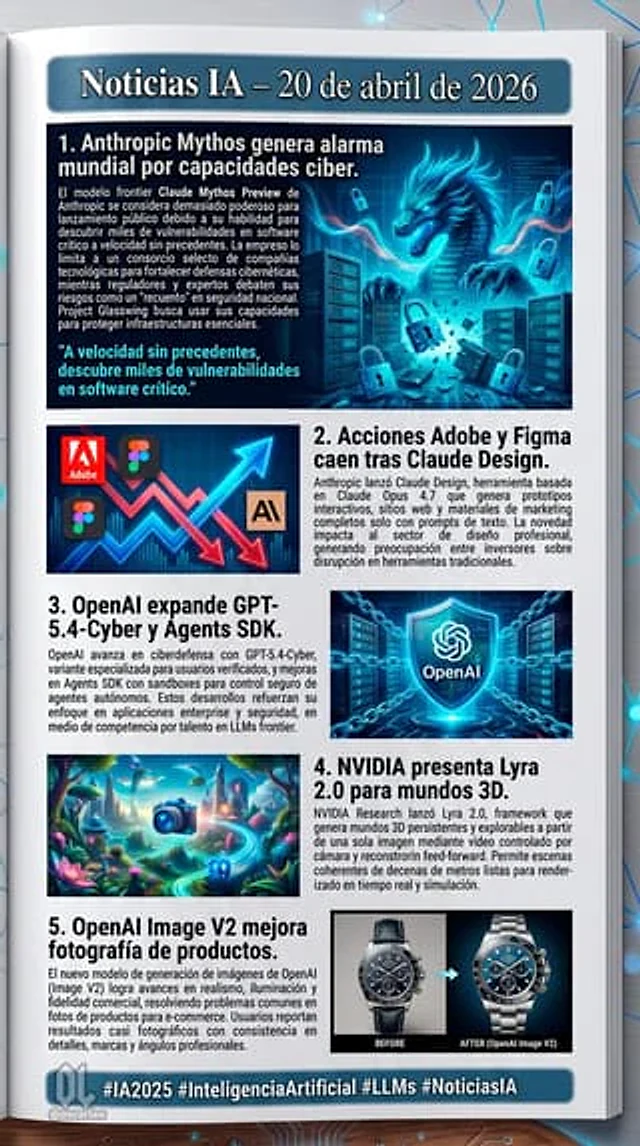
"type": "Digital Communication Page Layout",
"background": "White pages placed on a dark surface, featuring glowing blue digital nodes and connecting lines.",
"header": {
"text": "{argument name=\"main headline\" default=\"AI News – April 20, 2026\"}",
"style": "White text on a dark blue banner with a light blue border"
},
"layout": {
"sections": [
{
"id": 1,
"title": "{argument name=\"news item 1 title\" default=\"1. Anthropic Mythos raises global alarm over its cyber capabilities.\"}",
"image_description": "A glowing blue cyber dragon emerged from the server, surrounded by floating digital padlocks.",
"layout_style": "The image is on the right, the title and text are on the left, and there is a cyan quote in the lower left corner."
},
{
"id": 2,
"title": "{argument name=\"news item 2 title\" default=\"2. Following the release of Claude Design, the stock prices of Adobe and Figma fell.\"}",
"image_description": "A stylized stock chart showing jagged red downward arrows and glowing blue upward arrows, featuring the logos of Adobe and Figma, as well as an 'AI' icon.",
"layout_style": "The image is on the left, and the title and text are on the right."
},
{
"id": 3,
"title": "{argument name=\"news item 3 title\" default=\"3. OpenAI extends GPT-5.4-Cyber and Agents SDK.\"}",
"image_description": "A glowing blue holographic shield with the OpenAI logo at its center, surrounded by digital chains and server backgrounds.",
"layout_style": "The title and text are on the left, and the image is on the right."
},
{
"id": 4,
"title": "4. NVIDIA releases Lyra 2.0 for the 3D world.",
"image_description": "A vibrant, surreal 3D fantasy landscape featuring glowing plants, floating islands, and a glowing blue camera icon in the foreground.",
"layout_style": "The image is on the left, and the title and text are on the right."
},
{
"id": 5,
"title": "5. OpenAI Image V2 enhances product photography.",
"image_description": "A comparison image of a luxury chronograph. The left side is marked 'BEFORE' (darker, less detail), while the right side is marked 'AFTER (OpenAI Image V2)' (bright, rich in detail, professional lighting).",
"layout_style": "The title and text are on the left, and the image is on the right."
}
],
"count": 5
},
"footer": {
"text": "{argument name=\"footer hashtags\" default=\"#AI2025 #ArtificialIntelligence #LLMs #AINews\"}",
"logo": "Office lady logo with ' @oscarlau '",
"style": "White text on the dark blue banner at the bottom"
}
}Verwendung
- Den vollständigen Original-Prompt einschließlich Parametern kopieren.
- Motiv, Text und Komposition an die eigenen Anforderungen anpassen.
- Ein kompatibles externes Werkzeug nutzen; Zugangsbedingungen und Ergebnis prüfen.
Vor dem Start
- Prüfen, ob ein Referenzbild nötig ist. Kompatibilität belegt nicht das tatsächlich verwendete Modell.
- Namen, Zahlen und Bildtexte prüfen; Modellversionen können andere Ergebnisse liefern.