원본 문서
GPT Image 2 · en
{
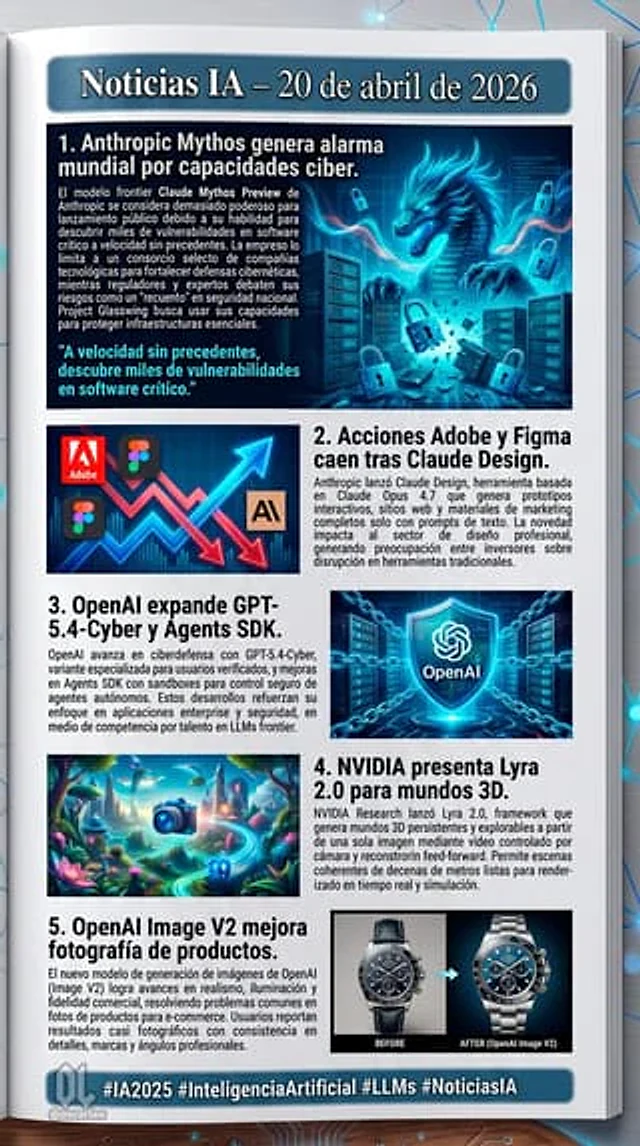
"type": "Digital Communication Page Layout",
"background": "White pages placed on a dark surface, featuring glowing blue digital nodes and connecting lines.",
"header": {
"text": "{argument name=\"main headline\" default=\"AI News – April 20, 2026\"}",
"style": "White text on a dark blue banner with a light blue border"
},
"layout": {
"sections": [
{
"id": 1,
"title": "{argument name=\"news item 1 title\" default=\"1. Anthropic Mythos raises global alarm over its cyber capabilities.\"}",
"image_description": "A glowing blue cyber dragon emerged from the server, surrounded by floating digital padlocks.",
"layout_style": "The image is on the right, the title and text are on the left, and there is a cyan quote in the lower left corner."
},
{
"id": 2,
"title": "{argument name=\"news item 2 title\" default=\"2. Following the release of Claude Design, the stock prices of Adobe and Figma fell.\"}",
"image_description": "A stylized stock chart showing jagged red downward arrows and glowing blue upward arrows, featuring the logos of Adobe and Figma, as well as an 'AI' icon.",
"layout_style": "The image is on the left, and the title and text are on the right."
},
{
"id": 3,
"title": "{argument name=\"news item 3 title\" default=\"3. OpenAI extends GPT-5.4-Cyber and Agents SDK.\"}",
"image_description": "A glowing blue holographic shield with the OpenAI logo at its center, surrounded by digital chains and server backgrounds.",
"layout_style": "The title and text are on the left, and the image is on the right."
},
{
"id": 4,
"title": "4. NVIDIA releases Lyra 2.0 for the 3D world.",
"image_description": "A vibrant, surreal 3D fantasy landscape featuring glowing plants, floating islands, and a glowing blue camera icon in the foreground.",
"layout_style": "The image is on the left, and the title and text are on the right."
},
{
"id": 5,
"title": "5. OpenAI Image V2 enhances product photography.",
"image_description": "A comparison image of a luxury chronograph. The left side is marked 'BEFORE' (darker, less detail), while the right side is marked 'AFTER (OpenAI Image V2)' (bright, rich in detail, professional lighting).",
"layout_style": "The title and text are on the left, and the image is on the right."
}
],
"count": 5
},
"footer": {
"text": "{argument name=\"footer hashtags\" default=\"#AI2025 #ArtificialIntelligence #LLMs #AINews\"}",
"logo": "Office lady logo with ' @oscarlau '",
"style": "White text on the dark blue banner at the bottom"
}
}사용 방법
- 매개변수를 포함한 전체 원본 프롬프트를 복사하세요.
- 주제, 문구, 구도를 자신의 요구에 맞게 바꾸세요.
- 호환되는 외부 도구에서 사용하고 이용 조건과 결과를 확인하세요.
시작 전 확인
- 참조 이미지가 필요한지 확인하세요. 호환 표시는 해당 모델로 이 예시를 생성했다는 뜻이 아닙니다.
- 이름, 수치, 이미지 속 문구를 확인하세요. 모델 버전에 따라 결과가 다를 수 있습니다.