Documento original
GPT Image 2 · en
{
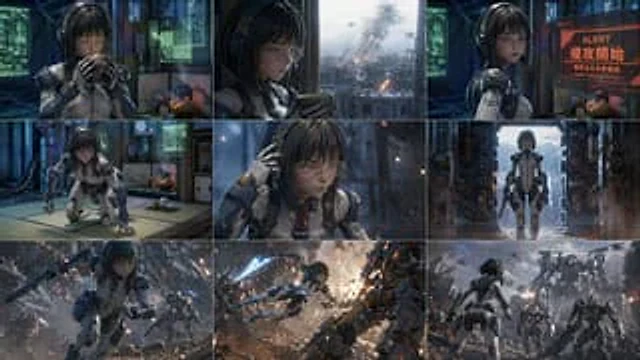
  "type": "3x3 grid storyboard",
  "character": "{argument name=\"character description\" default=\"A young woman with short black hair, wearing glasses, and dressed in a blue and white futuristic mecha suit.\"}",
  "layout": {
    "grid": "3x3",
    "total_panels": 9,
    "panels": [
      {
        "position": "top-left",
        "scene": "Enjoying tea in a high-tech tatami room"
      },
      {
        "position": "top-center",
        "scene": "Looking out the window at the city explosion"
      },
      {
        "position": "top-right",
        "scene": "Looking at the red hologram: 'ALERT',{argument name=\"alert main text\" default=\"Invasion begins\"} ','{argument name=\"alert sub text\" default=\"Numerous hostile responses confirmed.\"} '"
      },
      {
        "position": "mid-left",
        "scene": "Kneeling on the tatami"
      },
      {
        "position": "mid-center",
        "scene": "Close-up of touching the headphones"
      },
      {
        "position": "mid-right",
        "scene": "Standing in the dimly lit hangar"
      },
      {
        "position": "bottom-left",
        "scene": "Running through the ruined battlefield"
      },
      {
        "position": "bottom-center",
        "scene": "Leaping to attack the mech with an energy blade in hand"
      },
      {
        "position": "bottom-right",
        "scene": "Facing a massive enemy mech army"
      }
    ]
  }
}
Cómo usar
- Copia el prompt original completo, incluidos los parámetros.
- Adapta el tema, el texto y la composición a tus necesidades.
- Usa una herramienta externa compatible; comprueba el acceso y el resultado.
Antes de empezar
- Comprueba si necesita una imagen de referencia. La compatibilidad no demuestra qué modelo generó el ejemplo.
- Revisa nombres, cifras y textos; el resultado puede variar entre versiones del modelo.