Documento original
GPT Image 2 · en
{
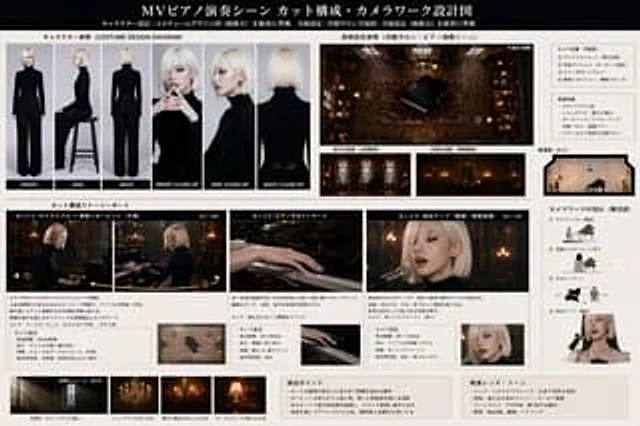
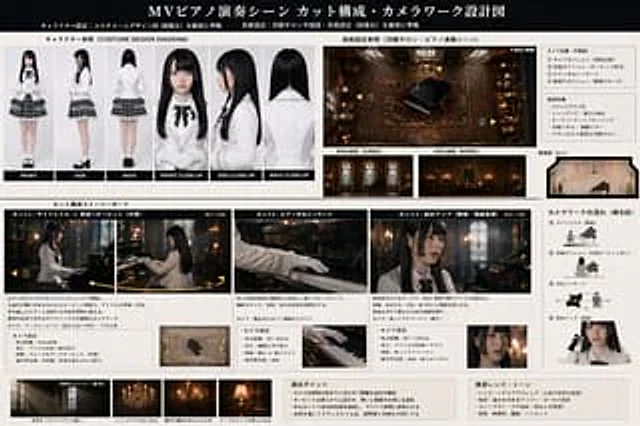
  "type": "Production design and storyboard blueprints",
  "header": {
    "title": "{argument name=\"project title\" default=\"MV Piano Performance Scene Shot Composition and Camera Movement Design\"}",
    "subtitles": [
      "Character settings",
      "Art Design"
    ]
  },
  "character_reference": {
    "title": "Character reference (COSTUME DESIGN DIAGRAM)",
    "description": "{argument name=\"character description\" default=\"A young woman with long, black hair, wearing a white shirt, a black ribbon, and a plaid skirt.\"}",
    "views_count": 6,
    "labels": [
      "front",
      "side",
      "back",
      "Front close-up",
      "Side close-up",
      "Back view"
    ]
  },
  "art_setting": {
    "title": "Art design reference",
    "setting": "{argument name=\"scene setting\" default=\"A classic Western-style salon with stained glass and chandeliers\"}",
    "diagrams_count": 4,
    "diagram_types": [
      "Top view with camera nodes",
      "North Elevation",
      "East Elevation",
      "Cross-sectional view"
    ],
    "text_boxes": [
      "Camera position",
      "Environmental characteristics"
    ]
  },
  "storyboard": {
    "title": "Shot composition storyboard",
    "action": "{argument name=\"action\" default=\"Playing grand piano\"}",
    "panels_count": 3,
    "panels": [
      {
        "cut": "Shot 1",
        "description": "Side view, mid-range, and back view.",
        "elements": [
          "Main image",
          "Description text",
          "Camera settings box",
          "small icon"
        ]
      },
      {
        "cut": "Shot 2",
        "description": "Close-up of pianist's hands",
        "elements": [
          "Main image",
          "Description text",
          "Camera settings box",
          "small icon"
        ]
      },
      {
        "cut": "Shot 3",
        "description": "Diagonal close-up",
        "elements": [
          "Main image",
          "Description text",
          "Camera settings box",
          "small icon"
        ]
      }
    ]
  },
  "camera_workflow": {
    "title": "Camera movement process (concept diagram)",
    "steps_count": 4,
    "descriptions": [
      "Side view medium shot",
      "Rear camera position",
      "Hand close-up",
      "Diagonal close-up"
    ]
  },
  "lighting_reference": {
    "title": "Lighting Impressions (Reference)",
    "images_count": 4,
    "labels": [
      "Natural light",
      "chandelier",
      "wall lamp",
      "desk lamp"
    ]
  },
  "notes": {
    "boxes_count": 2,
    "labels": [
      "Director's Guide",
      "Recommended lenses and color tones"
    ]
  }
}
Cómo usar
- Copia el prompt original completo, incluidos los parámetros.
- Adapta el tema, el texto y la composición a tus necesidades.
- Usa una herramienta externa compatible; comprueba el acceso y el resultado.
Antes de empezar
- Comprueba si necesita una imagen de referencia. La compatibilidad no demuestra qué modelo generó el ejemplo.
- Revisa nombres, cifras y textos; el resultado puede variar entre versiones del modelo.