Documento original
GPT Image 2 · en
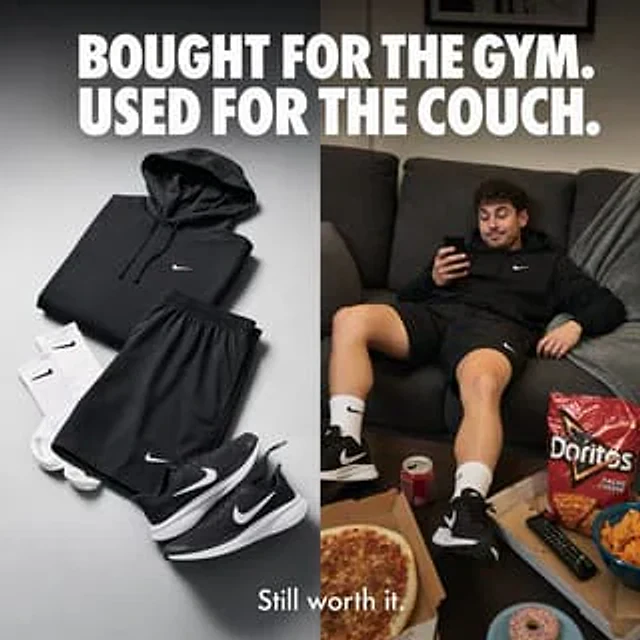
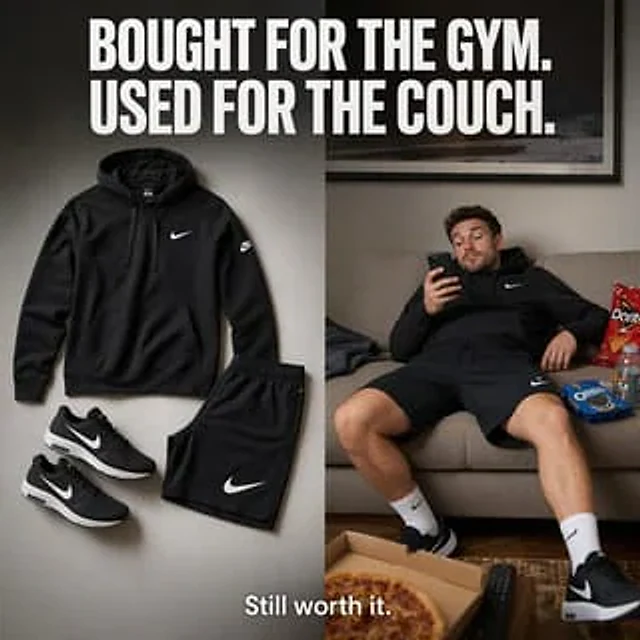
Create a square, split-screen e-commerce social ad that presents a clean, high-end sportswear brand aesthetic. At the top, use a huge, bold, compressed white all-caps sans-serif font spanning the entire width to place the headline:{argument name="headline text" default="I buy it to work out. I wear it so I can relax."} The image is vertically divided into two equal panels. The left panel displays a neatly laid-out image of four black sportswear items against a soft, light gray studio background with subtle shadows: a black hoodie with a small white swoosh logo on the chest, black athletic shorts with a large white swoosh logo on the calf, and two black running shoes (arranged as a pair) with white swoosh logos and white midsoles. The layout should have a catalog-like cleanliness, minimalism, balance, and sophistication, with realistic fabric textures and clear product photography lighting. The right panel presents a relaxed living room scene in neutral tones: a man wearing the same black hoodie, black shorts, white mid-calf socks, and black running shoes is casually slumped on a beige sofa, leaning back lazily and looking at his smartphone with one hand. His face is softly obscured or blurred and is not the focus. There are four visible snack/living room items around him: a bag of red chips on the sofa, a bag of blue sandwich cookies on the sofa, a sports drink next to the snacks, an open pizza box containing pizza on the foreground coffee table, and a TV remote next to it. Add a framed wall art piece above the sofa and use warm ambient lighting to create a truly homey atmosphere. At the bottom center, overlay smaller white sans-serif text:{argument name="tagline text" default="It's still great value for money."} The overall atmosphere should be humorous, relatable, sophisticated, and highly communicative, like a high-end sportswear advertisement that contrasts the initial motivation for fitness with a relaxed and comfortable feel.Cómo usar
- Copia el prompt original completo, incluidos los parámetros.
- Adapta el tema, el texto y la composición a tus necesidades.
- Usa una herramienta externa compatible; comprueba el acceso y el resultado.
Antes de empezar
- Comprueba si necesita una imagen de referencia. La compatibilidad no demuestra qué modelo generó el ejemplo.
- Revisa nombres, cifras y textos; el resultado puede variar entre versiones del modelo.