원본 문서
GPT Image 2 · en
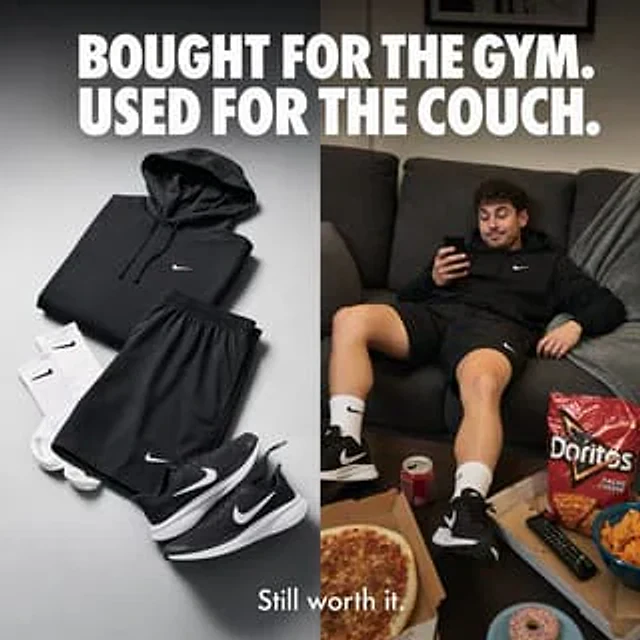
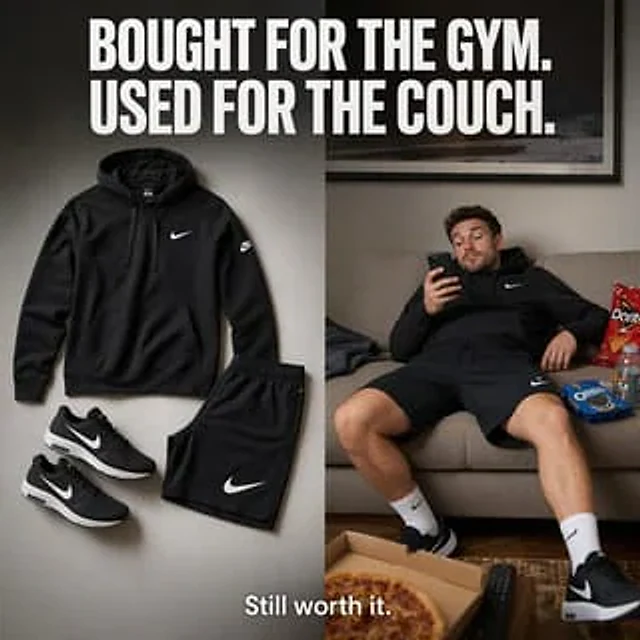
Create a square, split-screen e-commerce social ad that presents a clean, high-end sportswear brand aesthetic. At the top, use a huge, bold, compressed white all-caps sans-serif font spanning the entire width to place the headline:{argument name="headline text" default="I buy it to work out. I wear it so I can relax."} The image is vertically divided into two equal panels. The left panel displays a neatly laid-out image of four black sportswear items against a soft, light gray studio background with subtle shadows: a black hoodie with a small white swoosh logo on the chest, black athletic shorts with a large white swoosh logo on the calf, and two black running shoes (arranged as a pair) with white swoosh logos and white midsoles. The layout should have a catalog-like cleanliness, minimalism, balance, and sophistication, with realistic fabric textures and clear product photography lighting. The right panel presents a relaxed living room scene in neutral tones: a man wearing the same black hoodie, black shorts, white mid-calf socks, and black running shoes is casually slumped on a beige sofa, leaning back lazily and looking at his smartphone with one hand. His face is softly obscured or blurred and is not the focus. There are four visible snack/living room items around him: a bag of red chips on the sofa, a bag of blue sandwich cookies on the sofa, a sports drink next to the snacks, an open pizza box containing pizza on the foreground coffee table, and a TV remote next to it. Add a framed wall art piece above the sofa and use warm ambient lighting to create a truly homey atmosphere. At the bottom center, overlay smaller white sans-serif text:{argument name="tagline text" default="It's still great value for money."} The overall atmosphere should be humorous, relatable, sophisticated, and highly communicative, like a high-end sportswear advertisement that contrasts the initial motivation for fitness with a relaxed and comfortable feel.사용 방법
- 매개변수를 포함한 전체 원본 프롬프트를 복사하세요.
- 주제, 문구, 구도를 자신의 요구에 맞게 바꾸세요.
- 호환되는 외부 도구에서 사용하고 이용 조건과 결과를 확인하세요.
시작 전 확인
- 참조 이미지가 필요한지 확인하세요. 호환 표시는 해당 모델로 이 예시를 생성했다는 뜻이 아닙니다.
- 이름, 수치, 이미지 속 문구를 확인하세요. 모델 버전에 따라 결과가 다를 수 있습니다.