Documento original
GPT Image 2 · en
{
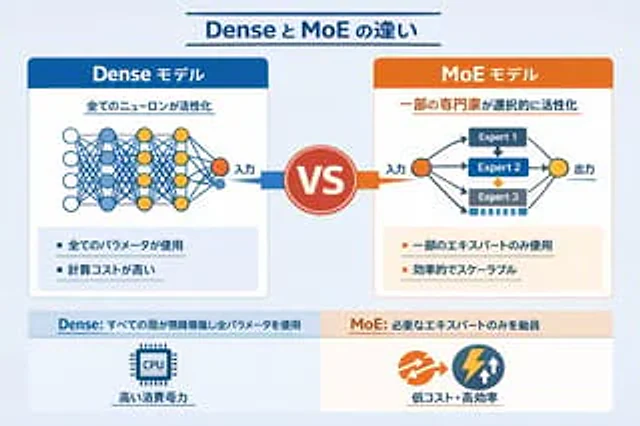
  "type": "Infographic Comparison Chart",
  "header": {
    "title": "{argument name=\"main title\" default=\"The difference between Dense and MoE\"}"
  },
  "layout": {
    "structure": "The layout is two columns, separated by the VS logo, with a footer at the bottom.",
    "sections": [
      {
        "position": "Left sidebar",
        "theme_color": "blue",
        "header": "{argument name=\"left model name\" default=\"Dense Model\"}",
        "subtitle": "All neurons were activated.",
        "diagram": {
          "type": "Fully connected neural networks",
          "elements": [
            "One orange input node, labeled \"Input\".",
            "There are 4 hidden layers with 4, 5, 4, and 2 nodes respectively.",
            "The node colors are white, blue, and yellow.",
            "Dense cross-connections between all adjacent nodes"
          ]
        },
        "bullet_points": {
          "count": 2,
          "items": [
            "{argument name=\"left bullet point\" default=\"Use all parameters\"}",
            "High computational cost"
          ]
        }
      },
      {
        "position": "Right sidebar",
        "theme_color": "orange color",
        "header": "{argument name=\"right model name\" default=\"MoE model\"}",
        "subtitle": "Selective activation of some experts",
        "diagram": {
          "type": "Hybrid expert network",
          "elements": [
            "One orange input node, labeled \"Input\".",
            "Three rectangular blocks, labeled Expert 1, Expert 2, and Expert 3 respectively.",
            "One yellow output node, labeled \"Output\".",
            "Branching arrows connecting input to expert and expert to output"
          ]
        },
        "bullet_points": {
          "count": 2,
          "items": [
            "{argument name=\"right bullet point\" default=\"Using only some experts\"}",
            "High efficiency and scalability"
          ]
        }
      },
      {
        "position": "center",
        "element": "Red circular badge with the word VS",
        "connections": "The blue arrow points to the left, and the orange arrow points to the right."
      },
      {
        "position": "Left side of the footer",
        "background": "light blue",
        "text": "Dense: All layers run continuously with all parameters.",
        "icon": "Graphics of a CPU chip",
        "label": "High power consumption"
      },
      {
        "position": "Right side of the footer",
        "background": "Light orange",
        "text": "MoE: Only call the necessary experts",
        "icons": "Two circular shapes (orange arrow, blue lightning bolt).",
        "label": "Low cost and high efficiency"
      }
    ]
  }
}
Cómo usar
- Copia el prompt original completo, incluidos los parámetros.
- Adapta el tema, el texto y la composición a tus necesidades.
- Usa una herramienta externa compatible; comprueba el acceso y el resultado.
Antes de empezar
- Comprueba si necesita una imagen de referencia. La compatibilidad no demuestra qué modelo generó el ejemplo.
- Revisa nombres, cifras y textos; el resultado puede variar entre versiones del modelo.