원본 문서
GPT Image 2 · en
{
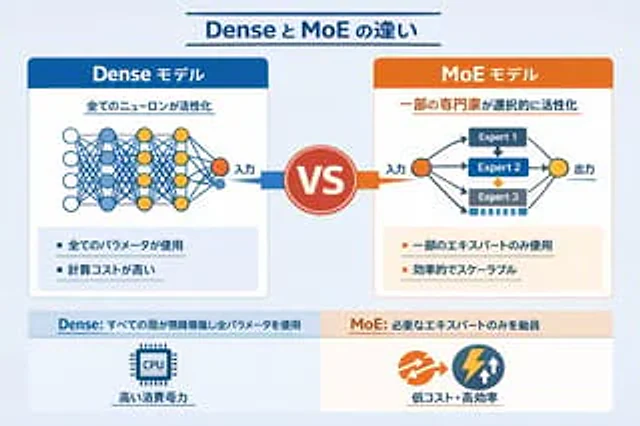
  "type": "Infographic Comparison Chart",
  "header": {
    "title": "{argument name=\"main title\" default=\"The difference between Dense and MoE\"}"
  },
  "layout": {
    "structure": "The layout is two columns, separated by the VS logo, with a footer at the bottom.",
    "sections": [
      {
        "position": "Left sidebar",
        "theme_color": "blue",
        "header": "{argument name=\"left model name\" default=\"Dense Model\"}",
        "subtitle": "All neurons were activated.",
        "diagram": {
          "type": "Fully connected neural networks",
          "elements": [
            "One orange input node, labeled \"Input\".",
            "There are 4 hidden layers with 4, 5, 4, and 2 nodes respectively.",
            "The node colors are white, blue, and yellow.",
            "Dense cross-connections between all adjacent nodes"
          ]
        },
        "bullet_points": {
          "count": 2,
          "items": [
            "{argument name=\"left bullet point\" default=\"Use all parameters\"}",
            "High computational cost"
          ]
        }
      },
      {
        "position": "Right sidebar",
        "theme_color": "orange color",
        "header": "{argument name=\"right model name\" default=\"MoE model\"}",
        "subtitle": "Selective activation of some experts",
        "diagram": {
          "type": "Hybrid expert network",
          "elements": [
            "One orange input node, labeled \"Input\".",
            "Three rectangular blocks, labeled Expert 1, Expert 2, and Expert 3 respectively.",
            "One yellow output node, labeled \"Output\".",
            "Branching arrows connecting input to expert and expert to output"
          ]
        },
        "bullet_points": {
          "count": 2,
          "items": [
            "{argument name=\"right bullet point\" default=\"Using only some experts\"}",
            "High efficiency and scalability"
          ]
        }
      },
      {
        "position": "center",
        "element": "Red circular badge with the word VS",
        "connections": "The blue arrow points to the left, and the orange arrow points to the right."
      },
      {
        "position": "Left side of the footer",
        "background": "light blue",
        "text": "Dense: All layers run continuously with all parameters.",
        "icon": "Graphics of a CPU chip",
        "label": "High power consumption"
      },
      {
        "position": "Right side of the footer",
        "background": "Light orange",
        "text": "MoE: Only call the necessary experts",
        "icons": "Two circular shapes (orange arrow, blue lightning bolt).",
        "label": "Low cost and high efficiency"
      }
    ]
  }
}
사용 방법
- 매개변수를 포함한 전체 원본 프롬프트를 복사하세요.
- 주제, 문구, 구도를 자신의 요구에 맞게 바꾸세요.
- 호환되는 외부 도구에서 사용하고 이용 조건과 결과를 확인하세요.
시작 전 확인
- 참조 이미지가 필요한지 확인하세요. 호환 표시는 해당 모델로 이 예시를 생성했다는 뜻이 아닙니다.
- 이름, 수치, 이미지 속 문구를 확인하세요. 모델 버전에 따라 결과가 다를 수 있습니다.