Document original
GPT Image 2 · en
{
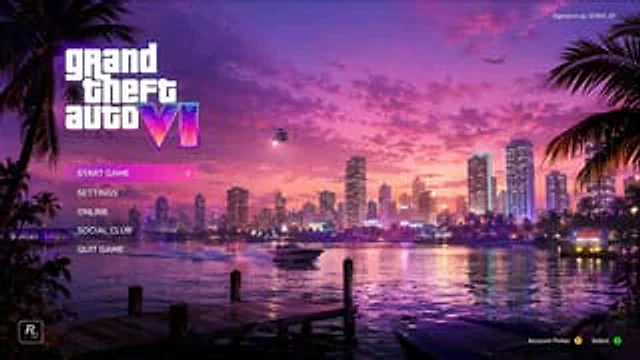
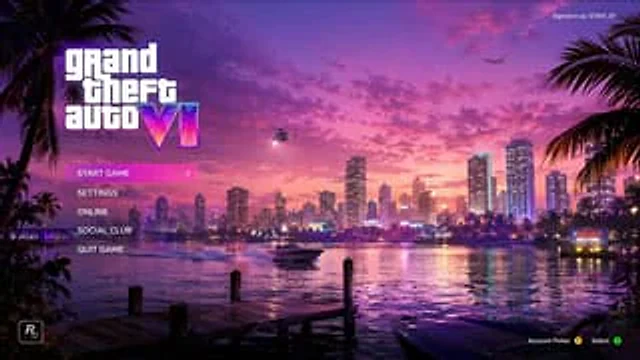
  "type": "Video game main menu UI design sketch",
  "theme": "{argument name=\"color palette\" default=\"A composite wave style of purple, pink and orange\"}",
  "background": {
    "setting": "Coastal city skyline, time period{argument name=\"time of day\" default=\"Sunset\"}",
    "elements": [
      "The water reflects the city lights",
      "Wooden dock in the foreground",
      "speedboats on the water",
      "helicopter with spotlight",
      "Airplanes in the sky",
      "Palm trees on the left and right edges",
      "It is written with '{argument name=\"city name\" default=\"VICE CITY\"} WELCOME neon sign"
    ]
  },
  "ui_layout": {
    "top_left": "Large logo{argument name=\"game title\" default=\"grand theft auto VI\"} Roman numerals with a neon gradient effect",
    "middle_left": {
      "type": "Vertical menu",
      "count": 5,
      "items": [
        "Start Game (highlighted with a pink gradient and a > arrow)",
        "set up",
        "Online",
        "Social club",
        "Exit game"
      ]
    },
    "top_right": "Text 'Login User:'{argument name=\"username\" default=\"GTAVI_01\"} '",
    "bottom_left": "Developer star icon 'R*'",
    "bottom_right": "The controller prompts 'Select account Y, confirm A'"
  }
}
Mode d’emploi
- Copiez le prompt original complet, paramètres compris.
- Adaptez le sujet, le texte et la composition à vos besoins.
- Utilisez un outil externe compatible ; vérifiez l’accès et le résultat.
Avant de commencer
- Vérifiez si une image de référence est nécessaire. La compatibilité ne prouve pas le modèle utilisé pour cet exemple.
- Vérifiez noms, chiffres et textes ; les versions du modèle peuvent produire des résultats différents.