Document original
GPT Image 2 · en
{
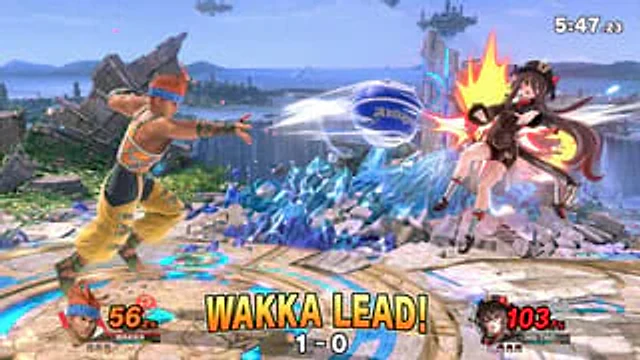
  "type": "3D platform fighting game screenshots",
  "style": "High-fidelity 3D rendering, vibrant colors, dynamic motion camera perspective, video game UI overlay.",
  "environment": {
    "stage": "{argument name=\"stage background\" default=\"A circular stone platform, adorned with glowing blue runes, is surrounded by jagged blue crystal structures, waterfalls, the ocean, and islands floating in the sky.\"}"
  },
  "characters": [
    {
      "role": "Player 1",
      "description": "{argument name=\"player 1 character\" default=\"Wakka from Final Fantasy X wears a yellow-orange outfit and a blue headband.\"}",
      "action": "Sprint forward and throw a projectile with a white, motion-blurred trajectory.{argument name=\"projectile\" default=\"Blue and white lightning ball\"}",
      "position": "Left side"
    },
    {
      "role": "Player 2",
      "description": "{argument name=\"player 2 character\" default=\"In Genshin Impact, Hu Tao wears a black and brown outfit and a hat decorated with flowers.\"}",
      "action": "Hit by the projectile, he staggered backward amidst a huge, stylized yellow and red shockwave.",
      "position": "Right side, in the air"
    }
  ],
  "ui_components": [
    {
      "position": "Top right corner",
      "type": "Match timer",
      "text": "5:47.23"
    },
    {
      "position": "bottom left corner",
      "type": "Player 1 HUD",
      "elements": [
        "Player 1 character avatar",
        "The nameplate displayed is 'WAKKA'",
        "The damage meter is displayed in yellow font as '56.2%'.",
        "3 small character remaining health icons"
      ]
    },
    {
      "position": "bottom right corner",
      "type": "Player 2 HUD",
      "elements": [
        "Player 2 character avatar",
        "The nameplate displayed is 'HU TAO'",
        "The damage meter is displayed in red font as '103.7%'.",
        "3 small character remaining health icons"
      ]
    },
    {
      "position": "Bottom Center",
      "type": "Game status overlay",
      "main_text": "{argument name=\"center text\" default=\"WAKKA leads the way!\"}",
      "sub_text": "1 - 0"
    }
  ]
}
Mode d’emploi
- Copiez le prompt original complet, paramètres compris.
- Adaptez le sujet, le texte et la composition à vos besoins.
- Utilisez un outil externe compatible ; vérifiez l’accès et le résultat.
Avant de commencer
- Vérifiez si une image de référence est nécessaire. La compatibilité ne prouve pas le modèle utilisé pour cet exemple.
- Vérifiez noms, chiffres et textes ; les versions du modèle peuvent produire des résultats différents.