Document original
GPT Image 2 · en
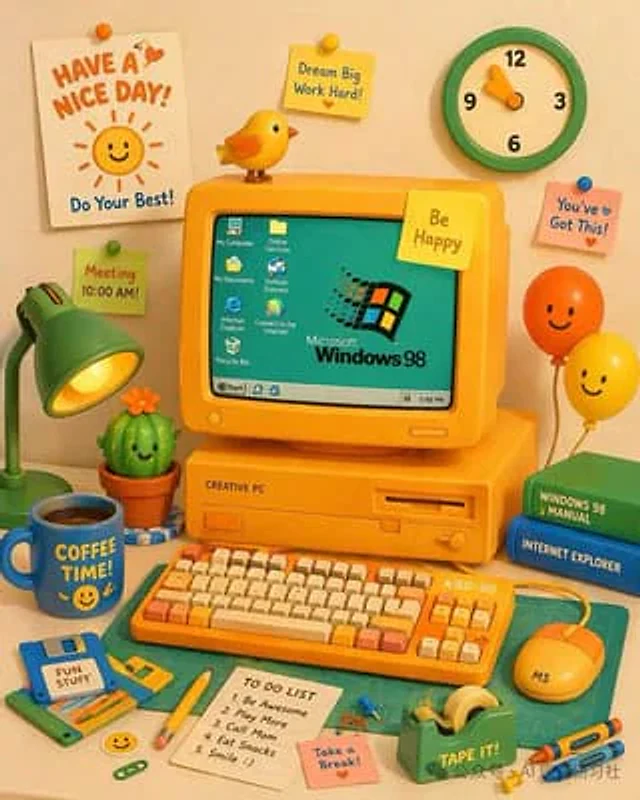
A vibrant and charming 3D claymation-style illustration depicts a retro yellow desktop computer setup. The central yellow CRT monitor screen is cyan, displaying…{argument name="OS logo text" default="Microsoft Windows 98"} The monitor displays a logo and seven desktop icons labeled "My Computer," "Online Services," "My Documents," "Outlook Express," "Internet Explorer," "Connect to the Internet," and "Recycle Bin." The bottom taskbar includes a "Start" button and a clock displaying "5:49 PM." A yellow sticky note on the monitor reads, "..."{argument name="monitor sticky note" default="Be Happy"} A small yellow bird perches on top. The computer stand is labeled "CREATIVE PC". In front is a yellow mechanical keyboard labeled "KBD-98", with orange and cream keycaps, and a yellow mouse labeled "MS". To the left is a green desk lamp, a smiling cactus, and a sign that reads "..."{argument name="floppy disk label" default="FUN STUFF"} A blue floppy disk with the word "", and a container with the word "{argument name="mug text" default="COFFEE TIME!"} A blue mug with a smiley face. To the right are two stacked books (green "WINDOWS 98 MANUAL," blue "INTERNET EXPLORER") and two smiling balloons (orange and yellow). The foreground includes a green cutting mat, a yellow pencil, a green tape dispenser labeled "TAPE IT!", two crayons, a pink sticky note that says "Take a Break!", and a white notebook with five "TO DO LIST" items: "1. Be Awesome," "2. Play More," "3. Call Mom," "4. Eat Snacks," and "5. Smile :)." A green and cream clock hangs on the background wall, along with a sign that reads "..."{argument name="poster text" default="HAVE A NICE DAY!"} The white poster featured a smiling sun and the words "Do Your Best!", along with three additional sticky notes: a yellow one that read "Dream Big Work Hard!", a pink one that read "You've Got This!", and a green one that read "Meeting 10:00 AM!"Mode d’emploi
- Copiez le prompt original complet, paramètres compris.
- Adaptez le sujet, le texte et la composition à vos besoins.
- Utilisez un outil externe compatible ; vérifiez l’accès et le résultat.
Avant de commencer
- Vérifiez si une image de référence est nécessaire. La compatibilité ne prouve pas le modèle utilisé pour cet exemple.
- Vérifiez noms, chiffres et textes ; les versions du modèle peuvent produire des résultats différents.