원본 문서
GPT Image 2 · en
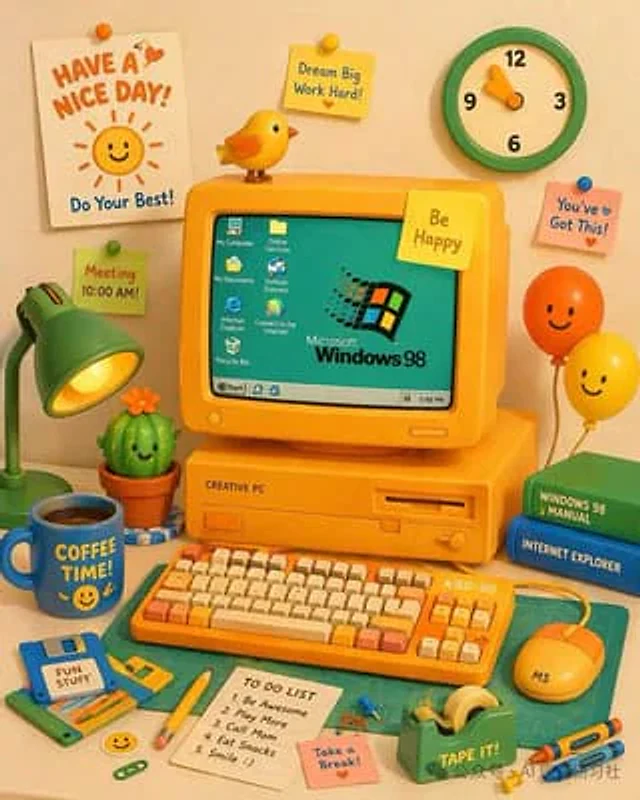
A vibrant and charming 3D claymation-style illustration depicts a retro yellow desktop computer setup. The central yellow CRT monitor screen is cyan, displaying…{argument name="OS logo text" default="Microsoft Windows 98"} The monitor displays a logo and seven desktop icons labeled "My Computer," "Online Services," "My Documents," "Outlook Express," "Internet Explorer," "Connect to the Internet," and "Recycle Bin." The bottom taskbar includes a "Start" button and a clock displaying "5:49 PM." A yellow sticky note on the monitor reads, "..."{argument name="monitor sticky note" default="Be Happy"} A small yellow bird perches on top. The computer stand is labeled "CREATIVE PC". In front is a yellow mechanical keyboard labeled "KBD-98", with orange and cream keycaps, and a yellow mouse labeled "MS". To the left is a green desk lamp, a smiling cactus, and a sign that reads "..."{argument name="floppy disk label" default="FUN STUFF"} A blue floppy disk with the word "", and a container with the word "{argument name="mug text" default="COFFEE TIME!"} A blue mug with a smiley face. To the right are two stacked books (green "WINDOWS 98 MANUAL," blue "INTERNET EXPLORER") and two smiling balloons (orange and yellow). The foreground includes a green cutting mat, a yellow pencil, a green tape dispenser labeled "TAPE IT!", two crayons, a pink sticky note that says "Take a Break!", and a white notebook with five "TO DO LIST" items: "1. Be Awesome," "2. Play More," "3. Call Mom," "4. Eat Snacks," and "5. Smile :)." A green and cream clock hangs on the background wall, along with a sign that reads "..."{argument name="poster text" default="HAVE A NICE DAY!"} The white poster featured a smiling sun and the words "Do Your Best!", along with three additional sticky notes: a yellow one that read "Dream Big Work Hard!", a pink one that read "You've Got This!", and a green one that read "Meeting 10:00 AM!"사용 방법
- 매개변수를 포함한 전체 원본 프롬프트를 복사하세요.
- 주제, 문구, 구도를 자신의 요구에 맞게 바꾸세요.
- 호환되는 외부 도구에서 사용하고 이용 조건과 결과를 확인하세요.
시작 전 확인
- 참조 이미지가 필요한지 확인하세요. 호환 표시는 해당 모델로 이 예시를 생성했다는 뜻이 아닙니다.
- 이름, 수치, 이미지 속 문구를 확인하세요. 모델 버전에 따라 결과가 다를 수 있습니다.