
Documento originale
GPT Image 2 · en
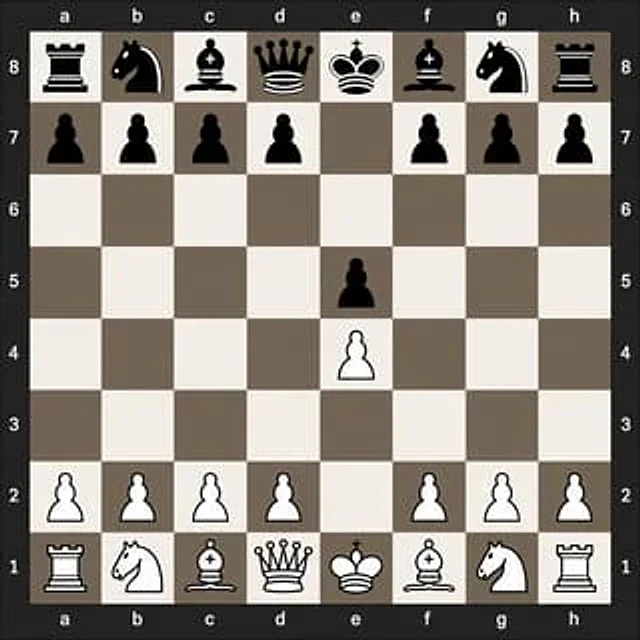
A clear, flat, numerically-oriented chessboard is centered in the image. The chessboard is an 8x8 grid, with algebraic coordinates displayed around its edges: letters a through h at the top and bottom, and numbers 8 through 1 on the left and right. A dark charcoal gray is used for the outer background and border, while the chessboard squares alternate between light beige and soft gray-brown. The rendered graphics are simple, high-contrast 2D chess icons, with black pieces at the top and white pieces at the bottom, exhibiting a clean vector style, devoid of wood grain textures, realistic lighting, and superfluous interface elements. Demonstration 1. The precise positions after the opening moves e4 e5: Black's major pieces are located at a8 (rook), b8 (knight), c8 (bishop), d8 (queen), e8 (king), f8 (bishop), g8 (knight), and h8 (rook); Black's pawns are located at a7, b7, c7, d7, f7, g7, h7, and e5; White's pawns are located at a2, b2, c2, d2, f2, g2, h2, and e4; White's major pieces are located at a1 (rook), b1 (knight), c1 (bishop), d1 (queen), e1 (king), f1 (bishop), g1 (knight), and h1 (rook). The remaining squares are left empty. Maintaining absolute symmetry, this diagram is educational and easily recognizable, similar to a numerical chess diagram used to illustrate opening moves.Come usare
- Copia tutto il prompt originale, inclusi i parametri.
- Adatta soggetto, testo e composizione alle tue esigenze.
- Usa uno strumento esterno compatibile; verifica accesso e risultato.
Prima di iniziare
- Controlla se serve un’immagine di riferimento. La compatibilità non prova il modello usato per l’esempio.
- Verifica nomi, numeri e testi; i risultati cambiano con le versioni del modello.