Documento originale
GPT Image 2 · en
{
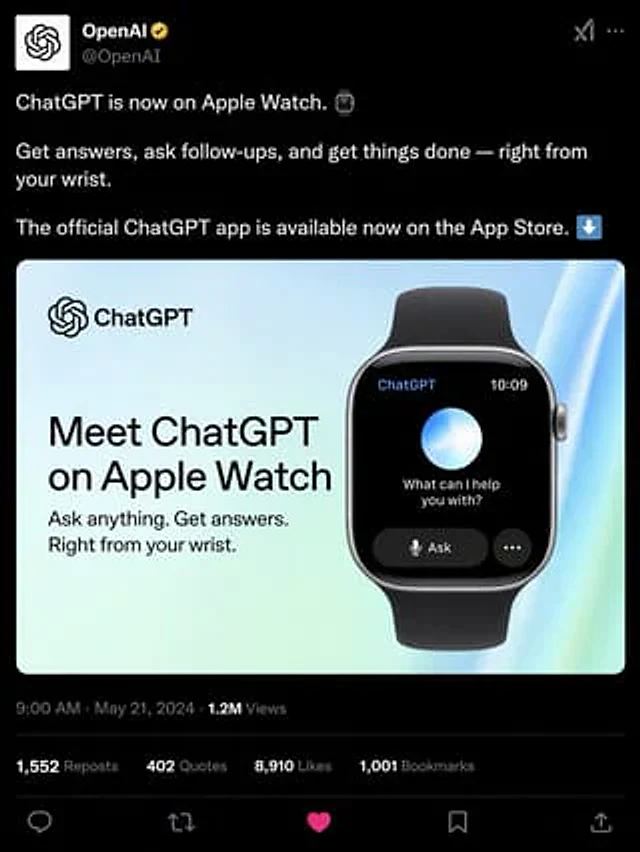
  "type": "Social media post simulation",
  "theme": "Dark mode",
  "header": {
    "avatar": "OpenAI logo",
    "account_name": "{argument name=\"account name\" default=\"OpenAI\"}",
    "badge": "Gold Certification Badge",
    "handle": "@OpenAI"
  },
  "post_text": [
    "{argument name=\"post text\" default=\"ChatGPT is now available on Apple Watch.\"}",
    "Ask questions, follow up, and handle matters anytime, anywhere—all at your fingertips.",
    "The official ChatGPT app is now available on the App Store."
  ],
  "embedded_card": {
    "background": "Light blue and green gradient",
    "left_column": {
      "logo": "ChatGPT",
      "headline": "{argument name=\"card headline\" default=\"Experience ChatGPT for Apple Watch\"}",
      "subheadline": "Ask questions anytime. Get answers. Everything at your fingertips."
    },
    "right_column": {
      "device": "Smartwatch with black strap",
      "screen_elements": {
        "top_bar": 2,
        "top_bar_labels": [
          "ChatGPT",
          "10:09"
        ],
        "center": "Glowing blue and white spheres",
        "text": "{argument name=\"watch screen text\" default=\"Is there anything I can help you with?\"}",
        "buttons": 2,
        "button_labels": [
          "Question",
          "..."
        ]
      }
    }
  },
  "footer": {
    "metadata": "9:00 AM · May 21, 2024 · 1.2 million views",
    "engagement_stats": {
      "count": 4,
      "labels": [
        "1,552 retweets",
        "402 citations",
        "{argument name=\"likes count\" default=\"8,910\"} Runner-up",
        "1,001 bookmarks"
      ]
    },
    "action_icons": {
      "count": 5,
      "types": [
        "reply",
        "Forward",
        "Like",
        "Bookmark",
        "share"
      ]
    }
  }
}
Come usare
- Copia tutto il prompt originale, inclusi i parametri.
- Adatta soggetto, testo e composizione alle tue esigenze.
- Usa uno strumento esterno compatibile; verifica accesso e risultato.
Prima di iniziare
- Controlla se serve un’immagine di riferimento. La compatibilità non prova il modello usato per l’esempio.
- Verifica nomi, numeri e testi; i risultati cambiano con le versioni del modello.