Documento originale
GPT Image 2 · en
{
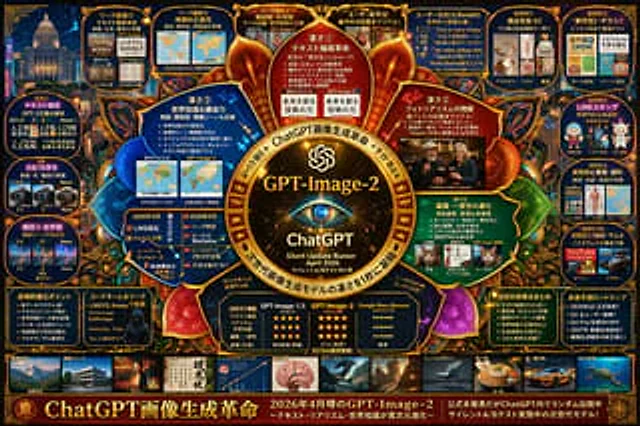
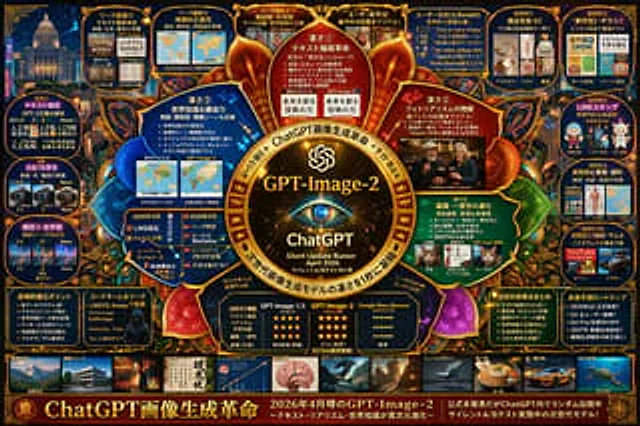
  "type": "High-density futuristic infographic project",
  "theme": {
    "colors": "{argument name=\"theme color\" default=\"Gold and dark blue\"}",
    "style": "Dark mode, glowing neon borders, complex mind map layout, cyberpunk aesthetics"
  },
  "centerpiece": {
    "description": "A glowing gold circular logo, resembling an eye or camera lens.",
    "text": [
      "{argument name=\"main title\" default=\"GPT-Image-2\"}",
      "ChatGPT",
      "Silent updates to rumors{argument name=\"release date\" default=\"April 2026\"}"
    ]
  },
  "layout": {
    "top_left": {
      "title": "Leaked images",
      "count": 4,
      "items": [
        "Text rendering coffee menu",
        "World map",
        "Anatomical diagram",
        "Photorealistic Bar"
      ]
    },
    "top_right": {
      "title": "Use Cases and Feedback",
      "count": 5,
      "items": [
        "e-commerce products",
        "Business flyers",
        "Chat stickers",
        "Educational materials",
        "YouTube thumbnails"
      ]
    },
    "left_side": {
      "title": "Version Comparison",
      "count": 3,
      "items": [
        "Text rendering comparison",
        "Photo Realism Comparison",
        "Comparison of compositional stability"
      ]
    },
    "inner_ring": {
      "title": "Core Functions",
      "count": 4,
      "items": [
        "Text rendering revolution",
        "The realism of the photos has increased dramatically.",
        "World Knowledge",
        "Edit consistency"
      ]
    },
    "bottom_left": {
      "title": "Technical Specifications",
      "count": 2,
      "items": [
        "Key points of technological evolution",
        "A silhouette of a hacker with a codename"
      ]
    },
    "bottom_center": {
      "title": "Model Comparison Table",
      "columns": 3,
      "headers": [
        "GPT-Image-1.5",
        "{argument name=\"main title\" default=\"GPT-Image-2\"}",
        "{argument name=\"competitor model\" default=\"Google Nano Banana\"}"
      ],
      "rows": [
        "Text accuracy",
        "Realism",
        "World Knowledge",
        "Editing ability",
        "speed"
      ]
    },
    "bottom_right": {
      "title": "Future Outlook",
      "count": 2,
      "items": [
        "List of significant improvements",
        "Future Roadmap Timeline"
      ]
    },
    "bottom_edge": {
      "title": "Style Gallery",
      "count": 10,
      "items": [
        "architecture",
        "poster",
        "Japanese text",
        "Infographic",
        "Fantasy",
        "Steampunk",
        "Minimalist design",
        "food",
        "car",
        "underwater"
      ]
    },
    "footer": {
      "title": "Main width",
      "text": [
        "{argument name=\"subtitle\" default=\"ChatGPT: A Revolution in Image Generation\"}",
        "Next-generation model in silent A/B testing"
      ]
    }
  }
}
Come usare
- Copia tutto il prompt originale, inclusi i parametri.
- Adatta soggetto, testo e composizione alle tue esigenze.
- Usa uno strumento esterno compatibile; verifica accesso e risultato.
Prima di iniziare
- Controlla se serve un’immagine di riferimento. La compatibilità non prova il modello usato per l’esempio.
- Verifica nomi, numeri e testi; i risultati cambiano con le versioni del modello.