Documento originale
GPT Image 2 · en
{
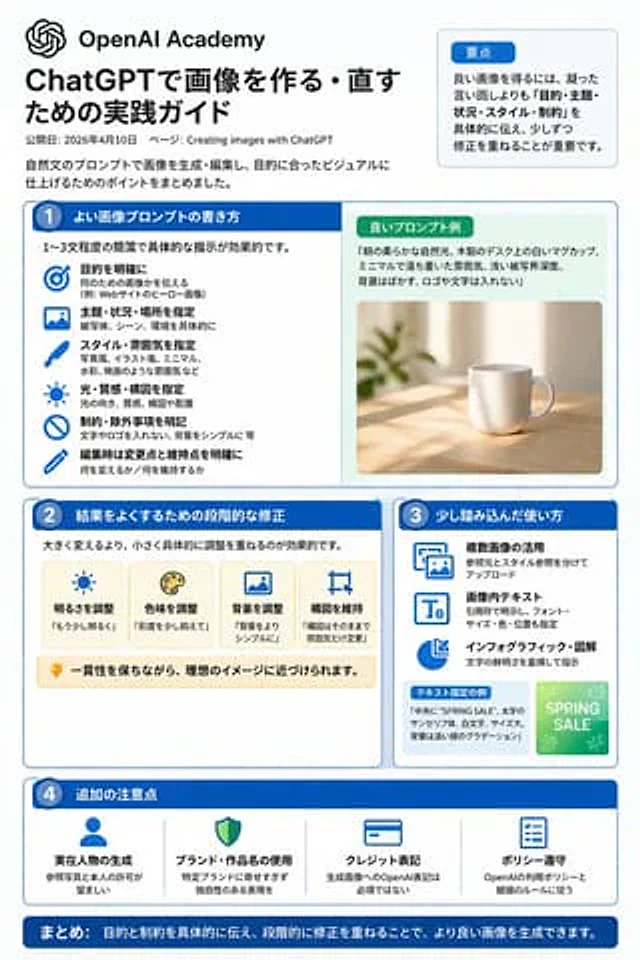
  "type": "Infographic Quick Reference",
  "style": "Simple, modern, flat design, corporate style, Japanese text",
  "header": {
    "main_title": "{argument name=\"main title\" default=\"ChatGPT Image Generation Techniques\"}",
    "subtitle": "{argument name=\"subtitle\" default=\"High-quality prompt word writing techniques and efficient revision methods (Key points to be released on April 10, 2026)\"}",
    "badge": "OpenAI Academy / Creating Images Using ChatGPT"
  },
  "layout": {
    "main_grid": {
      "columns": 4,
      "sections": [
        {
          "column": 1,
          "color_theme": "blue",
          "header": "1 {argument name=\"column 1 title\" default=\"High-quality prompt words (1-3 concise sentences)\"}",
          "item_count": 5,
          "labels": [
            "Purpose",
            "theme",
            "Scene/Location",
            "Art style/art",
            "Constraints/Specifications"
          ]
        },
        {
          "column": 2,
          "color_theme": "teal green",
          "header": "2 {argument name=\"column 2 title\" default=\"Optimization techniques for correcting results\"}",
          "item_count": 4,
          "labels": [
            "Fine-tuning specific details",
            "Use affirmative sentence instructions",
            "Clearly define the elements that need to be retained.",
            "Comparison and selection"
          ]
        },
        {
          "column": 3,
          "color_theme": "orange",
          "header": "3. Advanced Usage",
          "item_count": 4,
          "labels": [
            "Using multiple images",
            "Text within image",
            "Infographics",
            "Step-by-step refinement"
          ]
        },
        {
          "column": 4,
          "color_theme": "purple",
          "header": "4. Precautions",
          "item_count": 4,
          "labels": [
            "Realistic character generation",
            "Avoid excessive imitation of specific brands/works",
            "Signature",
            "Comply with usage policies"
          ]
        }
      ]
    },
    "bottom_section": {
      "left_panel": {
        "title": "{argument name=\"examples title\" default=\"Example prompts (1-3 sentences)\"}",
        "item_count": 3,
        "thumbnails": [
          "Orange cat",
          "coffee cup on the table",
          "Blue bar chart"
        ]
      },
      "right_panel": {
        "title": "Workflow",
        "step_count": 4,
        "labels": [
          "create",
          "Fine-tuning",
          "contrast",
          "Finish"
        ]
      }
    }
  }
}
Come usare
- Copia tutto il prompt originale, inclusi i parametri.
- Adatta soggetto, testo e composizione alle tue esigenze.
- Usa uno strumento esterno compatibile; verifica accesso e risultato.
Prima di iniziare
- Controlla se serve un’immagine di riferimento. La compatibilità non prova il modello usato per l’esempio.
- Verifica nomi, numeri e testi; i risultati cambiano con le versioni del modello.