Documento originale
GPT Image 2 · en
{
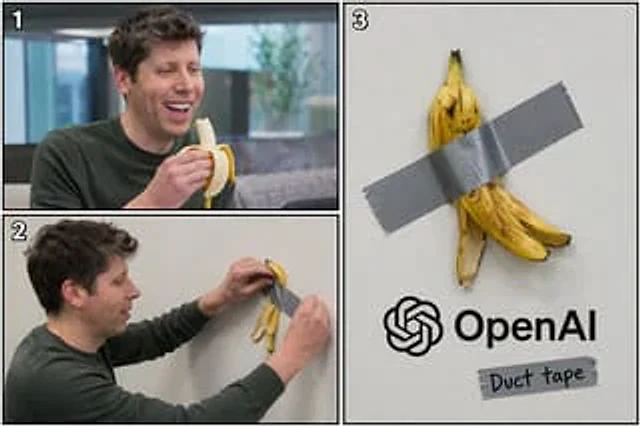
  "type": "3-panel comic layout",
  "subject": "{argument name=\"subject\" default=\"Sam Altman\"}",
  "object": "{argument name=\"object\" default=\"banana\"}",
  "layout": {
    "structure": "The left side is divided into two horizontal sections, while the right side is a large vertical panel.",
    "panels": [
      {
        "number": "1",
        "position": "Top left",
        "description": "The subject is happily eating an object while laughing in an office environment."
      },
      {
        "number": "2",
        "position": "Bottom left",
        "description": "The main body is shown in profile, with a strip of silver tape used to attach the fruit peel to a pure white wall."
      },
      {
        "number": "3",
        "position": "right half",
        "description": "A close-up of an object's peel taped to a white wall. Below is {argument name=\"company logo\" default=\"OpenAI\"} The logo and text. Below the logo is another piece of tape with the handwritten words \"...\"{argument name=\"tape text\" default=\"Duct tape\"} The word \"\"."
      }
    ]
  }
}
Come usare
- Copia tutto il prompt originale, inclusi i parametri.
- Adatta soggetto, testo e composizione alle tue esigenze.
- Usa uno strumento esterno compatibile; verifica accesso e risultato.
Prima di iniziare
- Controlla se serve un’immagine di riferimento. La compatibilità non prova il modello usato per l’esempio.
- Verifica nomi, numeri e testi; i risultati cambiano con le versioni del modello.