원본 문서
GPT Image 2 · en
{
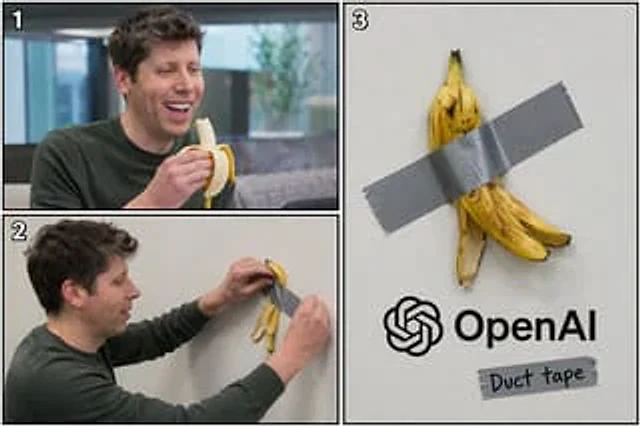
  "type": "3-panel comic layout",
  "subject": "{argument name=\"subject\" default=\"Sam Altman\"}",
  "object": "{argument name=\"object\" default=\"banana\"}",
  "layout": {
    "structure": "The left side is divided into two horizontal sections, while the right side is a large vertical panel.",
    "panels": [
      {
        "number": "1",
        "position": "Top left",
        "description": "The subject is happily eating an object while laughing in an office environment."
      },
      {
        "number": "2",
        "position": "Bottom left",
        "description": "The main body is shown in profile, with a strip of silver tape used to attach the fruit peel to a pure white wall."
      },
      {
        "number": "3",
        "position": "right half",
        "description": "A close-up of an object's peel taped to a white wall. Below is {argument name=\"company logo\" default=\"OpenAI\"} The logo and text. Below the logo is another piece of tape with the handwritten words \"...\"{argument name=\"tape text\" default=\"Duct tape\"} The word \"\"."
      }
    ]
  }
}
사용 방법
- 매개변수를 포함한 전체 원본 프롬프트를 복사하세요.
- 주제, 문구, 구도를 자신의 요구에 맞게 바꾸세요.
- 호환되는 외부 도구에서 사용하고 이용 조건과 결과를 확인하세요.
시작 전 확인
- 참조 이미지가 필요한지 확인하세요. 호환 표시는 해당 모델로 이 예시를 생성했다는 뜻이 아닙니다.
- 이름, 수치, 이미지 속 문구를 확인하세요. 모델 버전에 따라 결과가 다를 수 있습니다.