Documento originale
GPT Image 2 · en
{
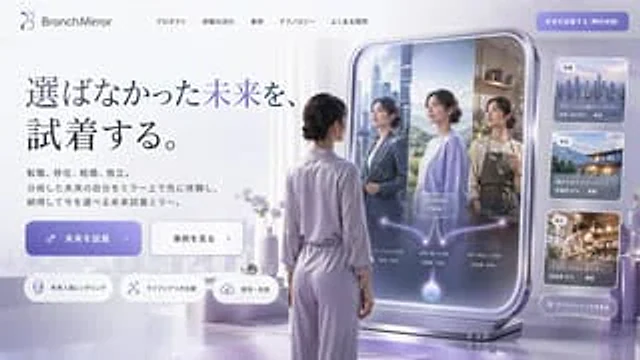
  "type": "Website landing page design draft",
  "style": "Futuristic, minimalist, 3D rendering, corporate tech style",
  "color_palette": "{argument name=\"color palette\" default=\"Soft purple, lavender purple and silver\"}",
  "header": {
    "logo": "{argument name=\"brand name\" default=\"BranchMirror\"}",
    "navigation_links": 5,
    "cta_button": "solid purple button in the upper right corner"
  },
  "hero_section": {
    "headline": "{argument name=\"main headline\" default=\"Try on the life you never chose.\"}",
    "subtext": "A Chinese paragraph explaining the product",
    "buttons": [
      {
        "style": "solid purple",
        "text": "{argument name=\"primary button text\" default=\"Try on the future\"}",
        "icon": "sparkles"
      },
      {
        "style": "white outline",
        "text": "View Case Studies",
        "icon": "arrow right"
      }
    ],
    "feature_tags": {
      "count": 3,
      "style": "Capsule shape, with icon",
      "labels": [
        "Future Personality Rendering",
        "Comparison of daily life scenarios",
        "Save and share"
      ]
    }
  },
  "main_visual": {
    "subject": "{argument name=\"subject description\" default=\"A woman wearing lavender loungewear and with her hair in a low bun\"}",
    "pose": "Standing, back to the camera, facing a large, freestanding smart mirror.",
    "smart_mirror_ui": {
      "reflections": {
        "count": 3,
        "descriptions": [
          "Women in business suits with a city background",
          "A woman wearing a casual sweater against a natural background",
          "A woman wearing an apron in a coffee shop setting"
        ]
      },
      "overlay_graphics": "The glowing, tree-like branching diagram starts from the bottom sphere and branches into three paths pointing to various mirror images, with the \"Now\" label at the center."
    }
  },
  "sidebar_ui": {
    "cards": {
      "count": 3,
      "descriptions": [
        "Cityscape map with occupational change statistics",
        "Coastal house maps with relocation statistics",
        "Flower shop images with statistics on independent entrepreneurship"
      ]
    },
    "bottom_button": "Button for viewing the frosted glass effect in all scenes"
  }
}
Come usare
- Copia tutto il prompt originale, inclusi i parametri.
- Adatta soggetto, testo e composizione alle tue esigenze.
- Usa uno strumento esterno compatibile; verifica accesso e risultato.
Prima di iniziare
- Controlla se serve un’immagine di riferimento. La compatibilità non prova il modello usato per l’esempio.
- Verifica nomi, numeri e testi; i risultati cambiano con le versioni del modello.