원본 문서
GPT Image 2 · en
{
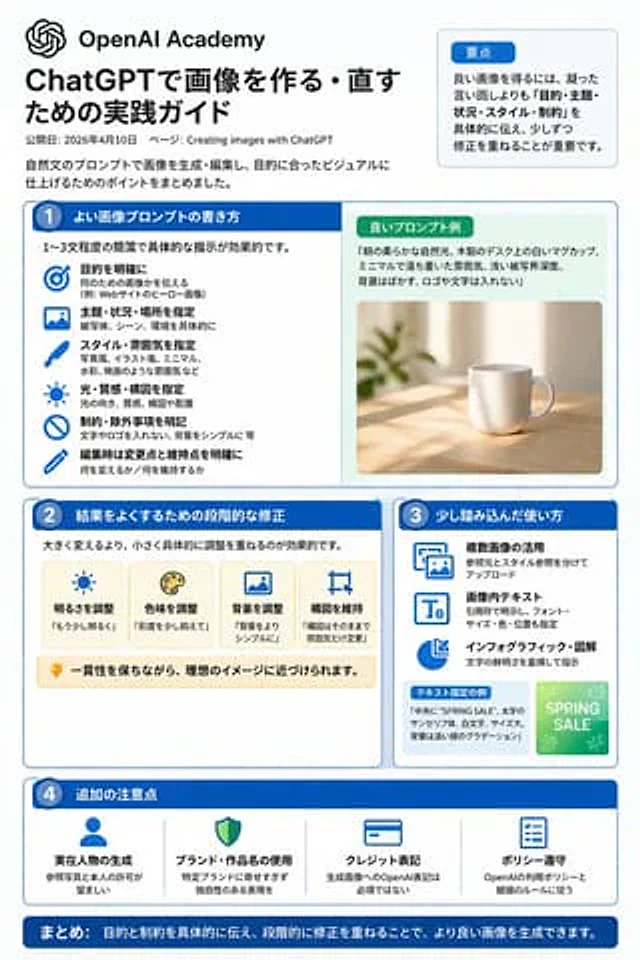
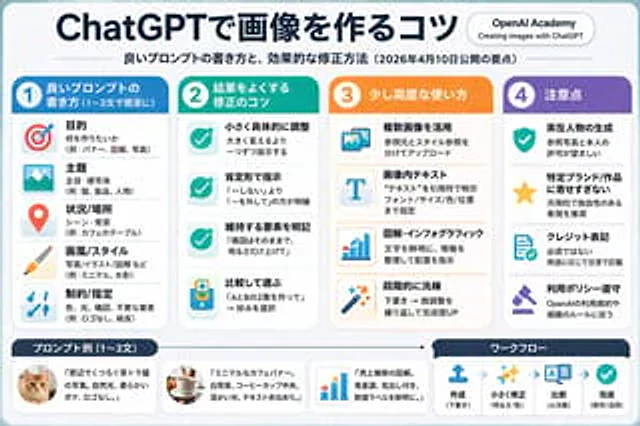
  "type": "Infographic Quick Reference",
  "style": "Simple, modern, flat design, corporate style, Japanese text",
  "header": {
    "main_title": "{argument name=\"main title\" default=\"ChatGPT Image Generation Techniques\"}",
    "subtitle": "{argument name=\"subtitle\" default=\"High-quality prompt word writing techniques and efficient revision methods (Key points to be released on April 10, 2026)\"}",
    "badge": "OpenAI Academy / Creating Images Using ChatGPT"
  },
  "layout": {
    "main_grid": {
      "columns": 4,
      "sections": [
        {
          "column": 1,
          "color_theme": "blue",
          "header": "1 {argument name=\"column 1 title\" default=\"High-quality prompt words (1-3 concise sentences)\"}",
          "item_count": 5,
          "labels": [
            "Purpose",
            "theme",
            "Scene/Location",
            "Art style/art",
            "Constraints/Specifications"
          ]
        },
        {
          "column": 2,
          "color_theme": "teal green",
          "header": "2 {argument name=\"column 2 title\" default=\"Optimization techniques for correcting results\"}",
          "item_count": 4,
          "labels": [
            "Fine-tuning specific details",
            "Use affirmative sentence instructions",
            "Clearly define the elements that need to be retained.",
            "Comparison and selection"
          ]
        },
        {
          "column": 3,
          "color_theme": "orange",
          "header": "3. Advanced Usage",
          "item_count": 4,
          "labels": [
            "Using multiple images",
            "Text within image",
            "Infographics",
            "Step-by-step refinement"
          ]
        },
        {
          "column": 4,
          "color_theme": "purple",
          "header": "4. Precautions",
          "item_count": 4,
          "labels": [
            "Realistic character generation",
            "Avoid excessive imitation of specific brands/works",
            "Signature",
            "Comply with usage policies"
          ]
        }
      ]
    },
    "bottom_section": {
      "left_panel": {
        "title": "{argument name=\"examples title\" default=\"Example prompts (1-3 sentences)\"}",
        "item_count": 3,
        "thumbnails": [
          "Orange cat",
          "coffee cup on the table",
          "Blue bar chart"
        ]
      },
      "right_panel": {
        "title": "Workflow",
        "step_count": 4,
        "labels": [
          "create",
          "Fine-tuning",
          "contrast",
          "Finish"
        ]
      }
    }
  }
}
사용 방법
- 매개변수를 포함한 전체 원본 프롬프트를 복사하세요.
- 주제, 문구, 구도를 자신의 요구에 맞게 바꾸세요.
- 호환되는 외부 도구에서 사용하고 이용 조건과 결과를 확인하세요.
시작 전 확인
- 참조 이미지가 필요한지 확인하세요. 호환 표시는 해당 모델로 이 예시를 생성했다는 뜻이 아닙니다.
- 이름, 수치, 이미지 속 문구를 확인하세요. 모델 버전에 따라 결과가 다를 수 있습니다.